
We detected 1 storage device(s) that are not partitioned or formatted. The affected device(s) are: ST9500325AS. They may also be formatted with a file system Windows does not support (Linux ext4, for example). Windows cannot use these drives until they are initialized and set up.
If the drive is used by another operating system (such as Linux), you can ignore this message. Otherwise, open the Disk Management tool to initialize the device(s), create a partition, and format the drive so it becomes usable.
We detected 1 storage device(s) that are not partitioned or formatted. The affected device(s) are: ST3500413AS. They may also be formatted with a file system Windows does not support (Linux ext4, for example). Windows cannot use these drives until they are initialized and set up.
If the drive is used by another operating system (such as Linux), you can ignore this message. Otherwise, open the Disk Management tool to initialize the device(s), create a partition, and format the drive so it becomes usable.
We detected 1 storage device(s) that are not partitioned or formatted. The affected device(s) are: TOSHIBA MQ01ABD050. They may also be formatted with a file system Windows does not support (Linux ext4, for example). Windows cannot use these drives until they are initialized and set up.
If the drive is used by another operating system (such as Linux), you can ignore this message. Otherwise, open the Disk Management tool to initialize the device(s), create a partition, and format the drive so it becomes usable.
The drive SanDisk SSD PLUS 240GB has reported 8 media error(s).
Media errors indicate that the drive was unable to read from or write to the NAND media successfully. A small number of media errors may be recoverable, but any increase can indicate failing flash cells, controller issues, or progressive drive degradation.
Back up any important data on this drive immediately, monitor the error count for further increases, and consider replacing the drive if the count continues to rise or reaches a critical level.
This PC encountered 5 unexpected crash(es) (BSOD, blue screen) in the 30 days before this validation, the most recent on 2026-11-09.
Crashes like these are often caused by a faulty driver, unstable overclocking or memory settings, overheating, or failing hardware.
Make sure Windows and your drivers are up to date. If the PC is overclocked, try returning to stock settings. The BSOD Details button in the Software section lists each crash.

Scan this QR code
To open this page on your phone
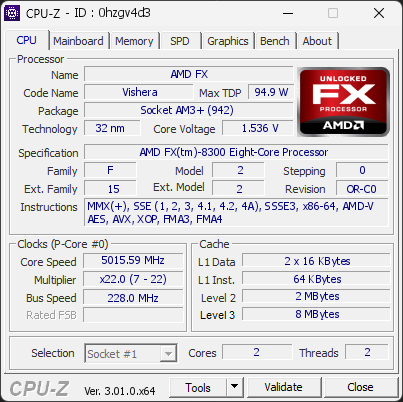
CPU clocks
Last sample and peak over the test, values in MHz
| Clock | Current | Peak |
|---|---|---|
| Cores | ||
| #0 | 5015.59 | 5015.59 |
| #1 | 5015.59 | 5015.59 |
| Uncore / BCLK | ||
| Uncore | 2507.79 | 2507.79 |
| CPU BCLK | 227.98 | 227.98 |
Previous validations from this PC
Unexpected crashes (BSOD) (5)
Boot Time details
Hardware errors (WHEA)
1 error recorded in the Windows event log.
Cache error, level 3, instruction fetch, core 6
Driver problems
No driver problems detected.
Flagged processes
24 running processes, none flagged.
Inform a support service
If a partner support service is helping you with this PC, enter the service code they gave you to send them this validation. A valid service code is required.