
Your graphics driver has not been updated in over 6 months. You are running version 581.80, released 12 months ago, while a much newer version (621.01) is available.
Such an outdated driver can cause crashes, instability, and serious performance issues.
Updating to the latest driver is strongly recommended to ensure compatibility and stability. Download the latest drivers for your graphics card here: NVIDIA Drivers
The drive INTEL SSDSC2BF180A4H has reported 6 media error(s).
Media errors indicate that the drive was unable to read from or write to the NAND media successfully. A small number of media errors may be recoverable, but any increase can indicate failing flash cells, controller issues, or progressive drive degradation.
Back up any important data on this drive immediately, monitor the error count for further increases, and consider replacing the drive if the count continues to rise or reaches a critical level.
Your antivirus (Windows Defender) protection is snoozed (temporarily paused), so the PC is not fully protected right now.
Protection was paused, often to avoid interruptions, and has not been switched back on.
Resume protection in your antivirus settings to stay protected.
This PC encountered 4 unexpected crash(es) (BSOD, blue screen) in the 30 days before this validation, the most recent on 2026-10-12.
Crashes like these are often caused by a faulty driver, unstable overclocking or memory settings, overheating, or failing hardware.
Make sure Windows and your drivers are up to date. If the PC is overclocked, try returning to stock settings. The BSOD Details button in the Software section lists each crash.
Windows reports 1 device(s) that are not working correctly. A device in this state is either unavailable or running in a degraded mode, and Windows will keep retrying it at every boot.
This usually comes from a driver that failed to load or was stopped after an error: a bad or outdated driver, a device that is not seated properly, or a component that is starting to fail.
Open the Device Manager to see which devices are flagged, then reinstall or update their drivers from the manufacturer's website. If a device keeps failing after a clean driver install, reseat it and test it on another port or slot. The Drivers button in the Software section lists every affected device.

Scan this QR code
To open this page on your phone
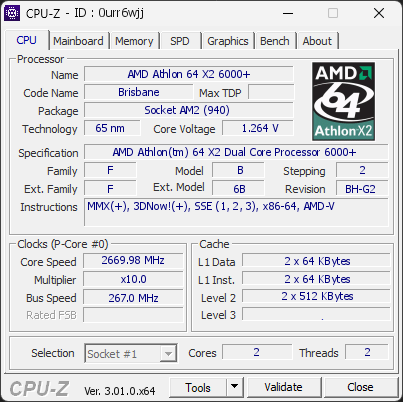
CPU clocks
Last sample and peak over the test, values in MHz
| Clock | Current | Peak |
|---|---|---|
| Cores | ||
| #0 | 2669.98 | 2669.98 |
| #1 | 2669.98 | 2669.98 |
| Uncore / BCLK | ||
| CPU BCLK | 267.00 | 267.00 |
Previous validations from this PC
Unexpected crashes (BSOD) (5)
Boot Time details
Hardware errors (WHEA)
4 errors recorded in the Windows event log.
Bus error, level 3, core 0
Bus error, level 3, core 0
Bus error, level 3, core 0
Bus error, level 3, core 0
Driver problems
1 device needs attention.
Flagged processes
23 running processes, none flagged.
Inform a support service
If a partner support service is helping you with this PC, enter the service code they gave you to send them this validation. A valid service code is required.