
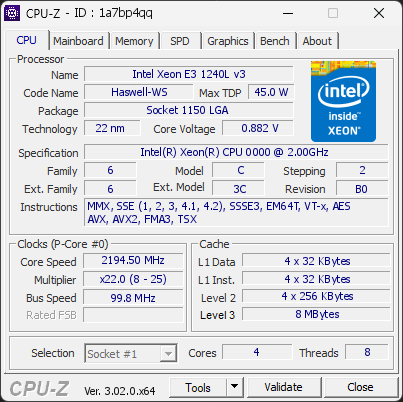
Your processor is an Engineering sample. An Engineering Sample (ES) CPU is a pre-release processor sent by the manufacturer to OEMs/engineers for testing and validation.
It often has unfinished microcode/firmware, may run at non-final clocks/voltages, and can show bugs or different performance vs retail chips.
ES chips are usually not for sale, may be locked/traceable, and don’t always support full warranty/official support.
Your system has four memory modules installed, and they are not all the same size (8 GB + 4 GB + 8 GB + 4 GB).
With all four slots populated, the CPU’s memory controller is specified for lower frequencies than with two modules, and mixing modules of different sizes makes stable operation harder to achieve. Stability issues may occur.
This configuration can work perfectly fine, but if you experience instability, try lowering the memory frequency in the BIOS, or use a matched kit of identical modules.
1 running program(s) are known to consume resources in the background with little benefit (preinstalled trials, redundant cleaners, or permanent helper services).
These programs are often preinstalled by the PC manufacturer or bundled with other software, and keep running at every startup even when unused.
Uninstalling them, or disabling their automatic startup, frees memory and shortens the boot time. The Processes button in the Software section lists each detected program and why it is flagged.
Your graphics card (NVIDIA GeForce GTX 1060 5GB) is detected on the PCI bus, but no manufacturer driver is bound to it. Windows has fallen back to its generic display driver.
This usually follows a failed or interrupted driver installation, a driver removed by a system update, or a card fitted without installing its driver. 3D acceleration is unavailable on this card, so games and GPU-accelerated applications either fail to start or run on another graphics adapter.
Install the latest driver for this card: NVIDIA Drivers If a previous installation failed, uninstall the existing driver first, then reinstall.
The drive WDC WD5000AAKX-08U6AA0 has reported 6 media error(s).
Media errors indicate that the drive was unable to read from or write to the NAND media successfully. A small number of media errors may be recoverable, but any increase can indicate failing flash cells, controller issues, or progressive drive degradation.
Back up any important data on this drive immediately, monitor the error count for further increases, and consider replacing the drive if the count continues to rise or reaches a critical level.
Windows reports 2 device(s) that are not working correctly. A device in this state is either unavailable or running in a degraded mode, and Windows will keep retrying it at every boot.
This usually comes from a driver that failed to load or was stopped after an error: a bad or outdated driver, a device that is not seated properly, or a component that is starting to fail.
Open the Device Manager to see which devices are flagged, then reinstall or update their drivers from the manufacturer's website. If a device keeps failing after a clean driver install, reseat it and test it on another port or slot. The Drivers button in the Software section lists every affected device.
The partition D: (on disk TS128GSSD340K) is almost full, with only 11.8 GB of free space remaining. At this level, Windows may fail to install updates, create temporary files, or operate reliably.
Freeing up space immediately is recommended: use the Windows cleanup tool or remove unnecessary files and applications.

Scan this QR code
To open this page on your phone
CPU clocks
Last sample and peak over the test, values in MHz
| Clock | Current | Peak |
|---|---|---|
| Cores | ||
| #0 | 2194.50 | 2394.00 |
| #1 | 2194.50 | 2194.50 |
| #2 | 2194.50 | 2194.50 |
| #3 | 2194.50 | 2194.50 |
| Uncore / BCLK | ||
| Ring / LLC | 2194.50 | 2194.50 |
| CPU BCLK | 99.75 | 99.75 |
Previous validations from this PC
Unexpected crashes (BSOD)
No unexpected crashes (BSOD) recorded on this PC.
Boot Time details
Hardware errors (WHEA)
No hardware errors recorded in the Windows event log.
Driver problems
2 devices need attention.
Flagged processes
147 running processes, 1 flagged.
Inform a support service
If a partner support service is helping you with this PC, enter the service code they gave you to send them this validation. A valid service code is required.