
Your graphics driver is not fully up to date. You are currently running version 621.14, while version 621.35 (2026-11-19) is available.
Without an update, you may miss out on security fixes or performance improvements. Updating your driver can improve overall stability and performance.
The latest drivers for your graphics card are available here: NVIDIA Drivers
The drive ST2000DM001-1CH164 has logged 3,332 CRC error(s) on its SATA interface, a high count that points to a connection problem. This is NOT a drive failure; the drive itself is likely healthy, but the cable, port, or backplane carrying its data was unreliable when the errors occurred. The counter is cumulative over the drive's whole lifetime, so these errors may be years old and come from an issue that has long been resolved.
If the count is still increasing, reseat or replace the SATA data cable, try a different SATA port, and check for issues with the drive sled or backplane in this chassis. If multiple drives in the same system show CRC errors, the chassis wiring is the likely culprit.
The drive KINGSTON SNV2S1000G has spent 12 minute(s) operating at or above its critical temperature threshold (typically 80–85°C). At these temperatures the controller is forced to throttle aggressively to avoid permanent damage, which causes severe performance loss and accelerates wear.
Improve airflow around the drive, add a heatsink if possible, and verify it is not installed near a heat source. Sustained critical thermal events shorten the drive's lifespan significantly.
The drive KINGSTON SNV2S1000G has spent 344 minute(s) operating above its warning temperature threshold (typically 70°C). The drive is still functional but is running hotter than its manufacturer recommends for sustained operation, which gradually shortens its lifespan.
Check airflow and cooling around the drive. Adding a heatsink or improving case ventilation usually resolves this.
1 running program(s) are known to consume resources in the background with little benefit (preinstalled trials, redundant cleaners, or permanent helper services).
These programs are often preinstalled by the PC manufacturer or bundled with other software, and keep running at every startup even when unused.
Uninstalling them, or disabling their automatic startup, frees memory and shortens the boot time. The Processes button in the Software section lists each detected program and why it is flagged.

Scan this QR code
To open this page on your phone
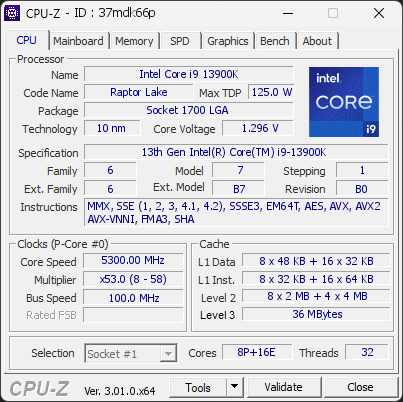
CPU clocks
Last sample and peak over the test, values in MHz
| Clock | Current | Peak |
|---|---|---|
| Cores | ||
| P0 | 5200.00 | 5800.00 |
| P1 | 5300.00 | 5800.00 |
| P2 | 5200.00 | 5800.00 |
| P3 | 5200.00 | 5800.00 |
| P4 | 5300.00 | 5800.00 |
| P5 | 5200.00 | 5800.00 |
| P6 | 5200.00 | 5800.00 |
| P7 | 5200.00 | 5800.00 |
| E8 | 3900.00 | 4500.00 |
| E9 | 3900.00 | 4300.00 |
| E10 | 3900.00 | 4500.00 |
| E11 | 3900.00 | 4500.00 |
| E12 | 3900.00 | 4300.00 |
| E13 | 3900.00 | 4500.00 |
| E14 | 3900.00 | 4500.00 |
| E15 | 3900.00 | 4500.00 |
| E16 | 3900.00 | 4500.00 |
| E17 | 3900.00 | 4500.00 |
| E18 | 3900.00 | 4500.00 |
| E19 | 3900.00 | 4500.00 |
| E20 | 3900.00 | 4500.00 |
| E21 | 3900.00 | 4500.00 |
| E22 | 3900.00 | 4500.00 |
| E23 | 3900.00 | 4500.00 |
| Uncore / BCLK | ||
| Ring / LLC | 4500.00 | 5000.00 |
| CPU BCLK | 100.00 | 100.00 |
| SOC BCLK | 100.00 | 100.00 |
Previous validations from this PC
Unexpected crashes (BSOD) (5)
Boot Time details
Hardware errors (WHEA)
21 errors recorded in the Windows event log, showing the 10 most recent.
Micro-architectural error, core 8
Micro-architectural error, core 8
Micro-architectural error, core 8
Micro-architectural error, core 8
Micro-architectural error, core 8
Micro-architectural error, core 8
Micro-architectural error, core 8
Micro-architectural error, core 8
Micro-architectural error, core 8
Micro-architectural error, core 8
Driver problems
No driver problems detected.
Flagged processes
83 running processes, 1 flagged.
Inform a support service
If a partner support service is helping you with this PC, enter the service code they gave you to send them this validation. A valid service code is required.