
Your graphics driver is not fully up to date. You are currently running version 582.53, while version 582.78 (2026-06-25) is available.
Without an update, you may miss out on security fixes or performance improvements. Updating your driver can improve overall stability and performance.
The latest drivers for your graphics card are available here: NVIDIA Drivers
The drive ST30000NM004K-3RM133 has logged 697 CRC error(s) on its SATA interface. These are bus-level transmission errors and indicate a connection problem, not a fault with the drive itself. Common causes are a loose, damaged, or low-quality SATA cable, a faulty SATA port, or a flaky backplane or drive sled. The counter is cumulative over the drive's whole lifetime, so these errors may be years old and come from an issue that has long been resolved.
If the count is still increasing, reseat the SATA data cable, try a different SATA port, and replace the cable if errors continue to accumulate.
The drive OOS18000G has logged 220 CRC error(s) on its SATA interface. These are bus-level transmission errors and indicate a connection problem, not a fault with the drive itself. Common causes are a loose, damaged, or low-quality SATA cable, a faulty SATA port, or a flaky backplane or drive sled. The counter is cumulative over the drive's whole lifetime, so these errors may be years old and come from an issue that has long been resolved.
If the count is still increasing, reseat the SATA data cable, try a different SATA port, and replace the cable if errors continue to accumulate.
The partition E: (on disk ST30000NM004K-3RM133) is almost full, with only 27.9 GB of free space remaining. With so little room, Windows may struggle to stay stable or apply future updates.
You can free space using the built-in Windows cleanup tool or by removing applications and files you no longer need.
The partition F: (on disk ST30000NM004K-3RM133) is almost full, with only 27.9 GB of free space remaining. With so little room, Windows may struggle to stay stable or apply future updates.
You can free space using the built-in Windows cleanup tool or by removing applications and files you no longer need.
The partition H: (on disk OOS18000G) is almost full, with only 16.8 GB of free space remaining. With so little room, Windows may struggle to stay stable or apply future updates.
You can free space using the built-in Windows cleanup tool or by removing applications and files you no longer need.
The drive XPG SPECTRIX S40G has reported 256 media error(s).
Media errors indicate that the drive was unable to read from or write to the NAND media successfully. A small number of media errors may be recoverable, but any increase can indicate failing flash cells, controller issues, or progressive drive degradation.
Back up any important data on this drive immediately, monitor the error count for further increases, and consider replacing the drive if the count continues to rise or reaches a critical level.
The drive ST18000NM000J-2TV103 has reported 61 media error(s).
Media errors indicate that the drive was unable to read from or write to the NAND media successfully. A small number of media errors may be recoverable, but any increase can indicate failing flash cells, controller issues, or progressive drive degradation.
Back up any important data on this drive immediately, monitor the error count for further increases, and consider replacing the drive if the count continues to rise or reaches a critical level.
The drive ST18000NM000J-2TV103 has reported 44 media error(s).
Media errors indicate that the drive was unable to read from or write to the NAND media successfully. A small number of media errors may be recoverable, but any increase can indicate failing flash cells, controller issues, or progressive drive degradation.
Back up any important data on this drive immediately, monitor the error count for further increases, and consider replacing the drive if the count continues to rise or reaches a critical level.
The partition L: (on disk ST18000NM000J-2TV103) is almost full, with only 0 GB of free space remaining. At this level, Windows may fail to install updates, create temporary files, or operate reliably.
Freeing up space immediately is recommended: use the Windows cleanup tool or remove unnecessary files and applications.
The drive ST8000DM004-2CX188 has reported 9928 media error(s).
Media errors indicate that the drive was unable to read from or write to the NAND media successfully. A small number of media errors may be recoverable, but any increase can indicate failing flash cells, controller issues, or progressive drive degradation.
Back up any important data on this drive immediately, monitor the error count for further increases, and consider replacing the drive if the count continues to rise or reaches a critical level.
The partition S: (on disk ST8000DM004-2CX188) is almost full, with only 14.9 GB of free space remaining. At this level, Windows may fail to install updates, create temporary files, or operate reliably.
Freeing up space immediately is recommended: use the Windows cleanup tool or remove unnecessary files and applications.

Scan this QR code
To open this page on your phone
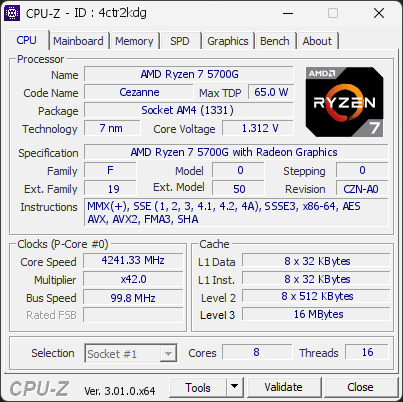
CPU clocks
Last sample and peak over the test, values in MHz
| Clock | Current | Peak |
|---|---|---|
| Cores | ||
| #0 | 4216.39 | 4290.49 |
| #1 | 4216.39 | 4513.40 |
| #2 | 4216.39 | 4265.54 |
| #3 | 4216.39 | 4513.40 |
| #4 | 4241.33 | 4265.54 |
| #5 | 4216.39 | 4265.54 |
| #6 | 4216.39 | 4290.49 |
| #7 | 4241.33 | 4438.59 |
| Uncore / BCLK | ||
| CPU BCLK | 99.80 | 99.80 |
Previous validations from this PC
Unexpected crashes (BSOD)
No unexpected crashes (BSOD) recorded on this PC.
Boot Time details
Hardware errors (WHEA)
1 error recorded in the Windows event log.
Driver problems
No driver problems detected.
Flagged processes
59 running processes, none flagged.
Inform a support service
If a partner support service is helping you with this PC, enter the service code they gave you to send them this validation. A valid service code is required.