CPU-Z VALIDATOR V3 - BETA VERSION - PROD ENVIRONMENT
Dump [5fy1ux63] Submitted by Anonymous -
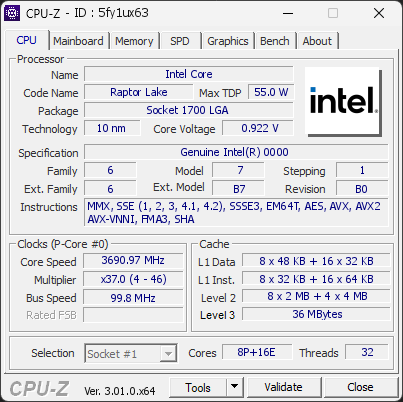
Genuine Intel(R) 0000
3690.97 MHz
E94E4F2B86177E0E 20ED3938FD9D9820 · 16 GB DDR4-3192 · NVIDIA GeForce RTX 5070
Warning
CPU-Z 3.01.0
Date:
Type: Quick Check
Duration: 5 seconds
System Analysis
3 Warnings 1 Info

Your processor is an Engineering sample. An Engineering Sample (ES) CPU is a pre-release processor sent by the manufacturer to OEMs/engineers for testing and validation.

It often has unfinished microcode/firmware, may run at non-final clocks/voltages, and can show bugs or different performance vs retail chips.

ES chips are usually not for sale, may be locked/traceable, and don’t always support full warranty/official support.

Your CPU is running at a high temperature (100°C). At this level, the processor may slow itself down to avoid overheating.

This usually means the cooling system is struggling to keep the CPU at a safe temperature. It can happen if the cooler is clogged with dust, not working correctly, or simply not powerful enough for this type of processor.

We recommend checking that the fan spins normally and that the cooling system is properly installed. Cleaning the cooler or improving airflow can help bring the temperature back to a safer range.

Your processor reached 100°C during the test, hotter than 100 % of the 101 validations recorded with the same Intel Core. The typical maximum for this model is 66°C.

The same CPU under the same load usually lands close to the typical value. A large gap points at the cooling rather than the processor: a cooler too small for this CPU, a poor mount or dried thermal paste, dust, low airflow in the case, or a BIOS power limit set higher than stock.

Compare your cooling setup with what this processor needs, check the cooler mounting and the thermal paste, clean the fans and filters, and review the case airflow. The CPU is not at risk yet, but it is running hotter than it should.

Your processor runs microcode revision 0x104, older than the 0x12B revision that fixes a known stability and degradation issue on this CPU family.

Intel 13th and 14th generation Core processors could receive excessive voltage from the BIOS, which causes crashes and permanent damage over time. The fix is delivered through a microcode update included in newer BIOS versions.

Update the motherboard BIOS to the latest version from the manufacturer, then check that the microcode revision has changed. Until then, keep the BIOS power and voltage settings at their defaults (Intel Default Settings).

01 Processor (CPU)
Max. Frequency
3990 MHz
L3 Cache
36 MB
Peak temp
100 °C
0100 °C
Power (TDP)
202 W
0253 W
CPU Name
Genuine Intel(R) 0000
Cores & Threads
1 CPU | 8P + 16E Cores | 32 Threads
Frequency
3690.97 MHz (37 * 99.76 MHz) - Max Turbo: 3990.24 MHz
Multiplier
Current: 37 | Min: 4 | Max: 46
Architecture
Raptor Lake | Stepping: B0 | Technology: 10 nm
CPUID / Ext.
6.7.1 | 6.B7
IA Extensions
MMX, SSE, SSE2, SSE3, SSSE3, SSE4.1, SSE4.2, EM64T, AES, AVX, AVX2, FMA3, SHA
L1 Data Cache
8 x 48 KB (12-way, 64-byte line) + 16 x 32 KB (8-way, 64-byte line)
L1 Instruction Cache
8 x 32 KB (8-way, 64-byte line) + 16 x 64 KB (8-way, 64-byte line)
L2 Cache
8 x 2 MB (16-way, 64-byte line) + 4 x 4 MB (16-way, 64-byte line)
L3 Cache
36 MB (12-way, 64-byte line)
Microcode
Rev. 0x104
TDP
55 W / PL1: 253 W / PL2: 253 W
Temperature
Current: 100°C | Max: 100°C | TjMax: 100°C
Type
Engineering Sample
02 Motherboard
Model
E94E4F2B86177E0E 20ED3938FD9D9820
Socket
LGA1700
North Bridge
Intel Raptor Lake rev 01
South Bridge
Intel B660 rev 11
BIOS
American Megatrends International LLC. H.P0 (08/31/2026)
03 Memory (RAM)
Total Capacity
16 GB
Channels
128 bits
Dual Channel
Effective Speed
DDR4-3192
1596 MHz
Memory Slots (2 / 4)
empty
S0
KINGSTON
8 GB
S1
empty
S2
KINGSTON
8 GB
S3
Total Size
16384 MB (16 GB)
Type
Dual Channel (128 bit) DDR4-SDRAM
Frequency
1596 MHz (DDR4-3192) - Ratio: 1:24
Timings
16-18-18-36-54-2 (tCAS-tRCD-tRP-tRAS-tRC-tCR)
Slot #1 Module
8 GB Kingston DDR4-3200 KHX3200C16D4/8GX (WW10'19)
Slot #2 Module
8 GB Kingston DDR4-3200 KHX3200C16D4/8GX (WW10'19)
04 Graphic Card (GPU)
GPU Clock
2325 MHz
GPU VRAM
12 GB
RTX 5070
Peak GPU temp.
33 °C
0100 °C
#1 NVIDIA GeForce RTX 5070
Name
NVIDIA GeForce RTX 5070 - Manufacturer: MSI
Freq.
2325 MHz (Turbo: 2542 MHz)
Specs
Process: 4 nm / Transistors: 31.1 B / Die Size: 263 mm² / TDP: 250 W
Units
Cores: 6144 | Texture (TMU): 384 | Render (ROP): 80
VRAM
12 GB GDDR7 (Micron) | 192-bit Bus @ 14001 MHz
Drivers
NVIDIA GeForce Driver 617.42 | Version 32.0.16.1742 (09/30/2026)
#2 Intel(R) UHD Graphics
Name
Intel(R) UHD Graphics - Manufacturer: MSI
Freq.
1550 MHz (Turbo: 900 MHz)
Units
Cores: 2
VRAM
128 MB
Drivers
Version 32.0.101.7088 (06/17/2026)
05 Storage
C:\WDC WDS100T2B0C-00PXH0 (FW: 211210WD)
66% usedTotal 931 GiB
Drive
WDC WDS100T2B0C-00PXH0 (FW: 211210WD)
Capacity
931 GiB (~1000 GB)
Type
Fixed SSD - Bus: NVMe PCIe 4x 3.0 (8 GT/s)
Partition
C:\ - Size: 930.4GB (66.4% used)
Run Time
Power Cycles: 106 | Power-On: 41579 h (~1732 days) | 72.9 TBW
Health
Remaining Life: 93% | Media Errors: 0 | Temperature: 36°C
06 Display
Monitor
WAN AG34P (W38'2025)
Specifications
34.1 inches (86.6 cm) | 3440 x 1440 pixels (UWQHD) @ 48-240 Hz
Current Mode
3440 x 1440 pixels | 240 Hz | On: NVIDIA GeForce RTX 5070
07 Software
Operating System
Microsoft Windows 11 Professional (x64) - 25H2 | Installed on 2026-09-27
Security
Secure Boot: Enabled | TPM: Enabled (V2.0 hardware)
Features
Code Integrity: Enabled | Fast Startup: Enabled
Power Plan
Balanced | 3 plans defined
Antivirus
Windows Defender: Enabled | Up to date
Boot Time
44 seconds (POST: 10 s. | Logon: 14 s. | Startup: 19 s.)
Hardware Errors
1 fatal hardware error (WHEA) recorded
Processes
88 running processes
CPU-Z Version
3.01.0.x64
CPU-Z SCREENSHOT Warning [5fy1ux63]
Tools
CPU-Z BENCHMARK
Version 2017.1 (x64)
Your position (multi-thread)
AMD Ryzen 9 9950X3D
11,216
YOU
11,061
AMD Ryzen 9 9950X
10,817
Forum Banner
[url=https://valid.cpuid.com/5fy1ux63][img]https://valid.cpuid.com/cache/banner/5fy1ux63.png[/img][/url]
Join us on Discord
Join our Discord