Dump [6s9lnfas] Submitted by MARCUS -
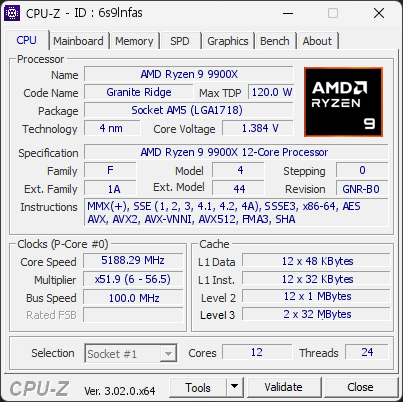
AMD Ryzen 9 9900X 12-Core Processor
5188.29 MHz
ASUS TUF GAMING B850M-PLUS WIFI · 64 GB DDR5-6000 · NVIDIA GeForce RTX 5070 Ti
Healthy
CPU-Z 3.02.0
Date:
Type: Quick Check
Duration: 5 seconds
System Analysis
3 Info

The drive CT1000MX500SSD1 has logged 150 CRC error(s) on its SATA interface. These are bus-level transmission errors and indicate a connection problem, not a fault with the drive itself. Common causes are a loose, damaged, or low-quality SATA cable, a faulty SATA port, or a flaky backplane or drive sled. The counter is cumulative over the drive's whole lifetime, so these errors may be years old and come from an issue that has long been resolved.

If the count is still increasing, reseat the SATA data cable, try a different SATA port, and replace the cable if errors continue to accumulate.

1 device(s) have no driver installed, so Windows cannot use them at all. This is very common on a fresh Windows installation, where the chipset drivers have not been installed yet.

Windows ships generic drivers for common hardware but not for chipset controllers, card readers, or manufacturer-specific devices, which have to be installed separately.

Install the chipset driver package for your motherboard or laptop from the manufacturer's support page, then run Windows Update. The Drivers button in the Software section lists every device still waiting for a driver.

1 running program(s) are known to consume resources in the background with little benefit (preinstalled trials, redundant cleaners, or permanent helper services).

These programs are often preinstalled by the PC manufacturer or bundled with other software, and keep running at every startup even when unused.

Uninstalling them, or disabling their automatic startup, frees memory and shortens the boot time. The Processes button in the Software section lists each detected program and why it is flagged.

01 Processor (CPU)
Max. Frequency
5570 MHz
Peak temp
76 °C
095 °C
PPT unlocked
Power (TDP)
212 W
TDP 120 W
0213 W
CPU Name
AMD Ryzen 9 9900X 12-Core Processor
Cores & Threads
1 CPU | 12 Cores | 24 Threads
Frequency
5188.29 MHz (51.9 * 99.97 MHz) - Max Turbo: 5569.79 MHz
Multiplier
Current: 51.9 | Min: 6 | Max: 56.5
Architecture
Granite Ridge | Stepping: GNR-B0 | Technology: 4 nm
CPUID / Ext.
F.4.0 | 1A.44
IA Extensions
MMX (+), SSE, SSE2, SSE3, SSSE3, SSE4.1, SSE4.2, SSE4A, x86-64, AES, AVX, AVX2, AVX512 (DQ, BW, VL, CD, IFMA, VBMI, VBMI2, VNNI, BITALG, VPOPCNTDQ, VP2INTERSECT, BF16), FMA3, SHA
L1 Data Cache
12 x 48 KB (12-way, 64-byte line)
L1 Instruction Cache
12 x 32 KB (8-way, 64-byte line)
L2 Cache
12 x 1024 KB (16-way, 64-byte line)
L3 Cache
2 x 32 MB (16-way, 64-byte line)
Microcode
Rev. 0xB404035
TDP
120 W / PPT: 1000 W
Temperature
Current: 76.4°C | Max: 76.4°C | TjMax: 95°C
Type
Retail
02 Motherboard
Model
ASUS TUF GAMING B850M-PLUS WIFI
Socket
AM5 (LGA1718)
North Bridge
AMD Ryzen SOC rev 00
South Bridge
AMD B850 rev 51
BIOS
American Megatrends Inc. 1654 (04/02/2026)
03 Memory (RAM)
Total Capacity
64 GB
Channels
128 bits
Dual Channel
Effective Speed
DDR5-6000
3000 MHz
Memory Slots (2 / 4)
empty
S0
G.SKILL
32 GB
S1
empty
S2
G.SKILL
32 GB
S3
Total Size
65536 MB (64 GB)
Type
Quad Channel (128 bit) DDR5-SDRAM
Frequency
3000 MHz (DDR5-6000) - Ratio: 1:30
Timings
36-36-36-96-132 (tCAS-tRCD-tRP-tRAS-tRC)
Slot #1 Module
32 GB G.Skill DDR5-6000 F5-6000J3636F32G (WW02'25)
Slot #2 Module
32 GB G.Skill DDR5-6000 F5-6000J3636F32G (WW02'25)
04 Graphic Card (GPU)
GPU Clock
2295 MHz
GPU VRAM
16 GB
RTX 5070 Ti
Peak GPU temp.
38 °C
0100 °C
#1 NVIDIA GeForce RTX 5070 Ti
Name
NVIDIA GeForce RTX 5070 Ti - Manufacturer: ASUS
Freq.
2295 MHz (Turbo: 2588 MHz)
Specs
Process: 4 nm / Transistors: 45.6 B / Die Size: 378 mm² / TDP: 300 W
Units
Cores: 8960 | Texture (TMU): 560 | Render (ROP): 96
VRAM
16 GB GDDR7 (Samsung) | 256-bit Bus @ 14001 MHz
Drivers
NVIDIA GeForce Driver 621.24 | Version 32.0.16.2124 (11/07/2026)
#2 AMD Radeon(TM) Graphics
Name
AMD Radeon(TM) Graphics - Manufacturer: ASUS
Freq.
600 MHz
Units
Cores: 128 | Render (ROP): 8
VRAM
2 GB @ 3000 MHz
Drivers
Version 32.0.21042.62 (04/17/2026)
05 Storage
C:\CT1000P310SSD8 (FW: VACR001)
14% usedTotal 931 GiB
Name
CT1000P310SSD8 (FW: VACR001)
Size
931 GiB (~1000 GB)
Type
Fixed SSD - Bus: NVMe PCIe 4x 4.0 (16 GT/s)
Volume
C:\ - Size: 930.4GB (14% used)
Run Time
Power Cycles: 140 | Power-On: 8994 h (~375 days) | 11.2 TBW
Health
Remaining Life: 99% | Media Errors: 0 | Temperature: 41°C
D:\WD_BLACK SN770 2TB (FW: 731130WD)
22% usedTotal 1863 GiB
Name
WD_BLACK SN770 2TB (FW: 731130WD)
Size
1863 GiB (~2000 GB)
Type
Fixed SSD - Bus: NVMe PCIe 4x 4.0 (16 GT/s)
Volume
D:\ - Size: 1860.9GB (21.9% used)
Run Time
Power Cycles: 222 | Power-On: 10016 h (~417 days) | 22.6 TBW
Health
Remaining Life: 100% | Media Errors: 0 | Temperature: 49°C
E:\SPCC M.2 PCIe SSD (FW: VC2S038E)
8% usedTotal 931 GiB
Name
SPCC M.2 PCIe SSD (FW: VC2S038E)
Size
931 GiB (~1000 GB)
Type
Fixed SSD - Bus: NVMe PCIe 4x 3.0 (8 GT/s)
Volume
E:\ - Size: 931.2GB (7.5% used)
Run Time
Power Cycles: 265 | Power-On: 27813 h (~1159 days) | 25.2 TBW
Health
Remaining Life: 99% | Media Errors: 0 | Temperature: 52°C
H:\CT1000MX500SSD1 (FW: M3CR023)
89% usedTotal 931 GiB
Name
CT1000MX500SSD1 (FW: M3CR023)
Size
931 GiB (~1000 GB)
Type
Fixed SSD - Bus: SATA - Controller: PCIe 1x 1.0 (2.5 GT/s)
Volume
H:\ - Size: 931.5GB (89% used)
Run Time
Power Cycles: 145840 | Power-On: 51949 h (~2165 days)
Health
Remaining Life: 85% | Media Errors: 0 | Temperature: 29°C
J:\TEAM T2531TB (FW: U1013A0)
29% usedTotal 953 GiB
Name
TEAM T2531TB (FW: U1013A0)
Size
953 GiB (~1020 GB)
Type
Fixed SSD - Bus: SATA - Controller: PCIe 1x 1.0 (2.5 GT/s)
Volume
J:\ - Size: 953.9GB (29.2% used)
Run Time
Power Cycles: 302 | Power-On: 29796 h (~1242 days)
Health
Remaining Life: 100% | Media Errors: 0 | Temperature: 12°C
K:\TEAM T2532TB (FW: HP2818D8)
91% usedTotal 1907 GiB
Name
TEAM T2532TB (FW: HP2818D8)
Size
1907 GiB (~2050 GB)
Type
Fixed SSD - Bus: SATA - Controller: PCIe 1x 1.0 (2.5 GT/s)
Volume
K:\ - Size: 1907.7GB (90.7% used)
Run Time
Power Cycles: 67 | Power-On: 1854 h (~77 days)
Health
Remaining Life: 100% | Media Errors: 0 | Temperature: 29°C
06 Display
#1 ASUSTeK XG27ACDMS (W39'2025)
Monitor
ASUSTeK XG27ACDMS (W39'2025)
Specifications
26.6 inches (67.6 cm) | 2560 x 1440 pixels (QHD) @ 48-25 Hz
Current Mode
2560 x 1440 pixels | 280 Hz | On: NVIDIA GeForce RTX 5070 Ti
#2 Micro-Star International G274QPF E2 (W25'2023)
Monitor
Micro-Star International G274QPF E2 (W25'2023)
Specifications
27.0 inches (68.6 cm) | 2560 x 1440 pixels (QHD) @ 48-144 Hz
Current Mode
2560 x 1440 pixels | 60 Hz | On: NVIDIA GeForce RTX 5070 Ti
07 Software
Operating System
Microsoft Windows 11 Professional (x64) - 26H2 | Installed on 2026-10-01
Security
Secure Boot: Enabled | TPM: Enabled (V2.0 hardware)
Features
Code Integrity: Enabled | Fast Startup: Enabled
Power Plan
High performance | 3 plans defined
Antivirus
Windows Defender: Enabled | Up to date
Boot Time
57 seconds (POST: 16 s. | Logon: 19 s. | Startup: 22 s.)
Drivers
1 device has no driver installed
Processes
110 running processes, 1 bloatware detected
CPU-Z Version
3.02.0.x64
CPU-Z SCREENSHOT Healthy [6s9lnfas]
Tools
Forum Banner
[url=https://valid.cpuid.com/6s9lnfas][img]https://valid.cpuid.com/cache/banner/6s9lnfas.png[/img][/url]
Join us on Discord
Join our Discord