
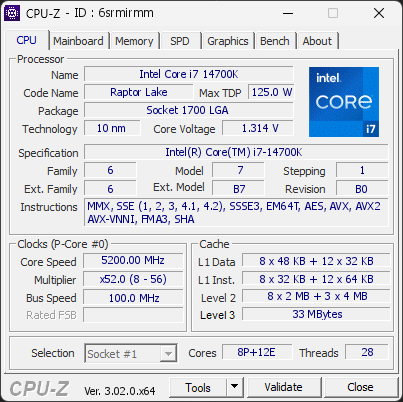
Your processor's power limits (PL1/PL2) appear to be set to an unlimited value. This means the CPU is allowed to draw as much power as it wants, with no enforced safeguard beyond what the cooling and voltage regulation can sustain. While this can unlock maximum performance, the processor may run hotter, consume more energy, and experience increased electrical stress over time.
This configuration is often applied automatically by motherboard manufacturers through performance-enhancing profiles. Even without any user changes, many boards ship with these limits effectively disabled by default.
We recommend reviewing your power limit settings in the BIOS or in the software provided by your motherboard. Restoring sensible PL1/PL2 values (typically aligned with the processor's rated TDP) can help lower temperatures, reduce power consumption, and extend the long-term reliability of your CPU.
The drive KINGSTON SNV2S1000G has spent 687 minute(s) operating at or above its critical temperature threshold (typically 80–85°C). At these temperatures the controller is forced to throttle aggressively to avoid permanent damage, which causes severe performance loss and accelerates wear.
Improve airflow around the drive, add a heatsink if possible, and verify it is not installed near a heat source. Sustained critical thermal events shorten the drive's lifespan significantly.
The drive KINGSTON SNV2S1000G has spent 10910 minute(s) operating above its warning temperature threshold (typically 70°C). The drive is still functional but is running hotter than its manufacturer recommends for sustained operation, which gradually shortens its lifespan.
Check airflow and cooling around the drive. Adding a heatsink or improving case ventilation usually resolves this.
2 running program(s) are known to consume resources in the background with little benefit (preinstalled trials, redundant cleaners, or permanent helper services).
These programs are often preinstalled by the PC manufacturer or bundled with other software, and keep running at every startup even when unused.
Uninstalling them, or disabling their automatic startup, frees memory and shortens the boot time. The Processes button in the Software section lists each detected program and why it is flagged.

Scan this QR code
To open this page on your phone
CPU clocks
Last sample and peak over the test, values in MHz
| Clock | Current | Peak |
|---|---|---|
| Cores | ||
| P0 | 5200.00 | 5500.00 |
| P1 | 5200.00 | 5500.00 |
| P2 | 5200.00 | 5500.00 |
| P3 | 5200.00 | 5500.00 |
| P4 | 5200.00 | 5500.00 |
| P5 | 5200.00 | 5600.00 |
| P6 | 5200.00 | 5500.00 |
| P7 | 5200.00 | 5500.00 |
| E8 | 4200.00 | 4200.00 |
| E9 | 4200.00 | 4200.00 |
| E10 | 4200.00 | 4200.00 |
| E11 | 4200.00 | 4200.00 |
| E12 | 4200.00 | 4200.00 |
| E13 | 4200.00 | 4200.00 |
| E14 | 4200.00 | 4200.00 |
| E15 | 4200.00 | 4200.00 |
| E16 | 4200.00 | 4200.00 |
| E17 | 4200.00 | 4200.00 |
| E18 | 4200.00 | 4200.00 |
| E19 | 4200.00 | 4300.00 |
| Uncore / BCLK | ||
| Ring / LLC | 4500.00 | 4600.00 |
| CPU BCLK | 100.00 | 100.00 |
| SOC BCLK | 100.00 | 100.00 |
Previous validations from this PC
Unexpected crashes (BSOD)
No unexpected crashes (BSOD) recorded on this PC.
Boot Time details
Hardware errors (WHEA)
2 errors recorded in the Windows event log.
Driver problems
No driver problems detected.
Flagged processes
72 running processes, 2 flagged.
Inform a support service
If a partner support service is helping you with this PC, enter the service code they gave you to send them this validation. A valid service code is required.