CPU-Z VALIDATOR V3 - BETA VERSION - PROD ENVIRONMENT
Dump [7wfrkwvs] Submitted by G3-JC -
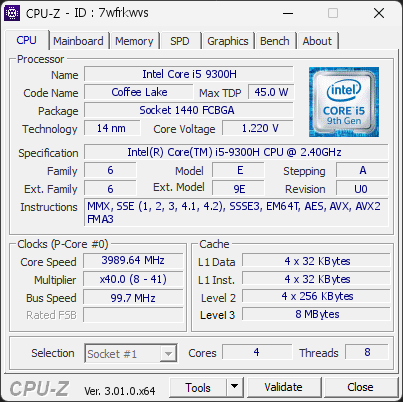
Intel(R) Core(TM) i5-9300H CPU @ 2.40GHz
3989.64 MHz
Dell 0GDFK2 · 32 GB DDR4-2658 · NVIDIA GeForce GTX 1650
Faulty
CPU-Z 3.01.0
Date:
Type: Quick Check
Duration: 5 seconds
System Analysis
1 Error 1 Warning 1 Info

1 running program(s) are known to consume resources in the background with little benefit (preinstalled trials, redundant cleaners, or permanent helper services).

These programs are often preinstalled by the PC manufacturer or bundled with other software, and keep running at every startup even when unused.

Uninstalling them, or disabling their automatic startup, frees memory and shortens the boot time. The Processes button in the Software section lists each detected program and why it is flagged.

Windows reports 1 device(s) that are not working correctly. A device in this state is either unavailable or running in a degraded mode, and Windows will keep retrying it at every boot.

This usually comes from a driver that failed to load or was stopped after an error: a bad or outdated driver, a device that is not seated properly, or a component that is starting to fail.

Open the Device Manager to see which devices are flagged, then reinstall or update their drivers from the manufacturer's website. If a device keeps failing after a clean driver install, reseat it and test it on another port or slot. The Drivers button in the Software section lists every affected device.

Your battery has lost a significant portion of its original capacity. It is currently holding only 37 % of what it was designed to store. This severely limits how long your device can run on battery power and may cause unexpected shutdowns.

Batteries degrade naturally over time, but heavy usage, frequent full discharges, and heat accelerate wear. At this level, the battery is no longer reliable for normal use.

We recommend replacing the battery as soon as possible to restore normal runtime and avoid abrupt power loss.

01 Processor (CPU)
Max. Frequency
3990 MHz
L3 Cache
8 MB
Peak temp
100 °C
0100 °C
Power (TDP)
62 W
090 W
CPU Name
Intel(R) Core(TM) i5-9300H CPU @ 2.40GHz
Cores & Threads
1 CPU | 4 Cores | 8 Threads
Frequency
3989.64 MHz (40 * 99.74 MHz) - Max Turbo: 3989.64 MHz
Multiplier
Current: 40 | Min: 8 | Max: 41
Architecture
Coffee Lake | Stepping: U0 | Technology: 14 nm
CPUID / Ext.
6.E.A | 6.9E
IA Extensions
MMX, SSE, SSE2, SSE3, SSSE3, SSE4.1, SSE4.2, EM64T, AES, AVX, AVX2, FMA3
L1 Data Cache
4 x 32 KB (8-way, 64-byte line)
L1 Instruction Cache
4 x 32 KB (8-way, 64-byte line)
L2 Cache
4 x 256 KB (4-way, 64-byte line)
L3 Cache
8 MB (16-way, 64-byte line)
Microcode
Rev. 0xF0
TDP
45 W / PL1: 90 W / PL2: 90 W
Temperature
Current: 100°C | Max: 100°C | TjMax: 100°C
Type
Retail
02 Motherboard
Model
Dell 0GDFK2
Socket
1440 FCBGA
North Bridge
Intel Coffee Lake rev 07
South Bridge
Intel HM370 rev 10
BIOS
Dell Inc. 1.21.0 (04/10/2023)
03 Memory (RAM)
Total Capacity
32 GB
Channels
128 bits
Dual Channel
Effective Speed
DDR4-2658
1329 MHz
Memory Slots (2 / 2)
KINGSTON
16 GB
S0
KINGSTON
16 GB
S1
Total Size
32768 MB (32 GB)
Type
Dual Channel (128 bit) DDR4-SDRAM
Frequency
1329 MHz (DDR4-2658) - Ratio: 3:40
Timings
19-19-19-43-2 (tCAS-tRCD-tRP-tRAS-tRC)
Slot #1 Module
16 GB Kingston DDR4-3200 KF432S201B/16 (WW20'26)
Slot #2 Module
16 GB Kingston DDR4-3200 KF432S201B/16 (WW20'26)
04 Graphic Card (GPU)
GPU Clock
1395 MHz
GPU VRAM
4 GB
GTX 1650
Peak GPU temp.
47 °C
0100 °C
#1 NVIDIA GeForce GTX 1650
Name
NVIDIA GeForce GTX 1650 - Manufacturer: Dell
Freq.
1395 MHz (Turbo: 1560 MHz)
Specs
Process: 12 nm / Transistors: 4.7 B / Die Size: 200 mm² / TDP: 75 W
Units
Cores: 1024 | Render (ROP): 32
VRAM
4 GB GDDR5 (Hynix) | 128-bit Bus @ 4001 MHz
Drivers
NVIDIA GeForce Driver 617.42 | Version 32.0.16.1742 (09/30/2026)
#2 Intel(R) UHD Graphics 630
Name
Intel(R) UHD Graphics 630 - Manufacturer: Dell
VRAM
128 MB
Drivers
Version 27.20.100.9664 (06/01/2021)
05 Storage
C:\WDC WDS480G2G0C-00AJM0 (FW: 231050WD)
39% usedTotal 447 GiB
Name
WDC WDS480G2G0C-00AJM0 (FW: 231050WD)
Size
447 GiB (~480 GB)
Type
Fixed - Bus: RAID
Volume
C:\ - Size: 446.2GB (39.4% used)
D:\WDC WD10SPZX-75Z10T3 (FW: 14244514)
22% usedTotal 931 GiB
Name
WDC WD10SPZX-75Z10T3 (FW: 14244514)
Size
931 GiB (~1000 GB)
Type
Fixed - Bus: RAID
Volume
D:\ - Size: 931.4GB (22.3% used)
06 Display
#1 LG Electronics (GoldStar) 23EA53 (W04'2014)
Monitor
LG Electronics (GoldStar) 23EA53 (W04'2014)
Specifications
23.1 inches (58.7 cm) | 1920 x 1080 pixels (FHD) @ 56-61 Hz
Current Mode
1920 x 1080 pixels | 60 Hz | On: NVIDIA GeForce GTX 1650
#2 LG Electronics (GoldStar) 23EA53 (W04'2014)
Monitor
LG Electronics (GoldStar) 23EA53 (W04'2014)
Specifications
23.1 inches (58.7 cm) | 1920 x 1080 pixels (FHD) @ 56-61 Hz
Current Mode
1920 x 1080 pixels | 60 Hz | On: Intel UHD Graphics 630
07 Battery
Remaining Capacity
19 Ah
051 Ah
Model
DELL PN1VN9A
Manufacturer
SMP (S/N: 186)
Capacity
51 Ah (Remaining: 19 Ah | 37%)
08 Software
Operating System
Microsoft Windows 11 Home Single Language (x64) - 26H2 | Installed on 2025-02-09
Security
Secure Boot: Enabled | TPM: Enabled (V2.0 hardware)
Features
Code Integrity: Enabled | Fast Startup: Disabled
Power Plan
Balanced | 1 plan defined
Antivirus
Avast Antivirus: Enabled | Up to date
Boot Time
117 seconds (POST: 8 s. | Logon: 17 s. | Startup: 92 s.)
Hardware Errors
4033 hardware errors (WHEA) recorded, corrected
Drivers
1 device is not working correctly
Processes
57 running processes, 1 bloatware detected
CPU-Z Version
3.01.0.x64
CPU-Z SCREENSHOT Faulty [7wfrkwvs]
Tools
Forum Banner
[url=https://valid.cpuid.com/7wfrkwvs][img]https://valid.cpuid.com/cache/banner/7wfrkwvs.png[/img][/url]
Join us on Discord
Join our Discord