Dump [8ldpc93q] Submitted by DESKTOP-V89G5S6 -
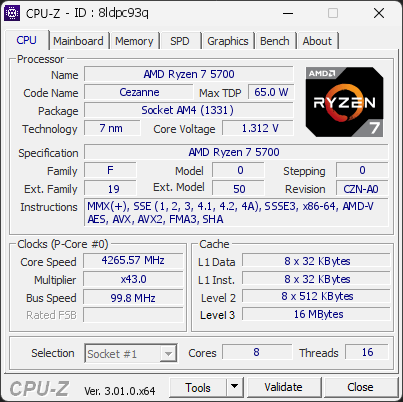
AMD Ryzen 7 5700
4265.57 MHz
ASUS TUF GAMING A520M-PLUS II · 16 GB DDR4-3194 · NVIDIA GeForce RTX 5060
Warning
CPU-Z 3.01.0
Date:
Type: Quick Check
Duration: 5 seconds
System Analysis
1 Warning 1 Info

The drive TS240GSSD220S has logged 6,000 CRC error(s) on its SATA interface, a high count that points to a connection problem. This is NOT a drive failure; the drive itself is likely healthy, but the cable, port, or backplane carrying its data was unreliable when the errors occurred. The counter is cumulative over the drive's whole lifetime, so these errors may be years old and come from an issue that has long been resolved.

If the count is still increasing, reseat or replace the SATA data cable, try a different SATA port, and check for issues with the drive sled or backplane in this chassis. If multiple drives in the same system show CRC errors, the chassis wiring is the likely culprit.

Your RAM is not running in dual-channel mode. This isn’t an issue, but you could gain some extra performance with the proper configuration.

If you have two modules, placing them in the correct slots on the motherboard usually enables dual channel. If you only have one module, adding a second one will activate it automatically.

01 Processor (CPU)
Max. Frequency
4442 MHz
L3 Cache
16 MB
Peak temp
76 °C
095 °C
Power (TDP)
74 W
088 W
CPU Name
AMD Ryzen 7 5700
Cores & Threads
1 CPU | 8 Cores | 16 Threads
Frequency
4265.57 MHz (42.75 * 99.78 MHz) - Max Turbo: 4441.57 MHz
Multiplier
Current: 42.75 | Max: 37
Architecture
Cezanne | Stepping: CZN-A0 | Technology: 7 nm
CPUID / Ext.
F.0.0 | 19.50
IA Extensions
MMX (+), SSE, SSE2, SSE3, SSSE3, SSE4.1, SSE4.2, SSE4A, x86-64, AMD-V, AES, AVX, AVX2, FMA3, SHA
L1 Data Cache
8 x 32 KB (8-way, 64-byte line)
L1 Instruction Cache
8 x 32 KB (8-way, 64-byte line)
L2 Cache
8 x 512 KB (8-way, 64-byte line)
L3 Cache
16 MB (16-way, 64-byte line)
Microcode
Rev. 0xA500014
TDP
65 W / PPT: 88 W / PPL (Short): 88 W / PPL (Long): 88 W
Temperature
Current: 76.4°C | Max: 76.4°C | TjMax: 95°C
Type
Retail
02 Motherboard
Model
ASUS TUF GAMING A520M-PLUS II
Socket
AM4 (1331)
North Bridge
AMD Ryzen SOC rev 00
South Bridge
AMD A520 rev 51
BIOS
American Megatrends Inc. 3621 (01/13/2025)
03 Memory (RAM)
Total Capacity
16 GB
Channels
64 bits
Single Channel
Effective Speed
DDR4-3194
1597 MHz
Memory Slots (1 / 4)
empty
S0
0000
16 GB
S1
empty
S2
empty
S3
Total Size
16384 MB (16 GB)
Type
Single Channel (64 bit) DDR4-SDRAM
Frequency
1597 MHz (DDR4-3194) - Ratio: 1:16
Timings
22-22-22-52-74-1 (tCAS-tRCD-tRP-tRAS-tRC-tCR)
Slot #1 Module
16 GB 0000 DDR4-3200 AKD4S16P3200 (WW25'26)
04 Graphic Card (GPU)
GPU Clock
2280 MHz
GPU VRAM
8 GB
Peak GPU temp.
64 °C
0100 °C
GPU Name
NVIDIA GeForce RTX 5060 - Manufacturer: Palit Microsystems
GPU Frequency
2280 MHz (Turbo: 2512 MHz)
GPU Specifications
Process: 4 nm / Transistors: 21.9 B / Die Size: 181 mm² / TDP: 145 W
GPU Units
Cores: 3840 | Texture (TMU): 240 | Render (ROP): 48
GPU VRAM
8 GB GDDR7 (Hynix) | 128-bit Bus @ 14001 MHz
GPU Drivers
NVIDIA GeForce Driver 621.14 | Version 32.0.16.2114 (10/27/2026)
05 Storage
C:\CT1000E100SSD8 (FW: VDCR4005)
59% usedTotal 931 GiB
Name
CT1000E100SSD8 (FW: VDCR4005)
Size
931 GiB (~1000 GB)
Type
Fixed SSD - Bus: NVMe PCIe 4x 3.0 (8 GT/s)
Volume
C:\ - Size: 930.5GB (59.2% used)
Run Time
Power Cycles: 57 | Power-On: 244 h (~10 days) | 9.9 TBW
Health
Remaining Life: 99% | Media Errors: 0 | Temperature: 43°C
D:\TS240GSSD220S (FW: R0510A0)
7% usedTotal 223 GiB
Name
TS240GSSD220S (FW: R0510A0)
Size
223 GiB (~240 GB)
Type
Fixed SSD - Bus: SATA - Controller: PCIe 4x 3.0 (8 GT/s)
Volume
D:\ - Size: 0.5GB (6.5% used) | 1 other volume found
Run Time
Power Cycles: 5083 | Power-On: 27101 h (~1129 days)
Health
Remaining Life: 100% | Media Errors: 0 | Temperature: 37°C
06 Display
Monitor
Samsung C27F390 (W43'2019)
Specifications
27.2 inches (69.1 cm) | 1920 x 1080 pixels (FHD) @ 50-72 Hz
Current Mode
1920 x 1080 pixels | 60 Hz
07 Software
Operating System
Microsoft Windows 11 Professional (x64) - 26H2 | Installed on 2026-09-07
Security
Secure Boot: Disabled | TPM: Enabled (V2.0 hardware)
Features
Code Integrity: Enabled | Fast Startup: Enabled
Power Plan
Balanced | 3 plans defined
Antivirus
Windows Defender: Enabled | Up to date
Boot Time
36 seconds (POST: 8 s. | Logon: 9 s. | Startup: 19 s.)
Processes
89 running processes
CPU-Z Version
3.01.0.x64
CPU-Z SCREENSHOT Warning [8ldpc93q]
Tools
Forum Banner
[url=https://valid.cpuid.com/8ldpc93q][img]https://valid.cpuid.com/cache/banner/8ldpc93q.png[/img][/url]
Join us on Discord
Join our Discord