
Your graphics driver is not fully up to date. You are currently running version 617.42, while version 621.14 (2026-10-27) is available.
Without an update, you may miss out on security fixes or performance improvements. Updating your driver can improve overall stability and performance.
The latest drivers for your graphics card are available here: NVIDIA Drivers
The drive ST8000VN004-2M2101 has logged 7,089 CRC error(s) on its SATA interface, a high count that points to a connection problem. This is NOT a drive failure; the drive itself is likely healthy, but the cable, port, or backplane carrying its data was unreliable when the errors occurred. The counter is cumulative over the drive's whole lifetime, so these errors may be years old and come from an issue that has long been resolved.
If the count is still increasing, reseat or replace the SATA data cable, try a different SATA port, and check for issues with the drive sled or backplane in this chassis. If multiple drives in the same system show CRC errors, the chassis wiring is the likely culprit.
We detected 1 storage device(s) that are not partitioned or formatted. The affected device(s) are: ST12000VN0007-2GS116. They may also be formatted with a file system Windows does not support (Linux ext4, for example). Windows cannot use these drives until they are initialized and set up.
If the drive is used by another operating system (such as Linux), you can ignore this message. Otherwise, open the Disk Management tool to initialize the device(s), create a partition, and format the drive so it becomes usable.
We detected 1 storage device(s) that are not partitioned or formatted. The affected device(s) are: ST12000VN0008-2JJ101. They may also be formatted with a file system Windows does not support (Linux ext4, for example). Windows cannot use these drives until they are initialized and set up.
If the drive is used by another operating system (such as Linux), you can ignore this message. Otherwise, open the Disk Management tool to initialize the device(s), create a partition, and format the drive so it becomes usable.
We detected 1 storage device(s) that are not partitioned or formatted. The affected device(s) are: OCZ-VERTEX3 MI. They may also be formatted with a file system Windows does not support (Linux ext4, for example). Windows cannot use these drives until they are initialized and set up.
If the drive is used by another operating system (such as Linux), you can ignore this message. Otherwise, open the Disk Management tool to initialize the device(s), create a partition, and format the drive so it becomes usable.

Scan this QR code
To open this page on your phone
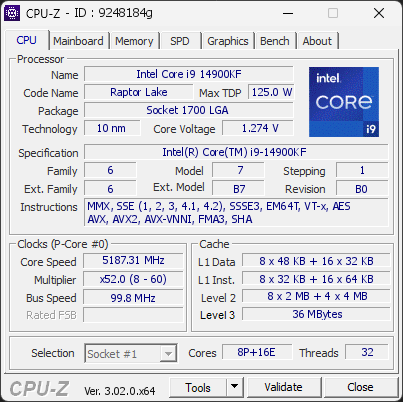
CPU clocks
Last sample and peak over the test, values in MHz
| Clock | Current | Peak |
|---|---|---|
| Cores | ||
| P0 | 5187.31 | 5686.09 |
| P1 | 5187.31 | 5686.09 |
| P2 | 5187.31 | 5686.09 |
| P3 | 5187.31 | 5686.09 |
| P4 | 5187.31 | 5686.09 |
| P5 | 5187.31 | 5686.09 |
| P6 | 5187.31 | 5686.09 |
| P7 | 5187.31 | 5686.09 |
| E8 | 4189.75 | 4389.26 |
| E9 | 4090.00 | 4389.26 |
| E10 | 4090.00 | 4389.26 |
| E11 | 4090.00 | 4389.26 |
| E12 | 4090.00 | 4389.26 |
| E13 | 4090.00 | 4389.26 |
| E14 | 4090.00 | 4389.26 |
| E15 | 4090.00 | 4389.26 |
| E16 | 4090.00 | 4389.26 |
| E17 | 4090.00 | 4389.26 |
| E18 | 4090.00 | 4389.26 |
| E19 | 4090.00 | 4389.26 |
| E20 | 4090.00 | 4389.26 |
| E21 | 4090.00 | 4389.26 |
| E22 | 4090.00 | 4389.26 |
| E23 | 4090.00 | 4389.26 |
| Uncore / BCLK | ||
| Ring / LLC | 4489.02 | 4588.78 |
| CPU BCLK | 99.76 | 99.76 |
| SOC BCLK | 99.76 | 99.76 |
Previous validations from this PC
Unexpected crashes (BSOD)
No unexpected crashes (BSOD) recorded on this PC.
Boot Time details
Hardware errors (WHEA)
No hardware errors recorded in the Windows event log.
Driver problems
No device needs attention, 2 more ignored.
Flagged processes
38 running processes, none flagged.
Inform a support service
If a partner support service is helping you with this PC, enter the service code they gave you to send them this validation. A valid service code is required.