
Dump [9gms3jk2] Submitted by Urakaze39 -
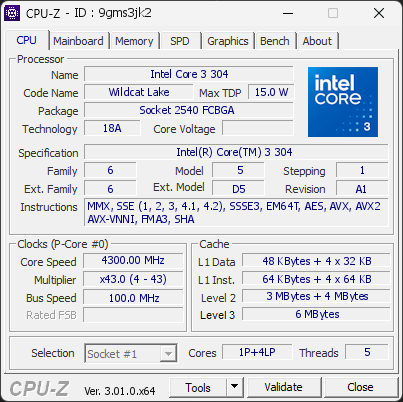
Intel(R) Core(TM) 3 304
4300.00
MHz
Warning
Your RAM is not running in dual-channel mode. This isn’t an issue, but you could gain some extra performance with the proper configuration.
If you have two modules, placing them in the correct slots on the motherboard usually enables dual channel. If you only have one module, adding a second one will activate it automatically.
01
Processor (CPU)
Max. Frequency
4300 MHz
L3 Cache
6 MB
CPU Name
Intel(R) Core(TM) 3 304
Cores & Threads
1 CPU | 1P + 4LP Cores | 5 Threads
Frequency
4300.00 MHz (43 * 100.00 MHz) - Max Turbo: 4300.00 MHz
Multiplier
Current: 43 | Min: 4 | Max: 43
Architecture
Wildcat Lake | Stepping: A1 | Technology: 1.8 nm
CPUID / Ext.
6.5.1 | 6.D5
IA Extensions
MMX, SSE, SSE2, SSE3, SSSE3, SSE4.1, SSE4.2, EM64T, AES, AVX, AVX2, FMA3, SHA, SHA256
L1 Data Cache
48 KB (12-way, 64-byte line) + 4 x 32 KB (8-way, 64-byte line)
L1 Instruction Cache
64 KB (16-way, 64-byte line) + 4 x 64 KB (8-way, 64-byte line)
L2 Cache
3 MB (12-way, 64-byte line) + 4 MB (16-way, 64-byte line)
L3 Cache
6 MB (12-way, 64-byte line)
Microcode
Rev. 0x8
TDP
15 W / PL1: 30 W / PL2: 30 W
Temperature
Current: 72°C | Max: 75°C | TjMax: 100°C
Type
Retail
02
Motherboard
Model
LENOVO LNVNB161216
Socket
2540 FCBGA
North Bridge
Intel IDFD03 rev 01
South Bridge
Intel Wildcat Lake PCH rev 01
BIOS
LENOVO U2CN21WW (05/13/2026)
03
Memory (RAM)
Total Capacity
8 GB
Memory Slots (1 / 1)
SAMSUNG
8 GB
S0
Total Size
8192 MB (8 GB)
04
Graphic Card (GPU)
GPU Clock
2300 MHz
GPU VRAM
128 MB
GPU Name
Intel(R) Graphics - Manufacturer: Lenovo
GPU Frequency
2300 MHz (Turbo: 1000 MHz)
GPU Units
Cores: 1
GPU VRAM
128 MB
GPU Drivers
Version 32.0.101.8572 (03/12/2026)
05
Storage
C:\KEG70ZNT512G LS KIOXIA (FW: 9105A1LS)
Drive
KEG70ZNT512G LS KIOXIA (FW: 9105A1LS)
Capacity
476 GiB (~510 GB)
Type
Fixed SSD - Bus: NVMe PCIe 4x 4.0 (16 GT/s)
Partition
C:\ - Size: 474.5GB (17.4% used)
Run Time
Power Cycles: 29 | Power-On: 8 h | 0.6 TBW
Health
Remaining Life: 100% | Media Errors: 0 | Temperature: 48°C
06
Display
Monitor
Lenovo LEN153WUM (W17'2025)
Specifications
15.4 inches (39.1 cm) | 1920 x 1200 pixels @ 40-60 Hz
Current Mode
1920 x 1200 pixels | 60 Hz
07
Battery
Model
L24B3PK3
Manufacturer
BYD (S/N: 63)
Capacity
50 Ah (Remaining: 53.2 Ah | 106%)
08
Software
Operating System
Microsoft Windows 11 Home (x64) - 25H2 | Installed on 2026-09-29
Security
Secure Boot: Enabled | TPM: Enabled (V2.0 hardware)
Features
Code Integrity: Enabled | Fast Startup: Enabled
Power Plan
Balanced | 1 plan defined
Antivirus
Windows Defender: Enabled | Up to date
Boot Time
36 seconds (POST: 4 s. | Logon: 15 s. | Startup: 17 s.)
Processes
39 running processes
CPU-Z Version
3.01.0.x64
CPU-Z SCREENSHOT
Warning [9gms3jk2]
Tools
CPU-Z BENCHMARK
Version 2017.1 (x64)
Forum Banner

[url=https://valid.cpuid.com/9gms3jk2][img]https://valid.cpuid.com/cache/banner/9gms3jk2.png[/img][/url]
Join us on Discord
Scan this QR code
To open this page on your phone
Previous validations from this PC
Unexpected crashes (BSOD)
No unexpected crashes (BSOD) recorded on this PC.
Boot Time details
POST (BIOS/UEFI)4.4 s
Windows Logon15 s
Kernel init77 ms
Driver init178 ms
Plug and Play init887 ms
Session manager init6.7 s
User profile load1.2 s
Other logon activity478 ms
Desktop init (Explorer)4.9 s
Startup17 s
Total
36 s
Hardware errors (WHEA)
No hardware errors recorded in the Windows event log.
Driver problems
No driver problems detected.
Flagged processes
39 running processes, none flagged.
Inform a support service
If a partner support service is helping you with this PC, enter the service code they gave you to send them this validation. A valid service code is required.