
Your graphics driver is not fully up to date. You are currently running version 32.0.32015.7029, while version 32.0.32015.16001 (2026-11-11) is available.
Without an update, you may miss out on security fixes or performance improvements. Updating your driver can improve overall stability and performance.
The latest drivers for your graphics card are available here: AMD Drivers
1 device(s) have no driver installed, so Windows cannot use them at all. This is very common on a fresh Windows installation, where the chipset drivers have not been installed yet.
Windows ships generic drivers for common hardware but not for chipset controllers, card readers, or manufacturer-specific devices, which have to be installed separately.
Install the chipset driver package for your motherboard or laptop from the manufacturer's support page, then run Windows Update. The Drivers button in the Software section lists every device still waiting for a driver.
Your RAM is currently operating at a lower frequency than it was designed for. It is running at 6200.8 MT/s, while its rated speed is 7200 MT/s.
This doesn’t cause issues, but you may miss out on some performance.
Enabling the proper memory profile (XMP/EXPO/DOCP) in the BIOS usually restores the RAM to its intended speed. It’s optional, but adjusting this setting can help your system run a bit faster.
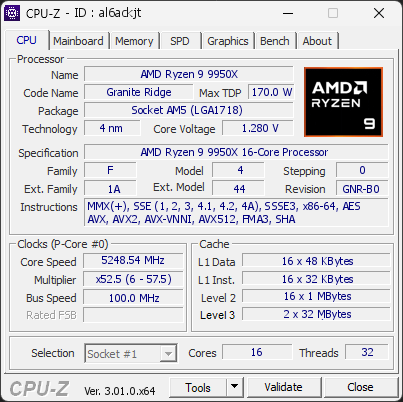
Your CPU is running at a temperature that is above a safe limit (95.3°C). At this level, the processor may lose performance and its long-term lifespan can be affected.
This often means the cooling system isn’t working as intended or isn’t strong enough for this type of CPU. Dust buildup, a weak cooler, or an installation issue can all cause temperatures to rise this high.
You should inspect the cooling system as soon as possible. Make sure the fan operates normally, the cooler is correctly mounted, and airflow is not blocked.

Scan this QR code
To open this page on your phone
CPU clocks
Last sample and peak over the test, values in MHz
| Clock | Current | Peak |
|---|---|---|
| Cores | ||
| #0 | 5238.54 | 5539.83 |
| #1 | 5243.54 | 5529.83 |
| #2 | 5233.54 | 5539.83 |
| #3 | 5218.55 | 5534.83 |
| #4 | 5238.54 | 5534.83 |
| #5 | 5248.54 | 5534.83 |
| #6 | 5238.54 | 5374.76 |
| #7 | 5223.55 | 5539.83 |
| #8 | 5153.57 | 5529.83 |
| #9 | 5148.57 | 5194.76 |
| #10 | 5228.55 | 5268.37 |
| #11 | 5118.58 | 5314.76 |
| #12 | 5143.57 | 5204.76 |
| #13 | 5158.56 | 5324.76 |
| #14 | 5153.57 | 5324.76 |
| #15 | 5143.57 | 5199.76 |
| Uncore / BCLK | ||
| CPU BCLK | 99.97 | 100.00 |
Previous validations from this PC
Unexpected crashes (BSOD)
No unexpected crashes (BSOD) recorded on this PC.
Boot Time details
Hardware errors (WHEA)
No hardware errors recorded in the Windows event log.
Driver problems
1 device needs attention.
Flagged processes
199 running processes, none flagged.
Inform a support service
If a partner support service is helping you with this PC, enter the service code they gave you to send them this validation. A valid service code is required.