
1 device(s) have no driver installed, so Windows cannot use them at all. This is very common on a fresh Windows installation, where the chipset drivers have not been installed yet.
Windows ships generic drivers for common hardware but not for chipset controllers, card readers, or manufacturer-specific devices, which have to be installed separately.
Install the chipset driver package for your motherboard or laptop from the manufacturer's support page, then run Windows Update. The Drivers button in the Software section lists every device still waiting for a driver.
Your graphics card (Microsoft Basic Display Adapter) is detected on the PCI bus, but no manufacturer driver is bound to it. Windows has fallen back to its generic display driver.
This usually follows a failed or interrupted driver installation, a driver removed by a system update, or a card fitted without installing its driver. 3D acceleration is unavailable on this card, so games and GPU-accelerated applications either fail to start or run on another graphics adapter.
Install the latest driver for this card: Intel Drivers If a previous installation failed, uninstall the existing driver first, then reinstall.
Windows reports 1 device(s) that are not working correctly. A device in this state is either unavailable or running in a degraded mode, and Windows will keep retrying it at every boot.
This usually comes from a driver that failed to load or was stopped after an error: a bad or outdated driver, a device that is not seated properly, or a component that is starting to fail.
Open the Device Manager to see which devices are flagged, then reinstall or update their drivers from the manufacturer's website. If a device keeps failing after a clean driver install, reseat it and test it on another port or slot. The Drivers button in the Software section lists every affected device.

Scan this QR code
To open this page on your phone
CPU clocks
Last sample and peak over the test, values in MHz
| Clock | Current | Peak |
|---|---|---|
| Cores | ||
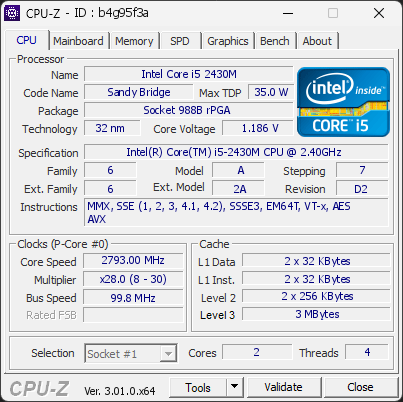
| #0 | 2793.00 | 2793.00 |
| #1 | 2793.00 | 2793.00 |
| Uncore / BCLK | ||
| CPU BCLK | 99.75 | 99.75 |
Previous validations from this PC
Unexpected crashes (BSOD)
No unexpected crashes (BSOD) recorded on this PC.
Hardware errors (WHEA)
8 errors recorded in the Windows event log.
Micro-architectural error, core 2
Micro-architectural error, core 0
Micro-architectural error, core 2
Micro-architectural error, core 2
Micro-architectural error, core 2
Micro-architectural error, core 4
Micro-architectural error, core 2
Micro-architectural error, core 0
Driver problems
2 devices need attention.
Flagged processes
16 running processes, none flagged.
Inform a support service
If a partner support service is helping you with this PC, enter the service code they gave you to send them this validation. A valid service code is required.