
Dump [c06mrzxd] Submitted by XO-ROGUE -
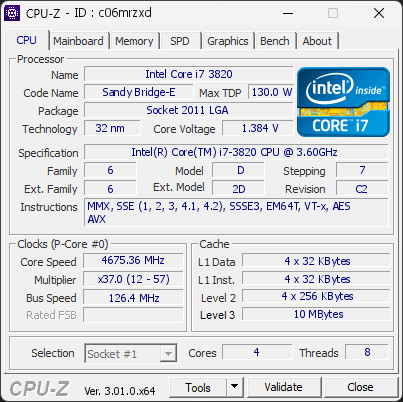
Intel(R) Core(TM) i7-3820 CPU @ 3.60GHz
4675.36
MHz
Warning
This PC encountered 2 unexpected crash(es) (BSOD, blue screen) in the 30 days before this validation, the most recent on 2026-10-19.
Crashes like these are often caused by a faulty driver, unstable overclocking or memory settings, overheating, or failing hardware.
Make sure Windows and your drivers are up to date. If the PC is overclocked, try returning to stock settings. The BSOD Details button in the Software section lists each crash.
01
Processor (CPU)
Max. Frequency
4675 MHz
L3 Cache
10 MB
CPU Name
Intel(R) Core(TM) i7-3820 CPU @ 3.60GHz
Cores & Threads
1 CPU | 4 Cores | 8 Threads
Frequency
4675.36 MHz (37 * 126.36 MHz) - Max Turbo: 4675.36 MHz
Multiplier
Current: 37 | Min: 12 | Max: 57
Architecture
Sandy Bridge-E | Stepping: C2 | Technology: 32 nm
CPUID / Ext.
6.D.7 | 6.2D
IA Extensions
MMX, SSE, SSE2, SSE3, SSSE3, SSE4.1, SSE4.2, EM64T, VT-x, AES, AVX
L1 Data Cache
4 x 32 KB (8-way, 64-byte line)
L1 Instruction Cache
4 x 32 KB (8-way, 64-byte line)
L2 Cache
4 x 256 KB (8-way, 64-byte line)
L3 Cache
10 MB (20-way, 64-byte line)
Microcode
Rev. 0x714
TDP
130 W
Temperature
Current: 56°C | Max: 56°C | TjMax: 100°C
Type
Retail
02
Motherboard
Model
ASUS P9X79 LE
Socket
LGA2011
North Bridge
Intel Sandy Bridge-E rev 07
South Bridge
Intel X79 rev 06
BIOS
American Megatrends Inc. 4005 (04/18/2013)
03
Memory (RAM)
Total Capacity
16 GB
Channels
256 bits
Quad Channel
Effective Speed
DDR3-1684
842 MHz
Memory Slots (4 / 8)
G.SKILL
4 GB
S0
empty
S1
G.SKILL
4 GB
S2
empty
S3
G.SKILL
4 GB
S4
empty
S5
G.SKILL
4 GB
S6
empty
S7
Total Size
16384 MB (16 GB)
Type
Quad Channel (256 bit) DDR3-SDRAM
Frequency
842 MHz (DDR3-1684) - Ratio: 1:10
Timings
8-9-9-24-2 (tCAS-tRCD-tRP-tRAS-tRC)
Slot #1 Module
4 GB G.Skill PC3-12800 F3-12800CL9-4GBXL
Slot #2 Module
4 GB G.Skill PC3-12800 F3-12800CL9-4GBXL
Slot #3 Module
4 GB G.Skill PC3-12800 F3-12800CL9-4GBXL
Slot #4 Module
4 GB G.Skill PC3-12800 F3-12800CL9-4GBXL
04
Graphic Card (GPU)
GPU Clock
1190 MHz
GPU VRAM
6 GB
GPU Name
NVIDIA GeForce GTX 980 Ti - Manufacturer: ASUS
GPU Frequency
1190 MHz (Turbo: 1291 MHz)
GPU Specifications
Process: 28 nm / Transistors: 8 B / Die Size: 601 mm² / TDP: 250 W
GPU Units
Cores: 2816 | Render (ROP): 96
GPU VRAM
6 GB GDDR5 (Samsung) | 384-bit Bus @ 3600 MHz
GPU Drivers
NVIDIA GeForce Driver 582.78 | Version 32.0.15.8278 (06/25/2026)
05
Storage
C:\T-FORCE T253TY002T (FW: Y0221C0)
Drive
T-FORCE T253TY002T (FW: Y0221C0)
Capacity
1907 GiB (~2050 GB)
Type
Fixed SSD - Bus: SATA
Partition
C:\ - Size: 1907.1GB (24.9% used)
Run Time
Power Cycles: 71 | Power-On: 147 h (~6 days)
Health
Remaining Life: 100% | Media Errors: 0 | Temperature: 15°C
06
Display
Monitor
SAMSUNG (W01'2017)
Specifications
54.6 inches (138.7 cm) | 3840 x 2160 pixels (UHD/4K) @ 24-75 Hz
Current Mode
3840 x 2160 pixels | 60 Hz
07
Software
Operating System
Microsoft Windows 10 Home (x64) - 22H2 | Installed on 2026-10-07
Security
Secure Boot: Enabled | TPM: Disabled
Features
Code Integrity: Enabled | Fast Startup: Enabled
Power Plan
Balanced | 3 plans defined
Antivirus
Windows Defender: Enabled | Up to date
Boot Time
53 seconds (POST: 12 s. | Logon: 20 s. | Startup: 22 s.)
Stability
2 unexpected crashes (BSOD) detected
Processes
63 running processes
CPU-Z Version
3.01.0.x64
CPU-Z SCREENSHOT
Warning [c06mrzxd]
Tools
Forum Banner

[url=https://valid.cpuid.com/c06mrzxd][img]https://valid.cpuid.com/cache/banner/c06mrzxd.png[/img][/url]
Join us on Discord
Scan this QR code
To open this page on your phone
Previous validations from this PC
Unexpected crashes (BSOD) (2)
0x101
2026-10-19 10:53:13
Param. #1 (developer info)
0xBE
2026-10-19 09:51:02
Param. #1 (developer info)
Boot Time details
POST (BIOS/UEFI)12 s
Windows Logon20 s
Kernel init41 ms
Driver init390 ms
Plug and Play init1.6 s
Session manager init3.9 s
User profile load567 ms
Other logon activity509 ms
Desktop init (Explorer)13 s
Startup22 s
Total
53 s
Hardware errors (WHEA)
No hardware errors recorded in the Windows event log.
Driver problems
No driver problems detected.
Flagged processes
63 running processes, none flagged.
Inform a support service
If a partner support service is helping you with this PC, enter the service code they gave you to send them this validation. A valid service code is required.