Dump [cc1blh4s] Submitted by DESKTOP-PKTIG3Q -
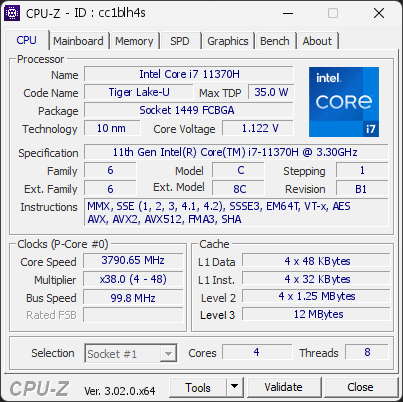
11th Gen Intel(R) Core(TM) i7-11370H @ 3.30GHz
3790.65 MHz
LENOVO LNVNB161216 · 16 GB DDR4-3194 · NVIDIA GeForce RTX 3050 Ti Laptop GPU
Healthy
CPU-Z 3.02.0
Date:
Type: Quick Check
Duration: 5 seconds
System Analysis
1 Info

1 running program(s) are known to consume resources in the background with little benefit (preinstalled trials, redundant cleaners, or permanent helper services).

These programs are often preinstalled by the PC manufacturer or bundled with other software, and keep running at every startup even when unused.

Uninstalling them, or disabling their automatic startup, frees memory and shortens the boot time. The Processes button in the Software section lists each detected program and why it is flagged.

01 Processor (CPU)
Max. Frequency
4300 MHz
L3 Cache
12 MB
Peak temp
95 °C
0100 °C
Power (TDP)
34 W
064 W
CPU Name
11th Gen Intel(R) Core(TM) i7-11370H @ 3.30GHz
Cores & Threads
1 CPU | 4 Cores | 8 Threads
Frequency
3790.65 MHz (38 * 99.75 MHz) - Max Turbo: 4300.04 MHz
Multiplier
Current: 38 | Min: 4 | Max: 48
Architecture
Tiger Lake-U | Stepping: B1 | Technology: 10 nm
CPUID / Ext.
6.C.1 | 6.8C
IA Extensions
MMX, SSE, SSE2, SSE3, SSSE3, SSE4.1, SSE4.2, EM64T, VT-x, AES, AVX, AVX2, AVX512 (DQ, BW, VL, CD, IFMA, VBMI, VBMI2, VNNI, BITALG, VPOPCNTDQ, VP2INTERSECT), FMA3, SHA
L1 Data Cache
4 x 48 KB (12-way, 64-byte line)
L1 Instruction Cache
4 x 32 KB (8-way, 64-byte line)
L2 Cache
4 x 1.25 MB (20-way, 64-byte line)
L3 Cache
12 MB (12-way, 64-byte line)
Microcode
Rev. 0xAA
TDP
35 W / PL1: 60 W / PL2: 64 W
Temperature
Current: 92°C | Max: 95°C | TjMax: 100°C
Type
Retail
02 Motherboard
Model
LENOVO LNVNB161216
Socket
1449 FCBGA
North Bridge
Intel Tiger Lake rev 01
South Bridge
Intel Tiger Lake-U/Y PCH rev 20
BIOS
LENOVO H4CN37WW(V2.06) (06/18/2024)
03 Memory (RAM)
Total Capacity
16 GB
Channels
128 bits
Dual Channel
Effective Speed
DDR4-3194
1597 MHz
Memory Slots (2 / 8)
SAMSUNG
8 GB
S0
SAMSUNG
8 GB
S1
empty
S2
empty
S3
empty
S4
empty
S5
empty
S6
empty
S7
Total Size
16384 MB (16 GB)
Type
Dual Channel (128 bit) DDR4-SDRAM
Frequency
1597 MHz (DDR4-3194) - Ratio: 3:48
Timings
22-22-22-52-1 (tCAS-tRCD-tRP-tRAS-tRC)
04 Graphic Card (GPU)
GPU Clock
1222 MHz
GPU VRAM
4 GB
RTX 3050 Ti
Peak GPU temp.
56 °C
0100 °C
#1 NVIDIA GeForce RTX 3050 Ti Laptop GPU
Name
NVIDIA GeForce RTX 3050 Ti Laptop GPU - Manufacturer: Lenovo
Freq.
1222 MHz (Turbo: 1485 MHz)
Units
Cores: 2560 | Texture (TMU): 160 | Render (ROP): 32
VRAM
4 GB GDDR6 (Hynix) | 128-bit Bus @ 6001 MHz
Drivers
NVIDIA GeForce Driver 621.14 | Version 32.0.16.2114 (10/27/2026)
#2 Intel(R) Iris(R) Xe Graphics
Name
Intel(R) Iris(R) Xe Graphics - Manufacturer: Lenovo
Freq.
1100 MHz
VRAM
8 GB
Drivers
Version 32.0.101.7092 (09/03/2026)
05 Storage
C:\CT1000P3PSSD8 (FW: P9CR413)
77% usedTotal 931 GiB
Drive
CT1000P3PSSD8 (FW: P9CR413)
Capacity
931 GiB (~1000 GB)
Type
Fixed - Bus: RAID
Partition
C:\ - Size: 930.5GB (76.9% used)
06 Display
Monitor
Lenovo (W36'2021)
Specifications
15.3 inches (38.9 cm) | 1920 x 1080 pixels (FHD) @ 60-165 Hz
Current Mode
1920 x 1080 pixels | 165 Hz | On: Intel Iris Xe Graphics
07 Battery
Remaining Capacity
38.6 Ah
045 Ah
Model
L20C3PC2 (Type: Lithium Ion)
Manufacturer
Celxpert (S/N: 2293)
Capacity
45 Ah (Remaining: 38.6 Ah | 86%)
08 Software
Operating System
Microsoft Windows 11 Home Single Language (x64) - 26H2 | Installed on 2026-08-05
Security
Secure Boot: Enabled | TPM: Enabled (V2.0 hardware)
Features
Code Integrity: Enabled | Fast Startup: Enabled
Power Plan
Balanced | 1 plan defined
Antivirus
Windows Defender: Enabled | Up to date
Boot Time
92 seconds (POST: 5 s. | Logon: 39 s. | Startup: 47 s.)
Hardware Errors
1 fatal hardware error (WHEA) recorded
Processes
110 running processes, 1 bloatware detected
CPU-Z Version
3.02.0.x64
CPU-Z SCREENSHOT Healthy [cc1blh4s]
Tools
Forum Banner
[url=https://valid.cpuid.com/cc1blh4s][img]https://valid.cpuid.com/cache/banner/cc1blh4s.png[/img][/url]
Join us on Discord
Join our Discord