
Your graphics driver is not fully up to date. You are currently running version 32.0.21045.16010, while version 32.0.21045.20006 (2026-10-28) is available.
Without an update, you may miss out on security fixes or performance improvements. Updating your driver can improve overall stability and performance.
The latest drivers for your graphics card are available here: AMD Drivers
Your RAM is currently operating at a lower frequency than it was designed for. It is running at 2661.2 MT/s, while its rated speed is 3200 MT/s.
This doesn’t cause issues, but you may miss out on some performance.
Enabling the proper memory profile (XMP/EXPO/DOCP) in the BIOS usually restores the RAM to its intended speed. It’s optional, but adjusting this setting can help your system run a bit faster.
Your RAM is not running in dual-channel mode. This isn’t an issue, but you could gain some extra performance with the proper configuration.
If you have two modules, placing them in the correct slots on the motherboard usually enables dual channel. If you only have one module, adding a second one will activate it automatically.
This PC encountered 1 unexpected crash(es) (BSOD, blue screen) in the 30 days before this validation, the most recent on 2026-10-17.
Crashes like these are often caused by a faulty driver, unstable overclocking or memory settings, overheating, or failing hardware.
Make sure Windows and your drivers are up to date. If the PC is overclocked, try returning to stock settings. The BSOD Details button in the Software section lists each crash.
Windows reports 1 device(s) that are not working correctly. A device in this state is either unavailable or running in a degraded mode, and Windows will keep retrying it at every boot.
This usually comes from a driver that failed to load or was stopped after an error: a bad or outdated driver, a device that is not seated properly, or a component that is starting to fail.
Open the Device Manager to see which devices are flagged, then reinstall or update their drivers from the manufacturer's website. If a device keeps failing after a clean driver install, reseat it and test it on another port or slot. The Drivers button in the Software section lists every affected device.

Scan this QR code
To open this page on your phone
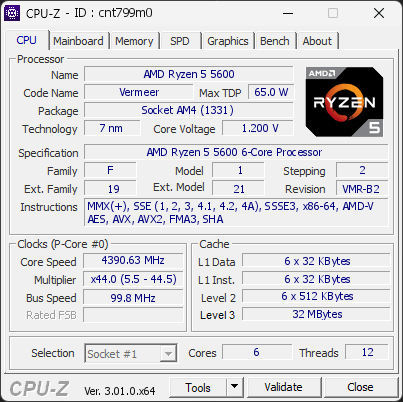
CPU clocks
Last sample and peak over the test, values in MHz
| Clock | Current | Peak |
|---|---|---|
| Cores | ||
| #0 | 4390.63 | 4391.16 |
| #1 | 4390.63 | 4391.16 |
| #2 | 4390.63 | 4391.16 |
| #3 | 4390.63 | 4391.16 |
| #4 | 4390.63 | 4391.16 |
| #5 | 4390.63 | 4391.16 |
| Uncore / BCLK | ||
| L3 Cache | 4390.63 | 4390.70 |
| CPU BCLK | 99.79 | 99.80 |
Previous validations from this PC
Unexpected crashes (BSOD) (1)
Boot Time details
Hardware errors (WHEA)
13 errors recorded in the Windows event log, showing the 10 most recent.
Cache error, level 1, data read
Cache error, instruction fetch, core 10
Cache error, instruction fetch, core 10
Cache error, instruction fetch, core 10
Cache error, level 3, core 0
Cache error, instruction fetch, core 10
Cache error, instruction fetch, core 10
Cache error, instruction fetch, core 10
Cache error, instruction fetch, core 10
Cache error, level 3, core 0
Driver problems
1 device needs attention.
Flagged processes
27 running processes, none flagged.
Inform a support service
If a partner support service is helping you with this PC, enter the service code they gave you to send them this validation. A valid service code is required.