CPU-Z VALIDATOR V3 - BETA VERSION - PROD ENVIRONMENT
Dump [d4nsw9tn] Submitted by BarnaulRomanTV122 -
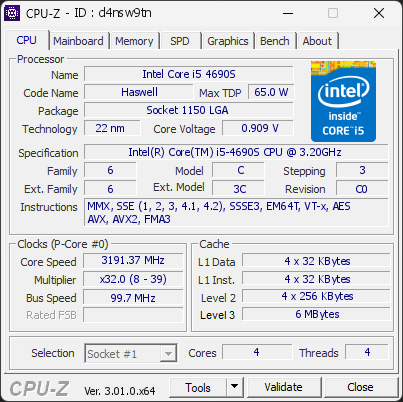
Intel(R) Core(TM) i5-4690S CPU @ 3.20GHz
3191.37 MHz
Gigabyte H81M-S1 · 2 GB DDR3-1328 · NVIDIA GeForce GT 730
Warning
CPU-Z 3.01.0
Date:
Type: Quick Check
Duration: 5 seconds
System Analysis
2 Warnings 1 Info

2 device(s) have no driver installed, so Windows cannot use them at all. This is very common on a fresh Windows installation, where the chipset drivers have not been installed yet.

Windows ships generic drivers for common hardware but not for chipset controllers, card readers, or manufacturer-specific devices, which have to be installed separately.

Install the chipset driver package for your motherboard or laptop from the manufacturer's support page, then run Windows Update. The Drivers button in the Software section lists every device still waiting for a driver.

Your RAM is not running in dual-channel mode. This isn’t an issue, but you could gain some extra performance with the proper configuration.

If you have two modules, placing them in the correct slots on the motherboard usually enables dual channel. If you only have one module, adding a second one will activate it automatically.

Windows reports 1 device(s) that are not working correctly. A device in this state is either unavailable or running in a degraded mode, and Windows will keep retrying it at every boot.

This usually comes from a driver that failed to load or was stopped after an error: a bad or outdated driver, a device that is not seated properly, or a component that is starting to fail.

Open the Device Manager to see which devices are flagged, then reinstall or update their drivers from the manufacturer's website. If a device keeps failing after a clean driver install, reseat it and test it on another port or slot. The Drivers button in the Software section lists every affected device.

01 Processor (CPU)
Max. Frequency
3192 MHz
L3 Cache
6 MB
Peak temp
46 °C
092 °C
Power (TDP)
19 W
065 W
CPU Name
Intel(R) Core(TM) i5-4690S CPU @ 3.20GHz
Cores & Threads
1 CPU | 4 Cores | 4 Threads
Frequency
3191.37 MHz (32 * 99.73 MHz) - Max Turbo: 3191.75 MHz
Multiplier
Current: 32 | Min: 8 | Max: 39
Architecture
Haswell | Stepping: C0 | Technology: 22 nm
CPUID / Ext.
6.C.3 | 6.3C
IA Extensions
MMX, SSE, SSE2, SSE3, SSSE3, SSE4.1, SSE4.2, EM64T, VT-x, AES, AVX, AVX2, FMA3
L1 Data Cache
4 x 32 KB (8-way, 64-byte line)
L1 Instruction Cache
4 x 32 KB (8-way, 64-byte line)
L2 Cache
4 x 256 KB (8-way, 64-byte line)
L3 Cache
6 MB (12-way, 64-byte line)
Microcode
Rev. 0x28
TDP
65 W
Temperature
Current: 46°C | Max: 46°C | TjMax: 92°C
Type
Retail
02 Motherboard
Model
Gigabyte H81M-S1
Socket
LGA1150
North Bridge
Intel Haswell rev 06
South Bridge
Intel H81 rev C2
BIOS
American Megatrends Inc. FF (06/20/2014)
03 Memory (RAM)
Total Capacity
2 GB
Channels
64 bits
Single Channel
Effective Speed
DDR3-1328
664 MHz
Memory Slots (1 / 2)
SK
2048 MB
S0
empty
S1
Total Size
2048 MB (2 GB)
Type
Single Channel (64 bit) DDR3-SDRAM
Frequency
664 MHz (DDR3-1328) - Ratio: 1:5
Timings
9-9-9-24-1 (tCAS-tRCD-tRP-tRAS-tRC)
Slot #1 Module
2048 MB SK Hynix PC3-10700 HMT325U6BFR8C-H9 (WW46'10)
04 Graphic Card (GPU)
GPU Clock
405 MHz
GPU VRAM
4 GB
Peak GPU temp.
37 °C
0100 °C
GPU Name
NVIDIA GeForce GT 730 - Manufacturer: NVIDIA Corporation
GPU Frequency
405 MHz
GPU Units
Cores: 96 | Render (ROP): 4
GPU VRAM
4 GB DDR3 (Micron) | 128-bit Bus @ 324 MHz
GPU Drivers
NVIDIA GeForce Driver 391.35 | Version 23.21.13.9135 (03/23/2018)
05 Storage
C:\SSD 120GB (FW: FW201105)
38% usedTotal 111 GiB
Drive
SSD 120GB (FW: FW201105)
Capacity
111 GiB (~120 GB)
Type
Fixed SSD - Bus: SATA
Partition
C:\ - Size: 111GB (38.4% used)
Run Time
Power Cycles: 2963 | Power-On: 14772 h (~616 days)
Health
Remaining Life: 100% | Media Errors: 0 | Temperature: 40°C
06 Display
Monitor
Acer AL1716 (W26'2008)
Specifications
17.1 inches (43.4 cm) | 1280 x 1024 pixels @ 55-75 Hz
Current Mode
1280 x 1024 pixels | 60 Hz
07 Software
Operating System
Microsoft Windows Server (10.0) Datacenter Edition (Full) (x64) - 21H2 | Installed on 2026-07-28
Security
Secure Boot: Unknown | TPM: Disabled
Features
Code Integrity: Enabled | Fast Startup: Disabled
Power Plan
High performance | 3 plans defined
Boot Time
POST: 17 s.
Drivers
1 device is not working correctly, 2 have no driver installed
Processes
47 running processes
CPU-Z Version
3.01.0.x64
CPU-Z SCREENSHOT Warning [d4nsw9tn]
Tools
Forum Banner
[url=https://valid.cpuid.com/d4nsw9tn][img]https://valid.cpuid.com/cache/banner/d4nsw9tn.png[/img][/url]
Join us on Discord
Join our Discord