
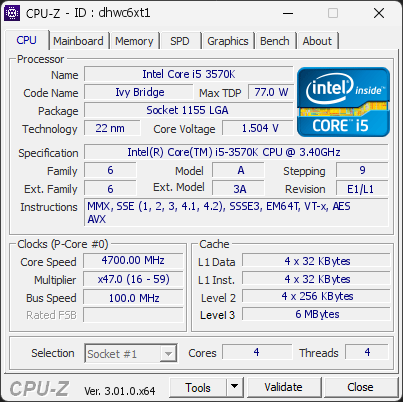
Your processor reached 83°C during the test, hotter than 96 % of the 108 validations recorded with the same Intel Core i5 3570K. The typical maximum for this model is 62°C.
The same CPU under the same load usually lands close to the typical value. A large gap points at the cooling rather than the processor: a cooler too small for this CPU, a poor mount or dried thermal paste, dust, low airflow in the case, or a BIOS power limit set higher than stock.
Compare your cooling setup with what this processor needs, check the cooler mounting and the thermal paste, clean the fans and filters, and review the case airflow. The CPU is not at risk yet, but it is running hotter than it should.
1 device(s) have no driver installed, so Windows cannot use them at all. This is very common on a fresh Windows installation, where the chipset drivers have not been installed yet.
Windows ships generic drivers for common hardware but not for chipset controllers, card readers, or manufacturer-specific devices, which have to be installed separately.
Install the chipset driver package for your motherboard or laptop from the manufacturer's support page, then run Windows Update. The Drivers button in the Software section lists every device still waiting for a driver.
This PC encountered 3 unexpected crash(es) (BSOD, blue screen) in the 30 days before this validation, the most recent on 2026-09-27.
Crashes like these are often caused by a faulty driver, unstable overclocking or memory settings, overheating, or failing hardware.
Make sure Windows and your drivers are up to date. If the PC is overclocked, try returning to stock settings. The BSOD Details button in the Software section lists each crash.

Scan this QR code
To open this page on your phone
Previous validations from this PC
Unexpected crashes (BSOD) (5)
Boot Time details
Hardware errors (WHEA)
400 errors recorded in the Windows event log, showing the 10 most recent.
Micro-architectural error, core 2
Micro-architectural error, core 2
Micro-architectural error, core 2
Micro-architectural error, core 2
Micro-architectural error, core 2
Micro-architectural error, core 2
Micro-architectural error, core 2
Micro-architectural error, core 2
Micro-architectural error, core 2
Micro-architectural error, core 0
Driver problems
1 device needs attention.
Flagged processes
43 running processes, none flagged.
Inform a support service
If a partner support service is helping you with this PC, enter the service code they gave you to send them this validation. A valid service code is required.