CPU-Z VALIDATOR V3 - BETA VERSION - PROD ENVIRONMENT
Dump [ekryi01z] Submitted by Anonymous -
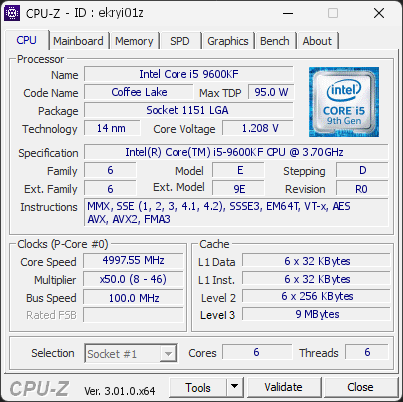
Intel(R) Core(TM) i5-9600KF CPU @ 3.70GHz
4997.55 MHz
ASUS ROG MAXIMUS XI HERO (WI-FI) · 32 GB DDR4-2998 · Radeon RX 580 Series
Warning
CPU-Z 3.01.0
Date:
Type: Quick Check
Duration: 5 seconds
System Analysis
1 Warning 2 Info

Your processor's power limits (PL1/PL2) appear to be set to an unlimited value. This means the CPU is allowed to draw as much power as it wants, with no enforced safeguard beyond what the cooling and voltage regulation can sustain. While this can unlock maximum performance, the processor may run hotter, consume more energy, and experience increased electrical stress over time.

This configuration is often applied automatically by motherboard manufacturers through performance-enhancing profiles. Even without any user changes, many boards ship with these limits effectively disabled by default.

We recommend reviewing your power limit settings in the BIOS or in the software provided by your motherboard. Restoring sensible PL1/PL2 values (typically aligned with the processor's rated TDP) can help lower temperatures, reduce power consumption, and extend the long-term reliability of your CPU.

1 running program(s) are known to consume resources in the background with little benefit (preinstalled trials, redundant cleaners, or permanent helper services).

These programs are often preinstalled by the PC manufacturer or bundled with other software, and keep running at every startup even when unused.

Uninstalling them, or disabling their automatic startup, frees memory and shortens the boot time. The Processes button in the Software section lists each detected program and why it is flagged.

This PC encountered 5 unexpected crash(es) (BSOD, blue screen) in the 30 days before this validation, the most recent on 2026-09-19.

Crashes like these are often caused by a faulty driver, unstable overclocking or memory settings, overheating, or failing hardware.

Make sure Windows and your drivers are up to date. If the PC is overclocked, try returning to stock settings. The BSOD Details button in the Software section lists each crash.

01 Processor (CPU)
Max. Frequency
5000 MHz
L3 Cache
9 MB
Peak temp
59 °C
0100 °C
PL1/PL2 unlocked
Power (TDP)
91 W
095 W
CPU Name
Intel(R) Core(TM) i5-9600KF CPU @ 3.70GHz
Cores & Threads
1 CPU | 6 Cores | 6 Threads
Frequency
4997.55 MHz (50 * 99.95 MHz) - Max Turbo: 5000.00 MHz
Multiplier
Current: 50 | Min: 8 | Max: 46
Architecture
Coffee Lake | Stepping: R0 | Technology: 14 nm
CPUID / Ext.
6.E.D | 6.9E
IA Extensions
MMX, SSE, SSE2, SSE3, SSSE3, SSE4.1, SSE4.2, EM64T, VT-x, AES, AVX, AVX2, FMA3
L1 Data Cache
6 x 32 KB (8-way, 64-byte line)
L1 Instruction Cache
6 x 32 KB (8-way, 64-byte line)
L2 Cache
6 x 256 KB (4-way, 64-byte line)
L3 Cache
9 MB (12-way, 64-byte line)
Microcode
Rev. 0x104
TDP
95 W / PL1: 4095.88 W / PL2: 4095.88 W
Temperature
Current: 59°C | Max: 59°C | TjMax: 100°C
Type
Retail
02 Motherboard
Model
ASUS ROG MAXIMUS XI HERO (WI-FI)
Socket
LGA1151
North Bridge
Intel Coffee Lake rev 0D
South Bridge
Intel Z390 rev 10
BIOS
American Megatrends Inc. 2203 (07/03/2026)
03 Memory (RAM)
Total Capacity
32 GB
Channels
128 bits
Dual Channel
Effective Speed
DDR4-2998
1499 MHz
Memory Slots (4 / 4)
CORSAIR
8 GB
S0
CORSAIR
8 GB
S1
CORSAIR
8 GB
S2
CORSAIR
8 GB
S3
Total Size
32768 MB (32 GB)
Type
Dual Channel (128 bit) DDR4-SDRAM
Frequency
1499 MHz (DDR4-2998) - Ratio: 1:15
Timings
15-17-17-35-2 (tCAS-tRCD-tRP-tRAS-tRC)
Slot #1 Module
8 GB Corsair DDR4-2998 CMK16GX4M2B3000C15
Slot #2 Module
8 GB Corsair DDR4-2998 CMK16GX4M2B3000C15
Slot #3 Module
8 GB Corsair DDR4-2998 CMK16GX4M2B3000C15
Slot #4 Module
8 GB Corsair DDR4-2998 CMK16GX4M2B3000C15
04 Graphic Card (GPU)
GPU Clock
300 MHz
GPU VRAM
8 GB
Peak GPU temp.
50 °C
0100 °C
GPU Name
Radeon RX 580 Series - Manufacturer: PowerColor
GPU Frequency
300 MHz
GPU Units
Cores: 2304 | Render (ROP): 32
GPU VRAM
8 GB GDDR5 (Samsung) @ 300 MHz
GPU Drivers
Version 31.0.21925.1001 (05/20/2026)
05 Storage
C:\SSDPEMKF256G8 NVMe INTEL 256GB (FW: 7002)
80% usedTotal 238 GiB
Name
SSDPEMKF256G8 NVMe INTEL 256GB (FW: 7002)
Size
238 GiB (~260 GB)
Type
Fixed SSD - Bus: NVMe PCIe 4x 3.0 (8 GT/s)
Volume
C:\ - Size: 238.2GB (80% used)
Run Time
Power Cycles: 1760 | Power-On: 3829 h (~160 days) | 11.2 TBW
Health
Remaining Life: 94% | Media Errors: 0 | Temperature: 41°C
D:\ST3160318AS (FW: H4LS)
1% usedTotal 149 GiB
Name
ST3160318AS (FW: H4LS)
Size
149 GiB (~160 GB)
Type
Fixed - Bus: RAID
Volume
D:\ - Size: 149GB (0.6% used)
E:\TOSHIBA DT01ACA100 (FW: MS2OA800)
8% usedTotal 931 GiB
Name
TOSHIBA DT01ACA100 (FW: MS2OA800)
Size
931 GiB (~1000 GB)
Type
Fixed - Bus: RAID
Volume
E:\ - Size: 931.5GB (8.4% used)
06 Display
Monitor
AOC International Q27G42XE (W13'2026)
Specifications
27.2 inches (69.1 cm) | 2560 x 1440 pixels (QHD) @ 48-180 Hz
Current Mode
2560 x 1440 pixels | 120 Hz
07 Software
Operating System
Microsoft Windows 11 Home (x64) - 26H2 | Installed on 2026-08-29
Security
Secure Boot: Disabled | TPM: Enabled (V2.0 hardware)
Features
Code Integrity: Enabled | Fast Startup: Enabled
Power Plan
Balanced | 3 plans defined
Antivirus
Windows Defender: Enabled | Up to date
Boot Time
105 seconds (POST: 14 s. | Logon: 12 s. | Startup: 80 s.)
Stability
5 unexpected crashes (BSOD) detected
Hardware Errors
3 hardware errors (WHEA) recorded, including 1 fatal
Processes
78 running processes, 1 bloatware detected
CPU-Z Version
3.01.0.x64
CPU-Z SCREENSHOT Warning [ekryi01z]
Tools
CPU-Z BENCHMARK
Version 2017.1 (x64)
Your position (multi-thread)
AMD Ryzen 5 7600X3D
3,655
AMD Ryzen 5 7500X3D
3,614
AMD Ryzen 5 5600X
3,485
YOU
3,474
Intel Core i5-12400F
3,282
Forum Banner
[url=https://valid.cpuid.com/ekryi01z][img]https://valid.cpuid.com/cache/banner/ekryi01z.png[/img][/url]
Join us on Discord
Join our Discord