CPU-Z VALIDATOR V3 - BETA VERSION - PROD ENVIRONMENT
Dump [f5buxr49] Submitted by GIGABYTE3 - 2026-07-09 05:46:01
13th Gen Intel(R) Core(TM) i5-13400
4090.00 MHz
Gigabyte B760M AORUS ELITE AX DDR4 · 16 GB DDR4-4588 · Intel(R) Arc(TM) B580 Graphics
Healthy
CPU-Z 3.00.0 (Beta)
Date: 2026-07-09 05:46
Type: Quick Check
Duration: 5 seconds
System Analysis
2 Errors 1 info

Your processor's power limits (PL1/PL2) appear to be set to an unlimited value. This means the CPU is allowed to draw as much power as it wants, with no enforced safeguard beyond what the cooling and voltage regulation can sustain. While this can unlock maximum performance, the processor may run hotter, consume more energy, and experience increased electrical stress over time.

This configuration is often applied automatically by motherboard manufacturers through performance-enhancing profiles. Even without any user changes, many boards ship with these limits effectively disabled by default.

We recommend reviewing your power limit settings in the BIOS or in the software provided by your motherboard. Restoring sensible PL1/PL2 values (typically aligned with the processor's rated TDP) can help lower temperatures, reduce power consumption, and extend the long-term reliability of your CPU.

The drive WDC WD10EZEX-08M2NA0 has logged 2,139 CRC error(s) on its SATA interface — a severe count indicating a persistent connection problem. This is NOT a drive failure; the drive itself is likely healthy, but the cable, port, or backplane carrying its data is unreliable. Each CRC error means data had to be retransmitted, which can cause stalls, timeouts, and ultimately data corruption if the connection drops at the wrong moment.

Immediately reseat or replace the SATA data cable, try a different SATA port, and check for issues with the drive sled or backplane in this chassis. If multiple drives in the same system show CRC errors, the chassis wiring is the likely culprit.

The partition E: (on disk WDC WD10EZEX-08M2NA0) is almost full, with only 24.2 GB of free space remaining. At this level, Windows may fail to install updates, create temporary files, or operate reliably.

Freeing up space immediately is recommended — use the Windows cleanup tool or remove unnecessary files and applications.
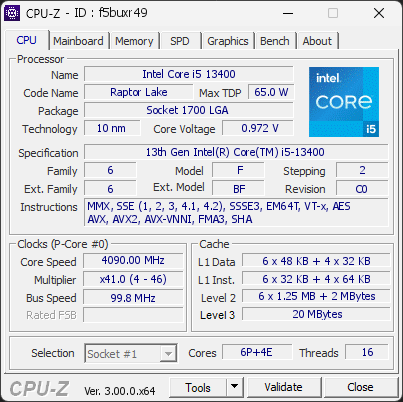

01 Processor
Max. Frequency
4090 MHz
L3 Cache
20 MB
Peak temp
55 °C
0100 °C
PL1/PL2 unlocked
Power (TDP)
62 W
065 W
CPU Name
13th Gen Intel(R) Core(TM) i5-13400
Cores & Threads
1 CPU / 6P + 4E Cores / 16 Threads
Frequency
4090.00 MHz (41 * 99.76 MHz) - Max Turbo: 4090.00 MHz
Multiplier
Current: 41 / Min: 4 / Max: 46
Architecture
Raptor Lake / Stepping: C0 / Technology: 10 nm
CPUID / Ext.
6.F.2 / 6.BF
IA Extensions
MMX, SSE, SSE2, SSE3, SSSE3, SSE4.1, SSE4.2, EM64T, VT-x, AES, AVX, AVX2, FMA3, SHA
L1 Data Cache
6 x 48 KB (12-way, 64-byte line) + 4 x 32 KB (8-way, 64-byte line)
L1 Instruction Cache
6 x 32 KB (8-way, 64-byte line) + 4 x 64 KB (8-way, 64-byte line)
L2 Cache
6 x 1.25 MB (10-way, 64-byte line) + 2 MB (16-way, 64-byte line)
L3 Cache
20 MB (10-way, 64-byte line)
Microcode
Rev. 0x3E
TDP
65 W / PL1: 253 W / PL2: 4095 W
Temperature
Current: 53°C / Max: 55°C / TjMax: 100°C
Type
Retail
02 Motherboard
Model
Gigabyte B760M AORUS ELITE AX DDR4
Socket
LGA1700
North Bridge
Intel Alder Lake rev 02
South Bridge
Intel B760 rev 11
BIOS
American Megatrends International LLC. F24 (06/12/2026)
03 Memory
Total Capacity
16 GB
Channels
128 bits
Dual Channel
Effective Speed
DDR4-4588
2294 MHz
Memory Slots (2 / 4)
empty
S0
PNY
8 GB
S1
empty
S2
PNY
8 GB
S3
Total Size
16384 MB (16 GB)
Type
Dual Channel (128 bit) DDR4-SDRAM
Frequency
2294 MHz (DDR4-4588) - Ratio: 1:23
Timings
19-25-25-45-70-1 (tCAS-tRCD-tRP-tRAS-tRC-tCR)
Slot #1 Module
8 GB PNY Electronics DDR4-3602 8GBF1X08RHJJ40-135-K
Slot #2 Module
8 GB PNY Electronics DDR4-3602 8GBF1X08RHJJ40-135-K
04 Graphic Card
GPU Clock
2850 MHz
GPU VRAM
12 GB
Peak GPU temp.
47 °C
0100 °C
GPU Name
Intel(R) Arc(TM) B580 Graphics - Manufacturer: Intel
GPU Frequency
2850 MHz (Turbo: 400 MHz)
GPU Units
Cores: 20
GPU VRAM
12 GB GDDR6 / 192-bit Bus
GPU Drivers
Version 32.0.101.8860 (06/25/2026)
05 Storage
C:\PNY CS1031 256GB SSD (FW: CS103801)
42% usedTotal 238 GiB
Name
PNY CS1031 256GB SSD (FW: CS103801)
Size
238 GiB (~260 GB)
Type
Fixed SSD - Bus: NVMe PCIe 4x 3.0 (8 GT/s)
Volume
C:\ - Size: 237.5GB (41.5% used)
Run Time
Power Cycles: 3439 / Power-On: 7938 h (~331 days)
Health
Remaining Life: 65% / Media Errors: 0 / Temperature: 35°C
D:\HS-SSD-WAVE(P) 256G (FW: HS2914)
36% usedTotal 238 GiB
Name
HS-SSD-WAVE(P) 256G (FW: HS2914)
Size
238 GiB (~260 GB)
Type
Fixed SSD - Bus: NVMe PCIe 4x 3.0 (8 GT/s)
Volume
D:\ - Size: 238.5GB (35.7% used)
Run Time
Power Cycles: 2042 / Power-On: 3133 h (~131 days)
Health
Remaining Life: 98% / Media Errors: 0 / Temperature: 32°C
E:\WDC WD10EZEX-08M2NA0 (FW: 01.01A01)
97% usedTotal 931 GiB
Name
WDC WD10EZEX-08M2NA0 (FW: 01.01A01)
Size
931 GiB (~1000 GB)
Type
Fixed - Bus: SATA
Volume
E:\ - Size: 931.5GB (97.4% used)
Run Time
Power Cycles: 9401 / Power-On: 26422 h (~1101 days) / Load Cycles: 9,026
Health
Media Errors: 0 / Temperature: 42°C
F:\WDC WD20EZBX-00AYRA0 (FW: 01.01A01)
94% usedTotal 1863 GiB
Name
WDC WD20EZBX-00AYRA0 (FW: 01.01A01)
Size
1863 GiB (~2000 GB)
Type
Fixed - Bus: SATA
Volume
F:\ - Size: 1863GB (94% used)
Run Time
Power Cycles: 5513 / Power-On: 14623 h (~609 days) / Load Cycles: 14,532
Health
Media Errors: 0 / Temperature: 42°C
06 Display
Monitor
GBT G27Q20 (W13'2025)
Specifications
27.2 inches (69.1 cm) / 2560 x 1440 pixels (QHD) @ 48-210 Hz
07 Miscellaneous
Operating System
Microsoft Windows 11 Professional (x64) - 25H2
Secure Boot
Enabled
CPU-Z Version
3.00.0b
CPU-Z SCREENSHOT Healthy [f5buxr49]
Forum Banner
[url=https://valid.cpuid.com/f5buxr49][img]https://valid.cpuid.com/cache/banner/f5buxr49.png[/img][/url]