CPU-Z VALIDATOR V3 - BETA VERSION - PROD ENVIRONMENT
Dump [g8w9hkln] Submitted by Thib - 2026-07-22 14:09:38
12th Gen Intel(R) Core(TM) i7-12700H
2394.56 MHz
Dell 0371KJ · 32 GB DDR5-4388 · Intel(R) Iris(R) Xe Graphics
Healthy
CPU-Z 3.00.2 (Beta)
Date: 2026-07-22 14:09
Type: Quick Check
Duration: 5 seconds
System Analysis
4 Warnings

Your CPU is running at a high temperature (98°C). At this level, the processor may slow itself down to avoid overheating.

This usually means the cooling system is struggling to keep the CPU at a safe temperature. It can happen if the cooler is clogged with dust, not working correctly, or simply not powerful enough for this type of processor.

We recommend checking that the fan spins normally and that the cooling system is properly installed. Cleaning the cooler or improving airflow can help bring the temperature back to a safer range.

Your RAM is currently operating at a lower frequency than it was designed for. It is running at 4389.2 MT/s, while its rated speed is 4800 MT/s.

This doesn’t cause issues, but you may miss out on some performance.

Enabling the proper memory profile (XMP/EXPO/DOCP) in the BIOS usually restores the RAM to its intended speed. It’s optional, but adjusting this setting can help your system run a bit faster.

The partition C: (on disk PC SN530 NVMe WDC 512GB) is almost full, with only 24.5 GB of free space remaining. With so little room, Windows may struggle to stay stable or apply future updates.

You can free space using the built-in Windows cleanup tool or by removing applications and files you no longer need.

Your battery has noticeably degraded from its original capacity. It is currently holding 50 % of its designed capacity, which reduces your available runtime. You may find that your device runs out of power sooner than expected.

Battery wear is normal over time, but high temperatures, frequent deep discharges, and leaving the device plugged in for extended periods can speed up the process.

Keeping the battery between 20% and 80% charge when possible can help slow further degradation. If runtime has become too short for your needs, consider replacing the battery.
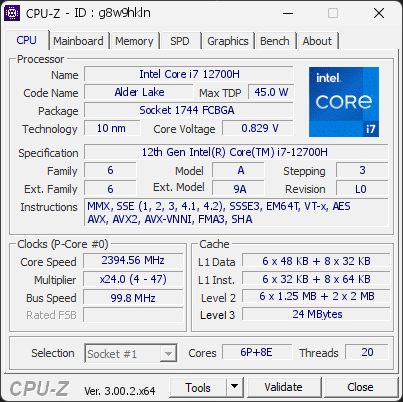

01 Processor
Max. Frequency
2893 MHz
L3 Cache
24 MB
Peak temp
98 °C
0100 °C
Power (TDP)
51 W
0115 W
CPU Name
12th Gen Intel(R) Core(TM) i7-12700H
Cores & Threads
1 CPU / 6P + 8E Cores / 20 Threads
Frequency
2394.56 MHz (24 * 99.76 MHz) - Max Turbo: 2892.92 MHz
Multiplier
Current: 24 / Min: 4 / Max: 47
Architecture
Alder Lake / Stepping: L0 / Technology: 10 nm
CPUID / Ext.
6.A.3 / 6.9A
IA Extensions
MMX, SSE, SSE2, SSE3, SSSE3, SSE4.1, SSE4.2, EM64T, VT-x, AES, AVX, AVX2, FMA3, SHA
L1 Data Cache
6 x 48 KB (12-way, 64-byte line) + 8 x 32 KB (8-way, 64-byte line)
L1 Instruction Cache
6 x 32 KB (8-way, 64-byte line) + 8 x 64 KB (8-way, 64-byte line)
L2 Cache
6 x 1.25 MB (10-way, 64-byte line) + 2 x 2 MB (16-way, 64-byte line)
L3 Cache
24 MB (12-way, 64-byte line)
Microcode
Rev. 0x43B
TDP
45 W / PL1: 115 W / PL2: 115 W
Temperature
Current: 97°C / Max: 98°C / TjMax: 100°C
Type
Retail
02 Motherboard
Model
Dell 0371KJ
Socket
1744 FCBGA
North Bridge
Intel Alder Lake rev 02
South Bridge
Intel Alder Lake PCH rev 01
BIOS
Dell Inc. 1.41.0 (04/24/2026)
03 Memory
Total Capacity
32 GB
Channels
128 bits
Dual Channel
Effective Speed
DDR5-4388
2194 MHz
Memory Slots (2 / 2)
MICRON
16 GB
S0
MICRON
16 GB
S1
Total Size
32768 MB (32 GB)
Type
Quad Channel (128 bit) DDR5-SDRAM
Frequency
2194 MHz (DDR5-4388) - Ratio: 1:22
Timings
36-36-36-70-106-2 (tCAS-tRCD-tRP-tRAS-tRC-tCR)
Slot #1 Module
16 GB Micron Technology DDR5-4800 CT16G48C40S5.M8A1 - Fab: W9'Y25
Slot #2 Module
16 GB Micron Technology DDR5-4800 CT16G48C40S5.M8A1 - Fab: W9'Y25
04 Graphic Card
GPU Clock
1387 MHz
GPU VRAM
6 GB
RTX 3060 Laptop GPU
Peak GPU temp.
89 °C
0100 °C
#1 Intel(R) Iris(R) Xe Graphics
Name
Intel(R) Iris(R) Xe Graphics - Manufacturer: Dell
Freq.
1400 MHz (Turbo: 1150 MHz)
Units
Cores: 6
VRAM
128 MB
Drivers
Version 32.0.101.7077 (09/16/2025)
#2 NVIDIA GeForce RTX 3060 Laptop GPU
Name
NVIDIA GeForce RTX 3060 Laptop GPU - Manufacturer: Dell
Freq.
1387 MHz (Turbo: 1702 MHz)
Units
Cores: 3840 / Texture (TMU): 240 / Render (ROP): 48
VRAM
6 GB GDDR6 (Samsung) / 192-bit Bus @ 7001 MHz
Drivers
NVIDIA GeForce Driver 581.95 / Version 32.0.15.8195 (11/18/2025)
05 Storage
C:\PC SN530 NVMe WDC 512GB (FW: 21113012)
95% usedTotal 476 GiB
Drive
PC SN530 NVMe WDC 512GB (FW: 21113012)
Capacity
476 GiB (~510 GB)
Type
Fixed SSD - Bus: NVMe
Partition
C:\ - Size: 454.4GB (94.6% used)
Run Time
Power Cycles: 1463 / Power-On: 4477 h (~187 days)
Health
Remaining Life: 67% / Media Errors: 0 / Temperature: 41°C
06 Display
Specifications
15.3 inches (38.9 cm) / 1920 x 1080 pixels (FHD) @ 60-165 Hz
07 Battery
Remaining Capacity
42.6 Ah
084.3 Ah
Model
DELL M59JH22
Manufacturer
BYD (S/N: 12870)
Capacity
84.3 Ah (Remaining: 42.6 Ah / 50%)
08 Miscellaneous
Operating System
Microsoft Windows 11 Professional (x64) - 25H2
Secure Boot
Enabled
CPU-Z Version
3.00.2b
CPU-Z SCREENSHOT Healthy [g8w9hkln]
Forum Banner
[url=https://valid.cpuid.com/g8w9hkln][img]https://valid.cpuid.com/cache/banner/g8w9hkln.png[/img][/url]