
Your RAM is currently operating at a lower frequency than it was designed for. It is running at 2130.2 MT/s, while its rated speed is 3002 MT/s.
This doesn’t cause issues, but you may miss out on some performance.
Enabling the proper memory profile (XMP/EXPO/DOCP) in the BIOS usually restores the RAM to its intended speed. It’s optional, but adjusting this setting can help your system run a bit faster.
The drive CL1-3D256-Q11 NVMe LITEON 256GB has reported 5 media error(s).
Media errors indicate that the drive was unable to read from or write to the NAND media successfully. A small number of media errors may be recoverable, but any increase can indicate failing flash cells, controller issues, or progressive drive degradation.
Back up any important data on this drive immediately, monitor the error count for further increases, and consider replacing the drive if the count continues to rise or reaches a critical level.

Scan this QR code
To open this page on your phone
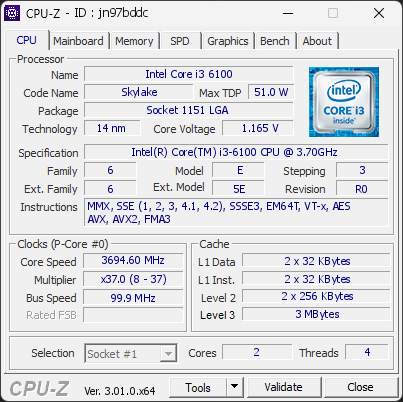
CPU clocks
Last sample and peak over the test, values in MHz
| Clock | Current | Peak |
|---|---|---|
| Cores | ||
| #0 | 3694.60 | 3694.60 |
| #1 | 3694.60 | 3694.60 |
| Uncore / BCLK | ||
| Ring / LLC | 3694.60 | 3694.60 |
| CPU BCLK | 99.85 | 99.85 |
Previous validations from this PC
Unexpected crashes (BSOD) (4)
Boot Time details
Hardware errors (WHEA)
No hardware errors recorded in the Windows event log.
Driver problems
No driver problems detected.
Flagged processes
31 running processes, none flagged.
Inform a support service
If a partner support service is helping you with this PC, enter the service code they gave you to send them this validation. A valid service code is required.