
Dump [k372rzlv] Submitted by Anonymous -
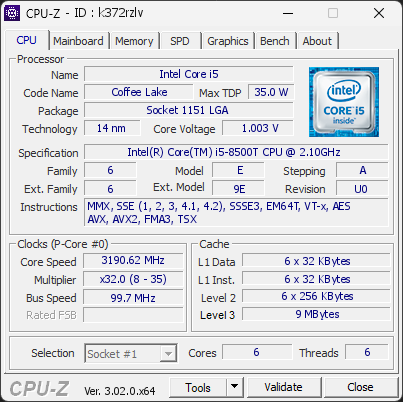
Intel(R) Core(TM) i5-8500T CPU @ 2.10GHz
3190.62
MHz
Healthy
Everything looks good
No issues were detected on this computer.
01
Processor (CPU)
Max. Frequency
3393 MHz
L3 Cache
9 MB
CPU Name
Intel(R) Core(TM) i5-8500T CPU @ 2.10GHz
Cores & Threads
1 CPU | 6 Cores | 6 Threads
Frequency
3190.62 MHz (32 * 99.71 MHz) - Max Turbo: 3392.52 MHz
Multiplier
Current: 32 | Min: 8 | Max: 35
Architecture
Coffee Lake | Stepping: U0 | Technology: 14 nm
CPUID / Ext.
6.E.A | 6.9E
IA Extensions
MMX, SSE, SSE2, SSE3, SSSE3, SSE4.1, SSE4.2, EM64T, VT-x, AES, AVX, AVX2, FMA3, TSX
L1 Data Cache
6 x 32 KB (8-way, 64-byte line)
L1 Instruction Cache
6 x 32 KB (8-way, 64-byte line)
L2 Cache
6 x 256 KB (4-way, 64-byte line)
L3 Cache
9 MB (12-way, 64-byte line)
Microcode
Rev. 0xF6
TDP
35 W / PL1: 35 W / PL2: 60 W
Temperature
Current: 59°C | Max: 59°C | TjMax: 100°C
Type
Retail
02
Motherboard
Model
Dell 03KWTV
Socket
LGA1151
North Bridge
Intel Coffee Lake rev 07
South Bridge
Intel H370 rev 10
BIOS
Dell Inc. 1.4.2 (06/11/2019)
03
Memory (RAM)
Total Capacity
16 GB
Channels
128 bits
Dual Channel
Effective Speed
DDR4-2660
1330 MHz
Memory Slots (2 / 2)
WALRAM
8 GB
S0
WALRAM
8 GB
S1
Total Size
16384 MB (16 GB)
Type
Dual Channel (128 bit) DDR4-SDRAM
Frequency
1330 MHz (DDR4-2660) - Ratio: 3:40
Timings
19-19-19-43-2 (tCAS-tRCD-tRP-tRAS-tRC)
Slot #1 Module
8 GB WALRAM DDR4-2666 (WW37'23)
Slot #2 Module
8 GB WALRAM DDR4-2666 (WW37'23)
04
Graphic Card (GPU)
GPU VRAM
128 MB
GPU Name
Intel(R) UHD Graphics 630 - Manufacturer: Dell
GPU VRAM
128 MB
GPU Drivers
Version 31.0.101.2141 (03/30/2026)
05
Storage
C:\KBG50ZNS512G NVMe KIOXIA 512GB (FW: 11200108)
Name
KBG50ZNS512G NVMe KIOXIA 512GB (FW: 11200108)
Size
476 GiB (~510 GB)
Type
Fixed SSD - Bus: NVMe PCIe 4x 2.0 (5 GT/s)
Volume
C:\ - Size: 146.4GB (9.1% used) | 1 other volume found
Run Time
Power Cycles: 374 | Power-On: 2022 h (~84 days) | 7.3 TBW
Health
Remaining Life: 98% | Media Errors: 0 | Temperature: 41°C
E:\HGST HTS541010A9E680 (FW: JA0OA7G0)
Name
HGST HTS541010A9E680 (FW: JA0OA7G0)
Size
931 GiB (~1000 GB)
Type
Fixed - Bus: SATA
Volume
E:\ - Size: 931.5GB (0% used)
Run Time
Power Cycles: 1475 | Power-On: 1071 h (~45 days) | Load Cycles: 18,387
Health
Media Errors: 0 | Temperature: 39°C
06
Display
Monitor
DELL P2419H (W20'2018)
Specifications
24.0 inches (61.0 cm) | 1920 x 1080 pixels (FHD) @ 56-76 Hz
Current Mode
1920 x 1080 pixels | 59 Hz
07
Software
Operating System
Microsoft Windows 11 Professional (x64) - 26H1 | Installed on 2025-11-26
Security
Secure Boot: Disabled | TPM: Enabled (V2.0)
Features
Code Integrity: Enabled | Fast Startup: Disabled
Power Plan
High performance | 3 plans defined
Antivirus
Windows Defender: Enabled | Up to date
Boot Time
63 seconds (POST: 13 s. | Logon: 18 s. | Startup: 31 s.)
Processes
20 running processes
CPU-Z Version
3.02.0.x64
CPU-Z SCREENSHOT
Healthy [k372rzlv]
Tools
CPU-Z BENCHMARK
Version 2017.1 (x64)
Your position (multi-thread)
Intel Core i5-9600T
2,368
YOU
2,215
Intel Core i5-9500T
2,189
Intel Core i5-8500T
2,127
AMD Ryzen 5 4500U
2,120
Forum Banner

[url=https://valid.cpuid.com/k372rzlv][img]https://valid.cpuid.com/cache/banner/k372rzlv.png[/img][/url]
Join us on Discord
Scan this QR code
To open this page on your phone
CPU clocks
Last sample and peak over the test, values in MHz
| Clock | Current | Peak |
|---|---|---|
| Cores | ||
| #0 | 3190.62 | 3292.74 |
| #1 | 3190.62 | 3392.52 |
| #2 | 3190.62 | 3392.52 |
| #3 | 3190.62 | 3292.74 |
| #4 | 3190.62 | 3392.52 |
| #5 | 3190.62 | 3392.52 |
| Uncore / BCLK | ||
| Ring / LLC | 2891.50 | 3093.18 |
| CPU BCLK | 99.71 | 99.81 |
Previous validations from this PC
Unexpected crashes (BSOD)
No unexpected crashes (BSOD) recorded on this PC.
Boot Time details
POST (BIOS/UEFI)13 s
Windows Logon18 s
Kernel init140 ms
Driver init537 ms
Plug and Play init2.0 s
Session manager init6.4 s
User profile load2.5 s
Other logon activity1.6 s
Desktop init (Explorer)4.7 s
Startup31 s
Total
1 min 3 s
Hardware errors (WHEA)
No hardware errors recorded in the Windows event log.
Driver problems
No driver problems detected.
Flagged processes
20 running processes, none flagged.
Inform a support service
If a partner support service is helping you with this PC, enter the service code they gave you to send them this validation. A valid service code is required.