
The drive ST1000DM010-2EP102 has accumulated 65,180 hours of powered-on time, about 7.4 years, exceeding the 5-year design service life typical for hard drives.
Hard drive reliability is rated over a 5-year service life. Beyond it the mechanics keep working, but the likelihood of failure gradually increases with age: this is a sign of aging, not an imminent fault.
Keep backups of important data and monitor this drive's SMART attributes for reallocated sectors or read errors, which would indicate the aging is turning into actual degradation.
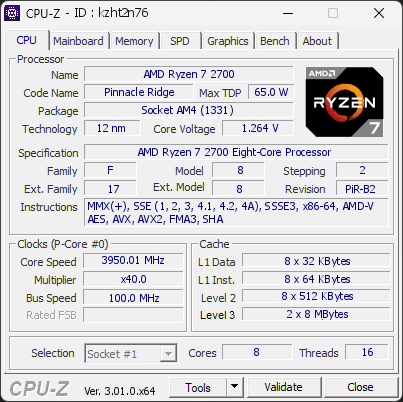
Your processor is using noticeably more power than expected for this model. It is currently drawing 84.8 W, which is over +20 % above typical values. This extra power leads to higher temperatures and unnecessary electrical stress on the CPU.
Such behavior may occur when power limits are raised, when boost settings are too aggressive, or when the motherboard automatically applies performance-enhancing profiles. Even if you haven’t changed any settings, some systems push the processor harder than its usual base limits.
We recommend checking your power settings in the BIOS or software provided by your motherboard. Reducing power limits can help lower temperatures, improve efficiency, and prevent premature wear.
The drive XPG GAMMIX S41 has reported 3 media error(s).
Media errors indicate that the drive was unable to read from or write to the NAND media successfully. A small number of media errors may be recoverable, but any increase can indicate failing flash cells, controller issues, or progressive drive degradation.
Back up any important data on this drive immediately, monitor the error count for further increases, and consider replacing the drive if the count continues to rise or reaches a critical level.
The drive KINGSTON SUV400S37120G has used more than half of its estimated lifespan, with 45% remaining. The drive is still operating normally, but it is entering a phase where the risk of failure increases progressively.
It is advisable to regularly monitor the S.M.A.R.T. status of this drive and keep your backups up to date.
The partition E: (on disk KINGSTON SUV400S37120G) is almost full, with only 12.7 GB of free space remaining. At this level, Windows may fail to install updates, create temporary files, or operate reliably.
Freeing up space immediately is recommended: use the Windows cleanup tool or remove unnecessary files and applications.

Scan this QR code
To open this page on your phone
Previous validations from this PC
Unexpected crashes (BSOD)
No unexpected crashes (BSOD) recorded on this PC.
Boot Time details
Hardware errors (WHEA)
No hardware errors recorded in the Windows event log.
Driver problems
No driver problems detected.
Flagged processes
78 running processes, none flagged.
Inform a support service
If a partner support service is helping you with this PC, enter the service code they gave you to send them this validation. A valid service code is required.