
Your graphics driver has not been updated in over 6 months. You are running version 472.39, released 56 months ago, while a much newer version (582.78) is available.
Such an outdated driver can cause crashes, instability, and serious performance issues.
Updating to the latest driver is strongly recommended to ensure compatibility and stability. Download the latest drivers for your graphics card here: NVIDIA Drivers
The partition C: (on disk GOODRAM C50) is almost full, with only 20.7 GB of free space remaining. With so little room, Windows may struggle to stay stable or apply future updates.
You can free space using the built-in Windows cleanup tool or by removing applications and files you no longer need.
This PC encountered 10 unexpected crash(es) (BSOD, blue screen) in the 30 days before this validation, the most recent on 2026-10-27.
Crashes like these are often caused by a faulty driver, unstable overclocking or memory settings, overheating, or failing hardware.
Make sure Windows and your drivers are up to date. If the PC is overclocked, try returning to stock settings. The BSOD Details button in the Software section lists each crash.

Scan this QR code
To open this page on your phone
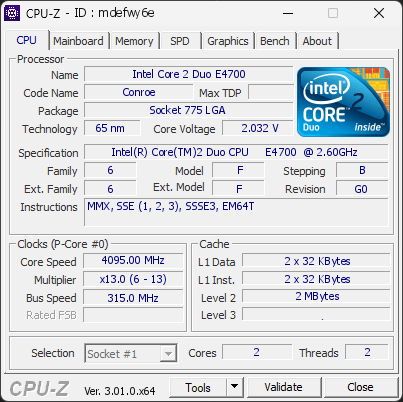
CPU clocks
Last sample and peak over the test, values in MHz
| Clock | Current | Peak |
|---|---|---|
| Cores | ||
| #0 | 4095.00 | 4095.00 |
| #1 | 4095.00 | 4095.00 |
| Uncore / BCLK | ||
| CPU BCLK | 315.00 | 315.00 |
Previous validations from this PC
Unexpected crashes (BSOD) (20)
Boot Time details
Hardware errors (WHEA)
14 errors recorded in the Windows event log, showing the 10 most recent.
Micro-architectural error, core 4
Micro-architectural error, core 4
Micro-architectural error, core 4
Micro-architectural error, core 4
Micro-architectural error, core 4
Micro-architectural error, core 4
Micro-architectural error, core 4
Micro-architectural error, core 0
Micro-architectural error, core 0
Micro-architectural error, core 4
Driver problems
No driver problems detected.
Flagged processes
6 running processes, none flagged.
Inform a support service
If a partner support service is helping you with this PC, enter the service code they gave you to send them this validation. A valid service code is required.