
The drive XG7000-2TB 2280 has spent 37 minute(s) operating at or above its critical temperature threshold (typically 80–85°C). At these temperatures the controller is forced to throttle aggressively to avoid permanent damage, which causes severe performance loss and accelerates wear.
Improve airflow around the drive, add a heatsink if possible, and verify it is not installed near a heat source. Sustained critical thermal events shorten the drive's lifespan significantly.
The drive XG7000-2TB 2280 has spent 49 minute(s) operating above its warning temperature threshold (typically 70°C). The drive is still functional but is running hotter than its manufacturer recommends for sustained operation, which gradually shortens its lifespan.
Check airflow and cooling around the drive. Adding a heatsink or improving case ventilation usually resolves this.
We detected 1 storage device(s) that are not partitioned or formatted. The affected device(s) are: XG7000-2TB 2280. They may also be formatted with a file system Windows does not support (Linux ext4, for example). Windows cannot use these drives until they are initialized and set up.
If the drive is used by another operating system (such as Linux), you can ignore this message. Otherwise, open the Disk Management tool to initialize the device(s), create a partition, and format the drive so it becomes usable.
6 device(s) have no driver installed, so Windows cannot use them at all. This is very common on a fresh Windows installation, where the chipset drivers have not been installed yet.
Windows ships generic drivers for common hardware but not for chipset controllers, card readers, or manufacturer-specific devices, which have to be installed separately.
Install the chipset driver package for your motherboard or laptop from the manufacturer's support page, then run Windows Update. The Drivers button in the Software section lists every device still waiting for a driver.

Scan this QR code
To open this page on your phone
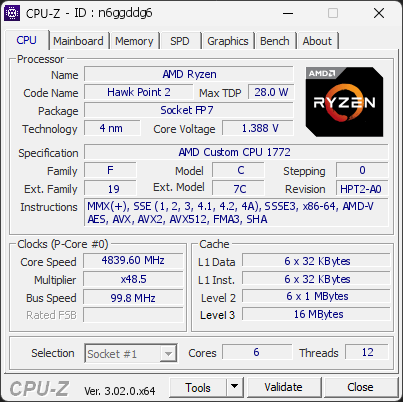
CPU clocks
Last sample and peak over the test, values in MHz
| Clock | Current | Peak |
|---|---|---|
| Cores | ||
| #0 | 4814.65 | 4840.66 |
| #1 | 3226.40 | 3227.26 |
| #2 | 3226.40 | 3227.26 |
| #3 | 3226.40 | 3227.26 |
| #4 | 4839.60 | 4840.89 |
| #5 | 3209.77 | 3227.26 |
| Uncore / BCLK | ||
| CPU BCLK | 99.79 | 99.81 |
Previous validations from this PC
Unexpected crashes (BSOD)
No unexpected crashes (BSOD) recorded on this PC.
Boot Time details
Hardware errors (WHEA)
No hardware errors recorded in the Windows event log.
Driver problems
6 devices need attention, 1 more ignored.
Flagged processes
40 running processes, none flagged.
Inform a support service
If a partner support service is helping you with this PC, enter the service code they gave you to send them this validation. A valid service code is required.