Dump [n6qc7wl9] Submitted by ARNOLD-I9 -
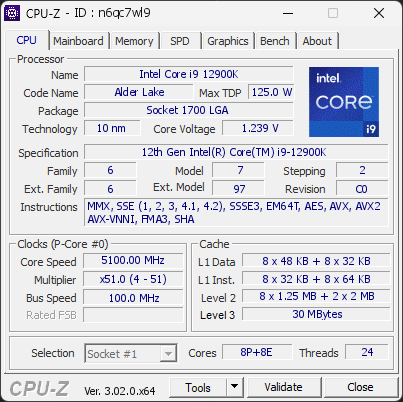
12th Gen Intel(R) Core(TM) i9-12900K
5100.00 MHz
ASUS ROG STRIX Z690-E GAMING WIFI · 32 GB DDR5-6000 · NVIDIA GeForce RTX 4080
Healthy
CPU-Z 3.02.0
Date:
Type: Quick Check
Duration: 5 seconds
System Analysis
2 Info

Your processor's power limits (PL1/PL2) appear to be set to an unlimited value. This means the CPU is allowed to draw as much power as it wants, with no enforced safeguard beyond what the cooling and voltage regulation can sustain. While this can unlock maximum performance, the processor may run hotter, consume more energy, and experience increased electrical stress over time.

This configuration is often applied automatically by motherboard manufacturers through performance-enhancing profiles. Even without any user changes, many boards ship with these limits effectively disabled by default.

We recommend reviewing your power limit settings in the BIOS or in the software provided by your motherboard. Restoring sensible PL1/PL2 values (typically aligned with the processor's rated TDP) can help lower temperatures, reduce power consumption, and extend the long-term reliability of your CPU.

7 device(s) have no driver installed, so Windows cannot use them at all. This is very common on a fresh Windows installation, where the chipset drivers have not been installed yet.

Windows ships generic drivers for common hardware but not for chipset controllers, card readers, or manufacturer-specific devices, which have to be installed separately.

Install the chipset driver package for your motherboard or laptop from the manufacturer's support page, then run Windows Update. The Drivers button in the Software section lists every device still waiting for a driver.

01 Processor (CPU)
Max. Frequency
5100 MHz
L3 Cache
30 MB
Peak temp
71 °C
0100 °C
PL1/PL2 unlocked
Power (TDP)
178 W
TDP 125 W
0179 W
CPU Name
12th Gen Intel(R) Core(TM) i9-12900K
Cores & Threads
1 CPU | 8P + 8E Cores | 24 Threads
Frequency
5100.00 MHz (51 * 100.00 MHz) - Max Turbo: 5100.00 MHz
Multiplier
Current: 51 | Min: 4 | Max: 51
Architecture
Alder Lake | Stepping: C0 | Technology: 10 nm
CPUID / Ext.
6.7.2 | 6.97
IA Extensions
MMX, SSE, SSE2, SSE3, SSSE3, SSE4.1, SSE4.2, EM64T, AES, AVX, AVX2, FMA3, SHA
L1 Data Cache
8 x 48 KB (12-way, 64-byte line) + 8 x 32 KB (8-way, 64-byte line)
L1 Instruction Cache
8 x 32 KB (8-way, 64-byte line) + 8 x 64 KB (8-way, 64-byte line)
L2 Cache
8 x 1.25 MB (10-way, 64-byte line) + 2 x 2 MB (16-way, 64-byte line)
L3 Cache
30 MB (12-way, 64-byte line)
Microcode
Rev. 0x3E
TDP
125 W / PL1: 4095 W / PL2: 4095 W
Temperature
Current: 71°C | Max: 71°C | TjMax: 100°C
Type
Retail
02 Motherboard
Model
ASUS ROG STRIX Z690-E GAMING WIFI
Socket
LGA1700
North Bridge
Intel Alder Lake rev 02
South Bridge
Intel Z690 rev 11
BIOS
American Megatrends Inc. 4701 (09/18/2026)
03 Memory (RAM)
Total Capacity
32 GB
Channels
128 bits
Dual Channel
Effective Speed
DDR5-6000
3000 MHz
Memory Slots (2 / 4)
empty
S0
G.SKILL
16 GB
S1
empty
S2
G.SKILL
16 GB
S3
Total Size
32768 MB (32 GB)
Type
Quad Channel (128 bit) DDR5-SDRAM
Frequency
3000 MHz (DDR5-6000) - Ratio: 1:30
Timings
36-36-36-96-132-2 (tCAS-tRCD-tRP-tRAS-tRC-tCR)
Slot #1 Module
16 GB G.Skill Lv1-6000C36 F5-6000J3636F16G
Slot #2 Module
16 GB G.Skill Lv1-6000C36 F5-6000J3636F16G
04 Graphic Card (GPU)
GPU Clock
2205 MHz
GPU VRAM
16 GB
Peak GPU temp.
29 °C
0100 °C
GPU Name
NVIDIA GeForce RTX 4080 - Manufacturer: Gigabyte
GPU Frequency
2205 MHz (Turbo: 2565 MHz)
GPU Specifications
Process: 4 nm / Transistors: 45.9 B / Die Size: 379 mm² / TDP: 320 W
GPU Units
Cores: 9728 | Texture (TMU): 608 | Render (ROP): 112
GPU VRAM
16 GB GDDR6X (Micron) | 256-bit Bus @ 11201 MHz
GPU Drivers
NVIDIA GeForce Driver 621.40 | Version 32.0.16.2140 (11/21/2026)
05 Storage
C:\Samsung SSD 970 EVO Plus 1TB (FW: 2B2QEXM7)
8% usedTotal 931 GiB
Name
Samsung SSD 970 EVO Plus 1TB (FW: 2B2QEXM7)
Size
931 GiB (~1000 GB)
Type
Fixed SSD - Bus: NVMe PCIe 4x 3.0 (8 GT/s)
Volume
C:\ - Size: 930.6GB (8.3% used)
Run Time
Power Cycles: 5482 | Power-On: 11424 h (~476 days) | 25.1 TBW
Health
Remaining Life: 99% | Media Errors: 0 | Temperature: 49°C
D:\PNY CS3030 2TB SSD (FW: CS303226)
0% usedTotal 1863 GiB
Name
PNY CS3030 2TB SSD (FW: CS303226)
Size
1863 GiB (~2000 GB)
Type
Fixed SSD - Bus: NVMe PCIe 4x 3.0 (8 GT/s)
Volume
D:\ - Size: 1863GB (0% used)
Run Time
Power Cycles: 4488 | Power-On: 13228 h (~551 days) | 11.9 TBW
Health
Remaining Life: 96% | Media Errors: 0 | Temperature: 28°C
E:\PNY CS3030 2TB SSD (FW: CS303226)
0% usedTotal 1863 GiB
Name
PNY CS3030 2TB SSD (FW: CS303226)
Size
1863 GiB (~2000 GB)
Type
Fixed SSD - Bus: NVMe PCIe 4x 3.0 (8 GT/s)
Volume
E:\ - Size: 1863GB (0.2% used)
Run Time
Power Cycles: 2796 | Power-On: 6670 h (~278 days) | 8.1 TBW
Health
Remaining Life: 97% | Media Errors: 0 | Temperature: 29°C
F:\Samsung SSD 980 PRO 1TB (FW: 5B2QGXA7)
2% usedTotal 931 GiB
Name
Samsung SSD 980 PRO 1TB (FW: 5B2QGXA7)
Size
931 GiB (~1000 GB)
Type
Fixed SSD - Bus: NVMe PCIe 4x 4.0 (16 GT/s)
Volume
F:\ - Size: 836.7GB (2.2% used)
Run Time
Power Cycles: 4142 | Power-On: 12805 h (~534 days) | 10.9 TBW
Health
Remaining Life: 99% | Media Errors: 0 | Temperature: 46°C
06 Display
#1 Dell S2716DG (W20'2019)
Monitor
Dell S2716DG (W20'2019)
Specifications
27.2 inches (69.1 cm) | 2560 x 1440 pixels (QHD) @ 30-144 Hz
Current Mode
2560 x 1440 pixels | 144 Hz
#2 DELL SE2719HR (W28'2019)
Monitor
DELL SE2719HR (W28'2019)
Specifications
27.2 inches (69.1 cm) | 1920 x 1080 pixels (FHD) @ 48-76 Hz
Current Mode
1920 x 1080 pixels | 60 Hz
07 Software
Operating System
Microsoft Windows 11 Home (x64) - 23H2 | Installed on 2026-11-26
Security
Secure Boot: Disabled | TPM: Enabled (V2.0 hardware)
Features
Code Integrity: Enabled | Fast Startup: Enabled
Power Plan
Balanced | 3 plans defined
Antivirus
Windows Defender: Enabled | Up to date
Boot Time
46 seconds (POST: 20 s. | Logon: 9 s. | Startup: 17 s.)
Drivers
7 devices have no driver installed
Processes
59 running processes
CPU-Z Version
3.02.0.x64
CPU-Z SCREENSHOT Healthy [n6qc7wl9]
Tools
Forum Banner
[url=https://valid.cpuid.com/n6qc7wl9][img]https://valid.cpuid.com/cache/banner/n6qc7wl9.png[/img][/url]
Join us on Discord
Join our Discord