
Your graphics driver is not fully up to date. You are currently running version 596.60, while version 610.88 (2026-07-22) is available.
Without an update, you may miss out on security fixes or performance improvements. Updating your driver can improve overall stability and performance.
The latest drivers for your graphics card are available here: NVIDIA Drivers
The drive CT250MX500SSD1 has logged 433 CRC error(s) on its SATA interface. These are bus-level transmission errors and indicate a connection problem, not a fault with the drive itself. Common causes are a loose, damaged, or low-quality SATA cable, a faulty SATA port, or a flaky backplane or drive sled. The counter is cumulative over the drive's whole lifetime, so these errors may be years old and come from an issue that has long been resolved.
If the count is still increasing, reseat the SATA data cable, try a different SATA port, and replace the cable if errors continue to accumulate.
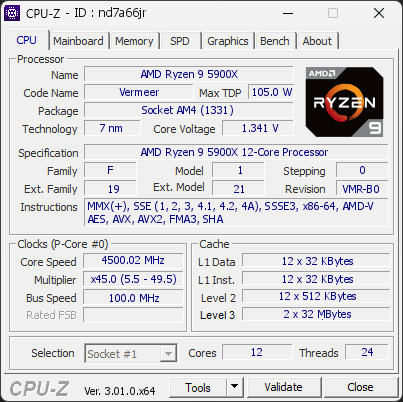
Your processor is using noticeably more power than expected for this model. It is currently drawing 177 W, which is over +20 % above typical values. This extra power leads to higher temperatures and unnecessary electrical stress on the CPU.
Such behavior may occur when power limits are raised, when boost settings are too aggressive, or when the motherboard automatically applies performance-enhancing profiles. Even if you haven’t changed any settings, some systems push the processor harder than its usual base limits.
We recommend checking your power settings in the BIOS or software provided by your motherboard. Reducing power limits can help lower temperatures, improve efficiency, and prevent premature wear.

Scan this QR code
To open this page on your phone
Previous validations from this PC
Unexpected crashes (BSOD)
No unexpected crashes (BSOD) recorded on this PC.
Boot Time details
Hardware errors (WHEA)
2 errors recorded in the Windows event log.
Cache error, level 2, data access, core 25
Cache error, level 2, data access, core 25
Driver problems
No driver problems detected.
Flagged processes
96 running processes, none flagged.
Inform a support service
If a partner support service is helping you with this PC, enter the service code they gave you to send them this validation. A valid service code is required.