
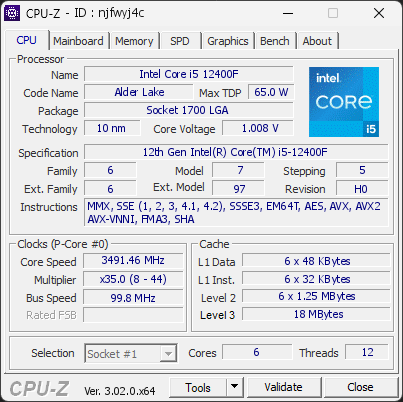
Your processor reached 100°C during the test, hotter than 97 % of the 2841 validations recorded with the same Intel Core i5 12400F. The typical maximum for this model is 60°C.
The same CPU under the same load usually lands close to the typical value. A large gap points at the cooling rather than the processor: a cooler too small for this CPU, a poor mount or dried thermal paste, dust, low airflow in the case, or a BIOS power limit set higher than stock.
Compare your cooling setup with what this processor needs, check the cooler mounting and the thermal paste, clean the fans and filters, and review the case airflow. The CPU is not at risk yet, but it is running hotter than it should.
1 running program(s) are known to consume resources in the background with little benefit (preinstalled trials, redundant cleaners, or permanent helper services).
These programs are often preinstalled by the PC manufacturer or bundled with other software, and keep running at every startup even when unused.
Uninstalling them, or disabling their automatic startup, frees memory and shortens the boot time. The Processes button in the Software section lists each detected program and why it is flagged.
Your CPU is running at a high temperature (100°C). At this level, the processor may slow itself down to avoid overheating.
This usually means the cooling system is struggling to keep the CPU at a safe temperature. It can happen if the cooler is clogged with dust, not working correctly, or simply not powerful enough for this type of processor.
We recommend checking that the fan spins normally and that the cooling system is properly installed. Cleaning the cooler or improving airflow can help bring the temperature back to a safer range.
Your RAM is not running in dual-channel mode. This isn’t an issue, but you could gain some extra performance with the proper configuration.
If you have two modules, placing them in the correct slots on the motherboard usually enables dual channel. If you only have one module, adding a second one will activate it automatically.

Scan this QR code
To open this page on your phone
CPU clocks
Last sample and peak over the test, values in MHz
| Clock | Current | Peak |
|---|---|---|
| Cores | ||
| #0 | 3491.46 | 3890.48 |
| #1 | 3491.46 | 4189.75 |
| #2 | 3491.46 | 3690.97 |
| #3 | 3491.46 | 3990.24 |
| #4 | 3491.46 | 3990.24 |
| #5 | 3491.46 | 3890.48 |
| Uncore / BCLK | ||
| Ring / LLC | 3092.44 | 3690.97 |
| CPU BCLK | 99.76 | 99.76 |
Previous validations from this PC
Unexpected crashes (BSOD)
No unexpected crashes (BSOD) recorded on this PC.
Boot Time details
Hardware errors (WHEA)
1 error recorded in the Windows event log.
Driver problems
No driver problems detected.
Flagged processes
149 running processes, 1 flagged.
Inform a support service
If a partner support service is helping you with this PC, enter the service code they gave you to send them this validation. A valid service code is required.