
1 device(s) have no driver installed, so Windows cannot use them at all. This is very common on a fresh Windows installation, where the chipset drivers have not been installed yet.
Windows ships generic drivers for common hardware but not for chipset controllers, card readers, or manufacturer-specific devices, which have to be installed separately.
Install the chipset driver package for your motherboard or laptop from the manufacturer's support page, then run Windows Update. The Drivers button in the Software section lists every device still waiting for a driver.
Your graphics driver has not been updated in over 6 months. You are running version 465.89, released 39 months ago, while a much newer version (475.14) is available.
Such an outdated driver can cause crashes, instability, and serious performance issues.
Updating to the latest driver is strongly recommended to ensure compatibility and stability. Download the latest drivers for your graphics card here: NVIDIA Drivers
The partition D: (on disk WDC WDS250G1B0A-00H9H0) is almost full, with only 27.2 GB of free space remaining. With so little room, Windows may struggle to stay stable or apply future updates.
You can free space using the built-in Windows cleanup tool or by removing applications and files you no longer need.
The partition C: (on disk WDC WDS250G1B0A-00H9H0) is almost full, with only 6 GB of free space remaining. At this level, Windows may fail to install updates, create temporary files, or operate reliably.
Freeing up space immediately is recommended: use the Windows cleanup tool or remove unnecessary files and applications.

Scan this QR code
To open this page on your phone
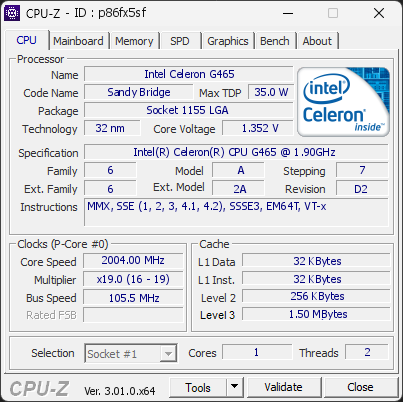
CPU clocks
Last sample and peak over the test, values in MHz
| Clock | Current | Peak |
|---|---|---|
| Cores | ||
| #0 | 2004.00 | 2004.00 |
| Uncore / BCLK | ||
| CPU BCLK | 105.47 | 105.47 |
Previous validations from this PC
Unexpected crashes (BSOD)
No unexpected crashes (BSOD) recorded on this PC.
Boot Time details
Hardware errors (WHEA)
5 errors recorded in the Windows event log.
Cache error, level 2, data read, core 19
Cache error, level 2, data read, core 0
Cache error, level 2, instruction fetch, core 2
Cache error, level 2, data read, core 5
Micro-architectural error, core 0
Driver problems
1 device needs attention.
Flagged processes
14 running processes, none flagged.
Inform a support service
If a partner support service is helping you with this PC, enter the service code they gave you to send them this validation. A valid service code is required.