
We detected 1 storage device(s) that are not partitioned or formatted. The affected device(s) are: TOSHIBA HDWG51JUZSVA. They may also be formatted with a file system Windows does not support (Linux ext4, for example). Windows cannot use these drives until they are initialized and set up.
If the drive is used by another operating system (such as Linux), you can ignore this message. Otherwise, open the Disk Management tool to initialize the device(s), create a partition, and format the drive so it becomes usable.
The drive WDC WUH721414ALE6L4 has logged 201 CRC error(s) on its SATA interface. These are bus-level transmission errors and indicate a connection problem, not a fault with the drive itself. Common causes are a loose, damaged, or low-quality SATA cable, a faulty SATA port, or a flaky backplane or drive sled. The counter is cumulative over the drive's whole lifetime, so these errors may be years old and come from an issue that has long been resolved.
If the count is still increasing, reseat the SATA data cable, try a different SATA port, and replace the cable if errors continue to accumulate.
We detected 1 storage device(s) that are not partitioned or formatted. The affected device(s) are: WDC WUH721414ALE6L4. They may also be formatted with a file system Windows does not support (Linux ext4, for example). Windows cannot use these drives until they are initialized and set up.
If the drive is used by another operating system (such as Linux), you can ignore this message. Otherwise, open the Disk Management tool to initialize the device(s), create a partition, and format the drive so it becomes usable.
We detected 1 storage device(s) that are not partitioned or formatted. The affected device(s) are: WDC WD80EAAZ-00BXBB0. They may also be formatted with a file system Windows does not support (Linux ext4, for example). Windows cannot use these drives until they are initialized and set up.
If the drive is used by another operating system (such as Linux), you can ignore this message. Otherwise, open the Disk Management tool to initialize the device(s), create a partition, and format the drive so it becomes usable.

Scan this QR code
To open this page on your phone
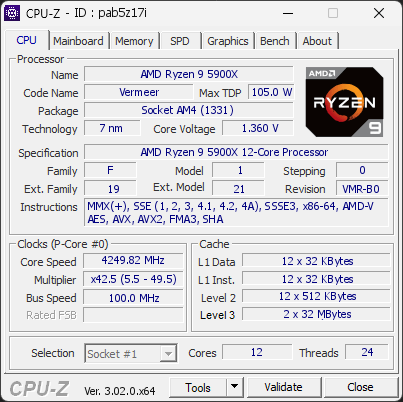
CPU clocks
Last sample and peak over the test, values in MHz
| Clock | Current | Peak |
|---|---|---|
| Cores | ||
| #0 | 4249.82 | 4250.32 |
| #1 | 4249.82 | 4250.32 |
| #2 | 4249.82 | 4250.32 |
| #3 | 4249.82 | 4250.32 |
| #4 | 4249.82 | 4250.32 |
| #5 | 4249.82 | 4250.32 |
| #6 | 4249.82 | 4250.32 |
| #7 | 4249.82 | 4250.32 |
| #8 | 4249.82 | 4250.32 |
| #9 | 4249.82 | 4250.32 |
| #10 | 4249.82 | 4250.32 |
| #11 | 4249.82 | 4250.32 |
| Uncore / BCLK | ||
| L3 Cache #0 | 4250.08 | 4250.32 |
| L3 Cache #1 | 4250.08 | 4250.32 |
| CPU BCLK | 100.00 | 100.01 |
Previous validations from this PC
Unexpected crashes (BSOD)
No unexpected crashes (BSOD) recorded on this PC.
Boot Time details
Hardware errors (WHEA)
No hardware errors recorded in the Windows event log.
Driver problems
No device needs attention, 1 more ignored.
Flagged processes
71 running processes, none flagged.
Inform a support service
If a partner support service is helping you with this PC, enter the service code they gave you to send them this validation. A valid service code is required.