CPU-Z VALIDATOR V3 - BETA VERSION - PROD ENVIRONMENT
Dump [sf4rjpu2] Submitted by THEUNBORN-HOME -
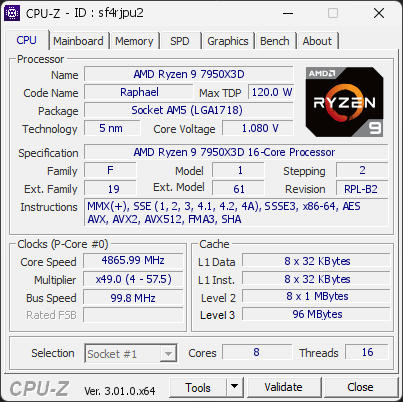
AMD Ryzen 9 7950X3D 16-Core Processor
4865.99 MHz
ASUS TUF GAMING B650-PLUS WIFI · 64 GB DDR5-4796 · NVIDIA GeForce RTX 3060
Warning
CPU-Z 3.01.0
Date:
Type: Quick Check
Duration: 5 seconds
System Analysis
3 Warnings

Your processor is currently operating with fewer cores than its official specifications. It is running with 8 cores, while this CPU normally supports 16 cores.

This limitation reduces performance and may indicate a configuration issue.

This situation can happen when Windows is set to limit the number of active cores, when BIOS settings are not at their defaults, or when a recent change has disabled certain CPU features. In rare cases, a BIOS update may be required for the system to properly detect the full capabilities of the processor.

We recommend checking Windows’ advanced boot options (msconfig) to ensure all cores are enabled. You should also load the default settings in your BIOS to restore proper CPU configuration.

This PC encountered 1 unexpected crash(es) (BSOD, blue screen) in the 30 days before this validation, the most recent on 2026-09-27.

Crashes like these are often caused by a faulty driver, unstable overclocking or memory settings, overheating, or failing hardware.

Make sure Windows and your drivers are up to date. If the PC is overclocked, try returning to stock settings. The BSOD Details button in the Software section lists each crash.

Windows reports 1 device(s) that are not working correctly. A device in this state is either unavailable or running in a degraded mode, and Windows will keep retrying it at every boot.

This usually comes from a driver that failed to load or was stopped after an error: a bad or outdated driver, a device that is not seated properly, or a component that is starting to fail.

Open the Device Manager to see which devices are flagged, then reinstall or update their drivers from the manufacturer's website. If a device keeps failing after a clean driver install, reseat it and test it on another port or slot. The Drivers button in the Software section lists every affected device.

01 Processor (CPU)
Max. Frequency
5040 MHz
L3 Cache
96 MB
Peak temp
82 °C
089 °C
PPT unlocked
Power (TDP)
85 W
0120 W
CPU Name
AMD Ryzen 9 7950X3D 16-Core Processor
Cores & Threads
1 CPU | 8 Cores | 16 Threads
Frequency
4865.99 MHz (48.75 * 99.82 MHz) - Max Turbo: 5040.35 MHz
Multiplier
Current: 48.75 | Min: 4 | Max: 57.5
Architecture
Raphael | Stepping: RPL-B2 | Technology: 5 nm
CPUID / Ext.
F.1.2 | 19.61
IA Extensions
MMX (+), SSE, SSE2, SSE3, SSSE3, SSE4.1, SSE4.2, SSE4A, x86-64, AES, AVX, AVX2, AVX512 (DQ, BW, VL, CD, IFMA, VBMI, VBMI2, VNNI, BITALG, VPOPCNTDQ, BF16), FMA3, SHA
L1 Data Cache
8 x 32 KB (8-way, 64-byte line)
L1 Instruction Cache
8 x 32 KB (8-way, 64-byte line)
L2 Cache
8 x 1024 KB (8-way, 64-byte line)
L3 Cache
96 MB (16-way, 64-byte line)
Microcode
Rev. 0xA60120C
TDP
120 W / PPT: 1000 W
Temperature
Current: 82°C | Max: 82°C | TjMax: 89°C
Type
Retail
02 Motherboard
Model
ASUS TUF GAMING B650-PLUS WIFI
Socket
AM5 (LGA1718)
North Bridge
AMD Ryzen SOC rev 00
South Bridge
AMD B650 rev 51
BIOS
American Megatrends Inc. 3827 (02/06/2026)
03 Memory (RAM)
Total Capacity
64 GB
Channels
128 bits
Dual Channel
Effective Speed
DDR5-4796
2398 MHz
Memory Slots (2 / 4)
empty
S0
CORSAIR
32 GB
S1
empty
S2
CORSAIR
32 GB
S3
Total Size
65536 MB (64 GB)
Type
Quad Channel (128 bit) DDR5-SDRAM
Frequency
2398 MHz (DDR5-4796) - Ratio: 1:24
Timings
40-40-40-77-117 (tCAS-tRCD-tRP-tRAS-tRC)
Slot #1 Module
32 GB Corsair DDR5-5200 CMH64GX5M2B5200Z40 (WW37'23)
Slot #2 Module
32 GB Corsair DDR5-5200 CMH64GX5M2B5200Z40 (WW37'23)
04 Graphic Card (GPU)
GPU Clock
1320 MHz
GPU VRAM
12 GB
RTX 3060
Peak GPU temp.
49 °C
0100 °C
#1 NVIDIA GeForce RTX 3060
Name
NVIDIA GeForce RTX 3060 - Manufacturer: Gigabyte
Freq.
1320 MHz (Turbo: 1792 MHz)
Specs
Process: 8 nm / Transistors: 13.2 B / Die Size: 276 mm² / TDP: 170 W
Units
Cores: 3584 | Texture (TMU): 224 | Render (ROP): 48
VRAM
12 GB GDDR6 (Samsung) | 192-bit Bus @ 7501 MHz
Drivers
NVIDIA GeForce Driver 617.14 | Version 32.0.16.1714 (09/17/2026)
#2 AMD Radeon(TM) Graphics
Name
AMD Radeon(TM) Graphics - Manufacturer: ASUS
Freq.
600 MHz
Units
Cores: 128 | Render (ROP): 8
VRAM
512 MB @ 2400 MHz
Drivers
Version 32.0.21045.5002 (08/17/2026)
05 Storage
C:\Force MP600 (FW: EGFM15.1)
58% usedTotal 931 GiB
Name
Force MP600 (FW: EGFM15.1)
Size
931 GiB (~1000 GB)
Type
Fixed SSD - Bus: NVMe PCIe 4x 4.0 (16 GT/s)
Volume
C:\ - Size: 929.7GB (58% used)
Run Time
Power Cycles: 823 | Power-On: 11322 h (~472 days) | 70 TBW
Health
Remaining Life: 90% | Media Errors: 0 | Temperature: 45°C
D:\CT2000P510SSD5 (FW: K1CR5102)
79% usedTotal 1863 GiB
Name
CT2000P510SSD5 (FW: K1CR5102)
Size
1863 GiB (~2000 GB)
Type
Fixed SSD - Bus: NVMe PCIe 4x 4.0 (16 GT/s)
Volume
D:\ - Size: 1863GB (79.2% used)
Run Time
Power Cycles: 201 | Power-On: 3790 h (~158 days) | 11.5 TBW
Health
Remaining Life: 100% | Media Errors: 0 | Temperature: 39°C
06 Display
#1 LG TV SSCR2 (W01'2022)
Monitor
LG TV SSCR2 (W01'2022)
Specifications
72.3 inches (183.6 cm) | 3840 x 2160 pixels (UHD/4K) @ 24-120 Hz
Current Mode
2560 x 1440 pixels | 144 Hz | On: NVIDIA GeForce RTX 3060
#2 LG ULTRAGEAR (W07'2023)
Monitor
LG ULTRAGEAR (W07'2023)
Specifications
31.5 inches (80.0 cm) | 2560 x 1440 pixels (QHD) @ 48-165 Hz
Current Mode
On: NVIDIA GeForce RTX 3060
07 Software
Operating System
Microsoft Windows 11 Professional (x64) - 25H2 | Installed on 2023-05-02
Security
Secure Boot: Disabled | TPM: Enabled (V2.0 hardware)
Features
Code Integrity: Enabled | Fast Startup: Enabled
Power Plan
High performance | 5 plans defined
Antivirus
Windows Defender: Enabled | Up to date
Boot Time
117 seconds (POST: 10 s. | Logon: 27 s. | Startup: 80 s.)
Stability
1 unexpected crash (BSOD) detected
Drivers
1 device is not working correctly
Processes
161 running processes
CPU-Z Version
3.01.0.x64
CPU-Z SCREENSHOT Warning [sf4rjpu2]
Tools
Forum Banner
[url=https://valid.cpuid.com/sf4rjpu2][img]https://valid.cpuid.com/cache/banner/sf4rjpu2.png[/img][/url]
Join us on Discord
Join our Discord