
1 device(s) have no driver installed, so Windows cannot use them at all. This is very common on a fresh Windows installation, where the chipset drivers have not been installed yet.
Windows ships generic drivers for common hardware but not for chipset controllers, card readers, or manufacturer-specific devices, which have to be installed separately.
Install the chipset driver package for your motherboard or laptop from the manufacturer's support page, then run Windows Update. The Drivers button in the Software section lists every device still waiting for a driver.
The drive SAMSUNG SP0411N has reported 1 media error(s).
Media errors indicate that the drive was unable to read from or write to the NAND media successfully. A small number of media errors may be recoverable, but any increase can indicate failing flash cells, controller issues, or progressive drive degradation.
Back up any important data on this drive immediately, monitor the error count for further increases, and consider replacing the drive if the count continues to rise or reaches a critical level.
The drive SAMSUNG SP0411N has accumulated 191,348 hours of powered-on time, about 21.8 years, far beyond the 5-year design service life typical for hard drives.
Field data shows hard drive failure rates climbing steeply once a drive is several years past its rated service life. At this age, a mechanical or electronic failure can occur with little or no SMART warning.
Back up any important data on this drive now and plan its replacement. A drive this old should no longer be trusted as the only copy of anything valuable.
The partition C: (on disk SAMSUNG SP0411N) is almost full, with only 16.5 GB of free space remaining. With so little room, Windows may struggle to stay stable or apply future updates.
You can free space using the built-in Windows cleanup tool or by removing applications and files you no longer need.

Scan this QR code
To open this page on your phone
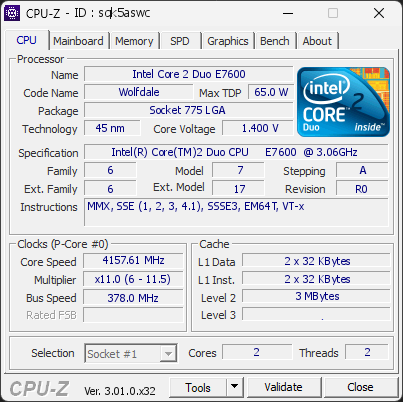
CPU clocks
Last sample and peak over the test, values in MHz
| Clock | Current | Peak |
|---|---|---|
| Cores | ||
| #0 | 4157.61 | 4158.00 |
| #1 | 4157.61 | 4158.00 |
| Uncore / BCLK | ||
| CPU BCLK | 377.96 | 378.00 |
Previous validations from this PC
Unexpected crashes (BSOD) (5)
Boot Time details
Hardware errors (WHEA)
9 errors recorded in the Windows event log.
Bus error, level 3, core 1
Bus error, level 3, core 0
Bus error, core 0
Bus error, level 3, core 1
Bus error, level 3, core 0
Bus error, core 0
Bus error, level 3, core 1
Bus error, level 3, core 0
Bus error, core 0
Driver problems
1 device needs attention.
Flagged processes
5 running processes, none flagged.
Inform a support service
If a partner support service is helping you with this PC, enter the service code they gave you to send them this validation. A valid service code is required.