Dump [tqtqrifs] Submitted by FURY-PC -
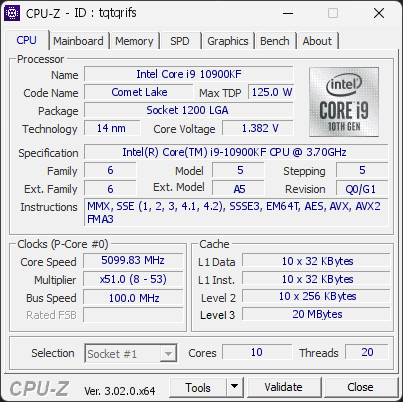
Intel(R) Core(TM) i9-10900KF CPU @ 3.70GHz
5099.83 MHz
MSI Z590 PRO WIFI (MS-7D09) · 32 GB DDR4-3198 · NVIDIA GeForce RTX 3080
Healthy
CPU-Z 3.02.0
Date:
Type: Quick Check
Duration: 5 seconds
System Analysis
2 Info

Your graphics driver is not fully up to date. You are currently running version 621.24, while version 621.35 (2026-11-19) is available.

Without an update, you may miss out on security fixes or performance improvements. Updating your driver can improve overall stability and performance.

The latest drivers for your graphics card are available here: NVIDIA Drivers

1 device(s) have no driver installed, so Windows cannot use them at all. This is very common on a fresh Windows installation, where the chipset drivers have not been installed yet.

Windows ships generic drivers for common hardware but not for chipset controllers, card readers, or manufacturer-specific devices, which have to be installed separately.

Install the chipset driver package for your motherboard or laptop from the manufacturer's support page, then run Windows Update. The Drivers button in the Software section lists every device still waiting for a driver.

01 Processor (CPU)
Max. Frequency
5200 MHz
L3 Cache
20 MB
Peak temp
80 °C
0100 °C
Power (TDP)
224 W
0250 W
CPU Name
Intel(R) Core(TM) i9-10900KF CPU @ 3.70GHz
Cores & Threads
1 CPU | 10 Cores | 20 Threads
Frequency
5099.83 MHz (51 * 100.00 MHz) - Max Turbo: 5200.16 MHz
Multiplier
Current: 51 | Min: 8 | Max: 53
Architecture
Comet Lake | Stepping: Q0/G1 | Technology: 14 nm
CPUID / Ext.
6.5.5 | 6.A5
IA Extensions
MMX, SSE, SSE2, SSE3, SSSE3, SSE4.1, SSE4.2, EM64T, AES, AVX, AVX2, FMA3
L1 Data Cache
10 x 32 KB (8-way, 64-byte line)
L1 Instruction Cache
10 x 32 KB (8-way, 64-byte line)
L2 Cache
10 x 256 KB (4-way, 64-byte line)
L3 Cache
20 MB (16-way, 64-byte line)
Microcode
Rev. 0x100
TDP
125 W / PL1: 225 W / PL2: 250 W
Temperature
Current: 80°C | Max: 80°C | TjMax: 100°C
Type
Retail
02 Motherboard
Model
MSI Z590 PRO WIFI (MS-7D09)
Socket
LGA1200
North Bridge
Intel Comet Lake rev 05
South Bridge
Intel Z590 rev 11
BIOS
American Megatrends International LLC. 1.B1 (04/08/2026)
03 Memory (RAM)
Total Capacity
32 GB
Channels
128 bits
Dual Channel
Effective Speed
DDR4-3198
1599 MHz
Memory Slots (4 / 4)
KINGSTON
8 GB
S0
KINGSTON
8 GB
S1
KINGSTON
8 GB
S2
KINGSTON
8 GB
S3
Total Size
32768 MB (32 GB)
Type
Dual Channel (128 bit) DDR4-SDRAM
Frequency
1599 MHz (DDR4-3198) - Ratio: 3:48
Timings
16-18-18-36-2 (tCAS-tRCD-tRP-tRAS-tRC)
Slot #1 Module
8 GB Kingston DDR4-3200 KHX3200C16D4/8GX (WW08'21)
Slot #2 Module
8 GB Kingston DDR4-3200 KHX3200C16D4/8GX (WW08'21)
Slot #3 Module
8 GB Kingston DDR4-3200 KHX3200C16D4/8GX (WW08'21)
Slot #4 Module
8 GB Kingston DDR4-3200 KHX3200C16D4/8GX (WW08'21)
04 Graphic Card (GPU)
GPU Clock
1440 MHz
GPU VRAM
10 GB
Peak GPU temp.
47 °C
0100 °C
GPU Name
NVIDIA GeForce RTX 3080 - Manufacturer: EVGA Corp.
GPU Frequency
1440 MHz (Turbo: 1800 MHz)
GPU Specifications
Process: 8 nm / Transistors: 28.3 B / Die Size: 628 mm² / TDP: 320 W
GPU Units
Cores: 8704 | Texture (TMU): 544 | Render (ROP): 96
GPU VRAM
10 GB GDDR6X (Micron) | 320-bit Bus @ 9501 MHz
GPU Drivers
NVIDIA GeForce Driver 621.24 | Version 32.0.16.2124 (11/07/2026)
05 Storage
C:\CT2000P310SSD8 (FW: VACR011)
19% usedTotal 1863 GiB
Name
CT2000P310SSD8 (FW: VACR011)
Size
1863 GiB (~2000 GB)
Type
Fixed SSD - Bus: NVMe PCIe 4x 3.0 (8 GT/s)
Volume
C:\ - Size: 1861.9GB (18.5% used)
Run Time
Power Cycles: 209 | Power-On: 492 h (~21 days) | 7.1 TBW
Health
Remaining Life: 100% | Media Errors: 0 | Temperature: 34°C
D:\Seagate FireCuda 520 SSD ZP1000GM30002 (FW: STNSC014)
0% usedTotal 931 GiB
Name
Seagate FireCuda 520 SSD ZP1000GM30002 (FW: STNSC014)
Size
931 GiB (~1000 GB)
Type
Fixed SSD - Bus: NVMe PCIe 4x 3.0 (8 GT/s)
Volume
D:\ - Size: 931.5GB (0% used)
Run Time
Power Cycles: 2434 | Power-On: 6985 h (~291 days) | 69.6 TBW
Health
Remaining Life: 94% | Media Errors: 0 | Temperature: 32°C
06 Display
#1 ASUSTeK XG32WCS (W19'2026)
Monitor
ASUSTeK XG32WCS (W19'2026)
Specifications
31.2 inches (79.2 cm) | 2560 x 1440 pixels (QHD) @ 48-180 Hz
Current Mode
2560 x 1440 pixels | 180 Hz
#2 Samsung LS27A70 (W36'2021)
Monitor
Samsung LS27A70 (W36'2021)
Specifications
27.2 inches (69.1 cm) | 3840 x 2160 pixels (UHD/4K) @ 30-75 Hz
Current Mode
2160 x 3840 pixels | 60 Hz
07 Software
Operating System
Microsoft Windows 11 Home (x64) - 26H2 | Installed on 2026-11-08
Security
Secure Boot: Enabled | TPM: Enabled (V2.0 hardware)
Features
Code Integrity: Enabled | Fast Startup: Disabled
Power Plan
Custom (6a8c3466) | 5 plans defined
Antivirus
Windows Defender: Enabled | Up to date
Boot Time
36 seconds (POST: 8 s. | Logon: 10 s. | Startup: 18 s.)
Drivers
1 device has no driver installed
Processes
54 running processes
CPU-Z Version
3.02.0.x64
CPU-Z SCREENSHOT Healthy [tqtqrifs]
Tools
CPU-Z BENCHMARK
Version 2017.1 (x64)
Your position (multi-thread)
Intel Core i5-14500
8,213
YOU
7,633
Intel Core i7-13650HX
7,346
Intel Core i9-10900KF
7,148
Intel Core i9-10900K
7,092
Forum Banner
[url=https://valid.cpuid.com/tqtqrifs][img]https://valid.cpuid.com/cache/banner/tqtqrifs.png[/img][/url]
Join us on Discord
Join our Discord