
The drive MAXTOR STM380215AS has logged 719 CRC error(s) on its SATA interface. These are bus-level transmission errors and indicate a connection problem, not a fault with the drive itself. Common causes are a loose, damaged, or low-quality SATA cable, a faulty SATA port, or a flaky backplane or drive sled. The counter is cumulative over the drive's whole lifetime, so these errors may be years old and come from an issue that has long been resolved.
If the count is still increasing, reseat the SATA data cable, try a different SATA port, and replace the cable if errors continue to accumulate.
1 device(s) have no driver installed, so Windows cannot use them at all. This is very common on a fresh Windows installation, where the chipset drivers have not been installed yet.
Windows ships generic drivers for common hardware but not for chipset controllers, card readers, or manufacturer-specific devices, which have to be installed separately.
Install the chipset driver package for your motherboard or laptop from the manufacturer's support page, then run Windows Update. The Drivers button in the Software section lists every device still waiting for a driver.
This PC encountered 3 unexpected crash(es) (BSOD, blue screen) in the 30 days before this validation, the most recent on 2026-11-10.
Crashes like these are often caused by a faulty driver, unstable overclocking or memory settings, overheating, or failing hardware.
Make sure Windows and your drivers are up to date. If the PC is overclocked, try returning to stock settings. The BSOD Details button in the Software section lists each crash.
The partition C: (on disk MAXTOR STM380215AS) is almost full, with only 12.1 GB of free space remaining. At this level, Windows may fail to install updates, create temporary files, or operate reliably.
Freeing up space immediately is recommended: use the Windows cleanup tool or remove unnecessary files and applications.

Scan this QR code
To open this page on your phone
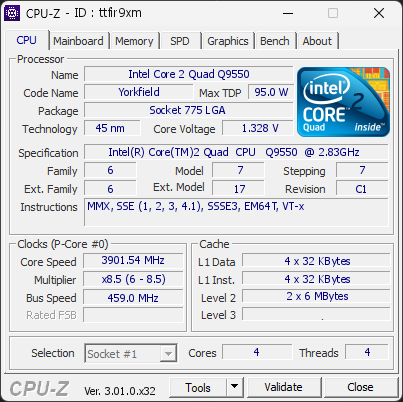
CPU clocks
Last sample and peak over the test, values in MHz
| Clock | Current | Peak |
|---|---|---|
| Cores | ||
| #0 | 3901.54 | 3901.85 |
| #1 | 3901.54 | 3901.85 |
| #2 | 3901.54 | 3901.85 |
| #3 | 3901.54 | 3901.85 |
| Uncore / BCLK | ||
| CPU BCLK | 459.01 | 459.04 |
Previous validations from this PC
Unexpected crashes (BSOD) (3)
Boot Time details
Hardware errors (WHEA)
No hardware errors recorded in the Windows event log.
Driver problems
1 device needs attention.
Flagged processes
5 running processes, none flagged.
Inform a support service
If a partner support service is helping you with this PC, enter the service code they gave you to send them this validation. A valid service code is required.