
Your processor's power limits (PL1/PL2) appear to be set to an unlimited value. This means the CPU is allowed to draw as much power as it wants, with no enforced safeguard beyond what the cooling and voltage regulation can sustain. While this can unlock maximum performance, the processor may run hotter, consume more energy, and experience increased electrical stress over time.
This configuration is often applied automatically by motherboard manufacturers through performance-enhancing profiles. Even without any user changes, many boards ship with these limits effectively disabled by default.
We recommend reviewing your power limit settings in the BIOS or in the software provided by your motherboard. Restoring sensible PL1/PL2 values (typically aligned with the processor's rated TDP) can help lower temperatures, reduce power consumption, and extend the long-term reliability of your CPU.
Your graphics driver is not fully up to date. You are currently running version 621.24, while version 621.40 (2026-11-21) is available.
Without an update, you may miss out on security fixes or performance improvements. Updating your driver can improve overall stability and performance.
The latest drivers for your graphics card are available here: NVIDIA Drivers
We detected 1 storage device(s) that are not partitioned or formatted. The affected device(s) are: Samsung SSD 970 EVO Plus 1TB. They may also be formatted with a file system Windows does not support (Linux ext4, for example). Windows cannot use these drives until they are initialized and set up.
If the drive is used by another operating system (such as Linux), you can ignore this message. Otherwise, open the Disk Management tool to initialize the device(s), create a partition, and format the drive so it becomes usable.
1 running program(s) are known to consume resources in the background with little benefit (preinstalled trials, redundant cleaners, or permanent helper services).
These programs are often preinstalled by the PC manufacturer or bundled with other software, and keep running at every startup even when unused.
Uninstalling them, or disabling their automatic startup, frees memory and shortens the boot time. The Processes button in the Software section lists each detected program and why it is flagged.

Scan this QR code
To open this page on your phone
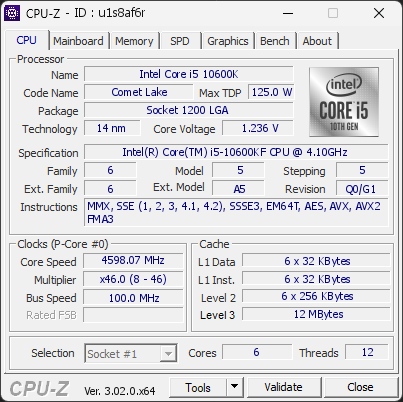
CPU clocks
Last sample and peak over the test, values in MHz
| Clock | Current | Peak |
|---|---|---|
| Cores | ||
| #0 | 4598.07 | 4600.13 |
| #1 | 4598.07 | 4600.13 |
| #2 | 4598.07 | 4600.13 |
| #3 | 4598.07 | 4600.13 |
| #4 | 4598.07 | 4600.13 |
| #5 | 4598.07 | 4600.13 |
| Uncore / BCLK | ||
| Ring / LLC | 4298.20 | 4300.12 |
| CPU BCLK | 99.96 | 100.00 |
Previous validations from this PC
Unexpected crashes (BSOD) (1)
Boot Time details
Hardware errors (WHEA)
1 error recorded in the Windows event log.
Intel PCI to PCI Bridge [8086:43BE]
Driver problems
No driver problems detected.
Flagged processes
69 running processes, 1 flagged.
Inform a support service
If a partner support service is helping you with this PC, enter the service code they gave you to send them this validation. A valid service code is required.