
1 device(s) have no driver installed, so Windows cannot use them at all. This is very common on a fresh Windows installation, where the chipset drivers have not been installed yet.
Windows ships generic drivers for common hardware but not for chipset controllers, card readers, or manufacturer-specific devices, which have to be installed separately.
Install the chipset driver package for your motherboard or laptop from the manufacturer's support page, then run Windows Update. The Drivers button in the Software section lists every device still waiting for a driver.
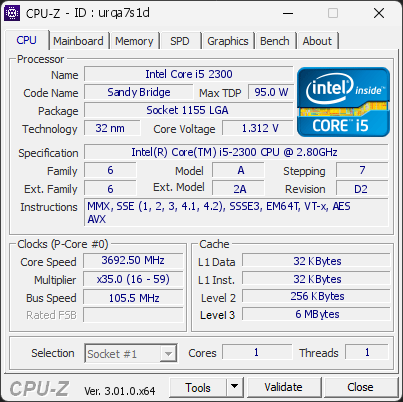
Your processor is currently operating with fewer cores than its official specifications. It is running with 1 cores, while this CPU normally supports 4 cores.
This limitation reduces performance and may indicate a configuration issue.
This situation can happen when Windows is set to limit the number of active cores, when BIOS settings are not at their defaults, or when a recent change has disabled certain CPU features. In rare cases, a BIOS update may be required for the system to properly detect the full capabilities of the processor.
We recommend checking Windows’ advanced boot options (msconfig) to ensure all cores are enabled. You should also load the default settings in your BIOS to restore proper CPU configuration.
Your graphics driver has not been updated in over 6 months. You are running version 456.71, released 45 months ago, while a much newer version (475.14) is available.
Such an outdated driver can cause crashes, instability, and serious performance issues.
Updating to the latest driver is strongly recommended to ensure compatibility and stability. Download the latest drivers for your graphics card here: NVIDIA Drivers
This PC encountered 1 unexpected crash(es) (BSOD, blue screen) in the 30 days before this validation, the most recent on 2026-09-21.
Crashes like these are often caused by a faulty driver, unstable overclocking or memory settings, overheating, or failing hardware.
Make sure Windows and your drivers are up to date. If the PC is overclocked, try returning to stock settings. The BSOD Details button in the Software section lists each crash.

Scan this QR code
To open this page on your phone
Previous validations from this PC
Unexpected crashes (BSOD) (2)
Boot Time details
Hardware errors (WHEA)
No hardware errors recorded in the Windows event log.
Driver problems
1 device needs attention.
Flagged processes
19 running processes, none flagged.
Inform a support service
If a partner support service is helping you with this PC, enter the service code they gave you to send them this validation. A valid service code is required.