
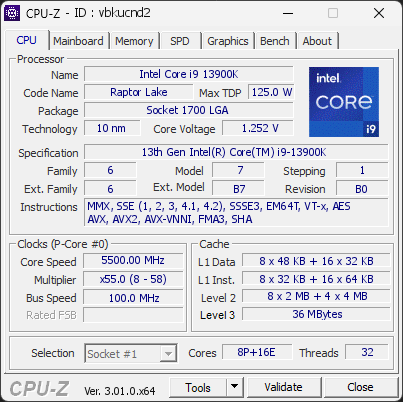
Your processor's power limits (PL1/PL2) appear to be set to an unlimited value. This means the CPU is allowed to draw as much power as it wants, with no enforced safeguard beyond what the cooling and voltage regulation can sustain. While this can unlock maximum performance, the processor may run hotter, consume more energy, and experience increased electrical stress over time.
This configuration is often applied automatically by motherboard manufacturers through performance-enhancing profiles. Even without any user changes, many boards ship with these limits effectively disabled by default.
We recommend reviewing your power limit settings in the BIOS or in the software provided by your motherboard. Restoring sensible PL1/PL2 values (typically aligned with the processor's rated TDP) can help lower temperatures, reduce power consumption, and extend the long-term reliability of your CPU.
The drive HGST HUH721008ALE600 has accumulated 60,447 hours of powered-on time, about 6.9 years, exceeding the 5-year design service life typical for hard drives.
Hard drive reliability is rated over a 5-year service life. Beyond it the mechanics keep working, but the likelihood of failure gradually increases with age: this is a sign of aging, not an imminent fault.
Keep backups of important data and monitor this drive's SMART attributes for reallocated sectors or read errors, which would indicate the aging is turning into actual degradation.
The drive HGST HUH721008ALE600 has accumulated 60,449 hours of powered-on time, about 6.9 years, exceeding the 5-year design service life typical for hard drives.
Hard drive reliability is rated over a 5-year service life. Beyond it the mechanics keep working, but the likelihood of failure gradually increases with age: this is a sign of aging, not an imminent fault.
Keep backups of important data and monitor this drive's SMART attributes for reallocated sectors or read errors, which would indicate the aging is turning into actual degradation.
1 running program(s) are known to consume resources in the background with little benefit (preinstalled trials, redundant cleaners, or permanent helper services).
These programs are often preinstalled by the PC manufacturer or bundled with other software, and keep running at every startup even when unused.
Uninstalling them, or disabling their automatic startup, frees memory and shortens the boot time. The Processes button in the Software section lists each detected program and why it is flagged.
Your processor runs microcode revision 0x10B, older than the 0x12B revision that fixes a known stability and degradation issue on this CPU family.
Intel 13th and 14th generation Core processors could receive excessive voltage from the BIOS, which causes crashes and permanent damage over time. The fix is delivered through a microcode update included in newer BIOS versions.
Update the motherboard BIOS to the latest version from the manufacturer, then check that the microcode revision has changed. Until then, keep the BIOS power and voltage settings at their defaults (Intel Default Settings).
The drive HGST HDS724040ALE640 has accumulated 80,290 hours of powered-on time, about 9.2 years, far beyond the 5-year design service life typical for hard drives.
Field data shows hard drive failure rates climbing steeply once a drive is several years past its rated service life. At this age, a mechanical or electronic failure can occur with little or no SMART warning.
Back up any important data on this drive now and plan its replacement. A drive this old should no longer be trusted as the only copy of anything valuable.
We detected 1 storage device(s) that are not partitioned or formatted. The affected device(s) are: HGST HDS724040ALE640. Windows cannot use these drives until they are initialized and set up.
Open the Disk Management tool to initialize the device(s), create a partition, and format the drive so it becomes usable.
We detected 1 storage device(s) that are not partitioned or formatted. The affected device(s) are: Samsung SSD 990 PRO 4TB. Windows cannot use these drives until they are initialized and set up.
Open the Disk Management tool to initialize the device(s), create a partition, and format the drive so it becomes usable.

Scan this QR code
To open this page on your phone
Previous validations from this PC
Unexpected crashes (BSOD)
No unexpected crashes (BSOD) recorded on this PC.
Boot Time details
Hardware errors (WHEA)
9719 errors recorded in the Windows event log, showing the 10 most recent.
Intel PCI to PCI Bridge [8086:7A3B]
Driver problems
No driver problems detected.
Flagged processes
148 running processes, 1 flagged.
Inform a support service
If a partner support service is helping you with this PC, enter the service code they gave you to send them this validation. A valid service code is required.