
We detected 1 storage device(s) that are not partitioned or formatted. The affected device(s) are: ADATA LEGEND 710. They may also be formatted with a file system Windows does not support (Linux ext4, for example). Windows cannot use these drives until they are initialized and set up.
If the drive is used by another operating system (such as Linux), you can ignore this message. Otherwise, open the Disk Management tool to initialize the device(s), create a partition, and format the drive so it becomes usable.
2 running program(s) are known to consume resources in the background with little benefit (preinstalled trials, redundant cleaners, or permanent helper services).
These programs are often preinstalled by the PC manufacturer or bundled with other software, and keep running at every startup even when unused.
Uninstalling them, or disabling their automatic startup, frees memory and shortens the boot time. The Processes button in the Software section lists each detected program and why it is flagged.
Your RAM is currently operating at a lower frequency than it was designed for. It is running at 2400.2 MT/s, while its rated speed is 3200 MT/s.
This doesn’t cause issues, but you may miss out on some performance.
Enabling the proper memory profile (XMP/EXPO/DOCP) in the BIOS usually restores the RAM to its intended speed. It’s optional, but adjusting this setting can help your system run a bit faster.
The drive ADATA LEGEND 710 has reported 6 media error(s).
Media errors indicate that the drive was unable to read from or write to the NAND media successfully. A small number of media errors may be recoverable, but any increase can indicate failing flash cells, controller issues, or progressive drive degradation.
Back up any important data on this drive immediately, monitor the error count for further increases, and consider replacing the drive if the count continues to rise or reaches a critical level.
The partition C: (on disk KINGSTON SUV500120G) is almost full, with only 8.5 GB of free space remaining. At this level, Windows may fail to install updates, create temporary files, or operate reliably.
Freeing up space immediately is recommended: use the Windows cleanup tool or remove unnecessary files and applications.
The partition D: (on disk KINGSTON SA400S37240G) is almost full, with only 13 GB of free space remaining. At this level, Windows may fail to install updates, create temporary files, or operate reliably.
Freeing up space immediately is recommended: use the Windows cleanup tool or remove unnecessary files and applications.

Scan this QR code
To open this page on your phone
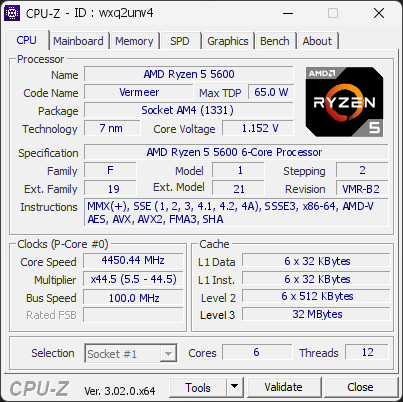
CPU clocks
Last sample and peak over the test, values in MHz
| Clock | Current | Peak |
|---|---|---|
| Cores | ||
| #0 | 4450.44 | 4450.44 |
| #1 | 4450.44 | 4450.44 |
| #2 | 4450.44 | 4450.44 |
| #3 | 4450.44 | 4450.44 |
| #4 | 4450.44 | 4450.44 |
| #5 | 4450.44 | 4450.44 |
| Uncore / BCLK | ||
| L3 Cache | 4449.87 | 4449.87 |
| CPU BCLK | 100.01 | 100.01 |
Previous validations from this PC
Unexpected crashes (BSOD)
No unexpected crashes (BSOD) recorded on this PC.
Boot Time details
Hardware errors (WHEA)
2 errors recorded in the Windows event log.
Cache error, core 5
Cache error, core 4
Driver problems
No driver problems detected.
Flagged processes
89 running processes, 2 flagged.
Inform a support service
If a partner support service is helping you with this PC, enter the service code they gave you to send them this validation. A valid service code is required.