
1 running program(s) are known to consume resources in the background with little benefit (preinstalled trials, redundant cleaners, or permanent helper services).
These programs are often preinstalled by the PC manufacturer or bundled with other software, and keep running at every startup even when unused.
Uninstalling them, or disabling their automatic startup, frees memory and shortens the boot time. The Processes button in the Software section lists each detected program and why it is flagged.
Your CPU is running at a high temperature (94.9°C). At this level, the processor may slow itself down to avoid overheating.
This usually means the cooling system is struggling to keep the CPU at a safe temperature. It can happen if the cooler is clogged with dust, not working correctly, or simply not powerful enough for this type of processor.
We recommend checking that the fan spins normally and that the cooling system is properly installed. Cleaning the cooler or improving airflow can help bring the temperature back to a safer range.
This PC encountered 2 unexpected crash(es) (BSOD, blue screen) in the 30 days before this validation, the most recent on 2026-11-07.
Crashes like these are often caused by a faulty driver, unstable overclocking or memory settings, overheating, or failing hardware.
Make sure Windows and your drivers are up to date. If the PC is overclocked, try returning to stock settings. The BSOD Details button in the Software section lists each crash.
Windows reports 1 device(s) that are not working correctly. A device in this state is either unavailable or running in a degraded mode, and Windows will keep retrying it at every boot.
This usually comes from a driver that failed to load or was stopped after an error: a bad or outdated driver, a device that is not seated properly, or a component that is starting to fail.
Open the Device Manager to see which devices are flagged, then reinstall or update their drivers from the manufacturer's website. If a device keeps failing after a clean driver install, reseat it and test it on another port or slot. The Drivers button in the Software section lists every affected device.

Scan this QR code
To open this page on your phone
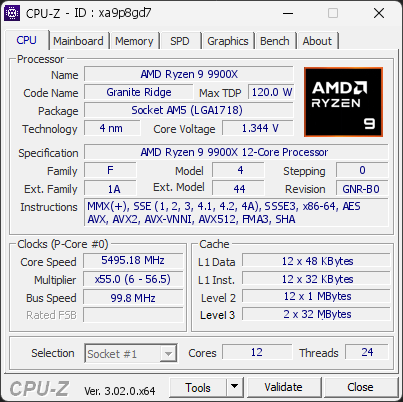
CPU clocks
Last sample and peak over the test, values in MHz
| Clock | Current | Peak |
|---|---|---|
| Cores | ||
| #0 | 5485.19 | 5556.76 |
| #1 | 5490.19 | 5556.76 |
| #2 | 5495.18 | 5556.76 |
| #3 | 5485.19 | 5526.84 |
| #4 | 5495.18 | 5561.75 |
| #5 | 5485.19 | 5556.76 |
| #6 | 5335.46 | 5536.81 |
| #7 | 5340.45 | 5536.81 |
| #8 | 5340.45 | 5412.11 |
| #9 | 5330.47 | 5447.02 |
| #10 | 5325.48 | 5461.99 |
| #11 | 5335.46 | 5442.04 |
| Uncore / BCLK | ||
| CPU BCLK | 99.82 | 99.82 |
Previous validations from this PC
Unexpected crashes (BSOD) (4)
Boot Time details
Hardware errors (WHEA)
No hardware errors recorded in the Windows event log.
Driver problems
1 device needs attention.
Flagged processes
56 running processes, 1 flagged.
Inform a support service
If a partner support service is helping you with this PC, enter the service code they gave you to send them this validation. A valid service code is required.