
Your processor's power limits (PL1/PL2) appear to be set to an unlimited value. This means the CPU is allowed to draw as much power as it wants, with no enforced safeguard beyond what the cooling and voltage regulation can sustain. While this can unlock maximum performance, the processor may run hotter, consume more energy, and experience increased electrical stress over time.
This configuration is often applied automatically by motherboard manufacturers through performance-enhancing profiles. Even without any user changes, many boards ship with these limits effectively disabled by default.
We recommend reviewing your power limit settings in the BIOS or in the software provided by your motherboard. Restoring sensible PL1/PL2 values (typically aligned with the processor's rated TDP) can help lower temperatures, reduce power consumption, and extend the long-term reliability of your CPU.
The drive WDC WD20EZRX-00D8PB0 has accumulated 59,169 hours of powered-on time, about 6.8 years, exceeding the 5-year design service life typical for hard drives.
Hard drive reliability is rated over a 5-year service life. Beyond it the mechanics keep working, but the likelihood of failure gradually increases with age: this is a sign of aging, not an imminent fault.
Keep backups of important data and monitor this drive's SMART attributes for reallocated sectors or read errors, which would indicate the aging is turning into actual degradation.
The drive TOSHIBA DT01ACA200 has accumulated 46,952 hours of powered-on time, about 5.4 years, exceeding the 5-year design service life typical for hard drives.
Hard drive reliability is rated over a 5-year service life. Beyond it the mechanics keep working, but the likelihood of failure gradually increases with age: this is a sign of aging, not an imminent fault.
Keep backups of important data and monitor this drive's SMART attributes for reallocated sectors or read errors, which would indicate the aging is turning into actual degradation.
The partition H: (on disk Samsung SSD 860 EVO 500GB) is almost full, with only 29.6 GB of free space remaining. With so little room, Windows may struggle to stay stable or apply future updates.
You can free space using the built-in Windows cleanup tool or by removing applications and files you no longer need.
We detected 1 storage device(s) that are not partitioned or formatted. The affected device(s) are: TOSHIBA HDWD130. Windows cannot use these drives until they are initialized and set up.
Open the Disk Management tool to initialize the device(s), create a partition, and format the drive so it becomes usable.
This PC encountered 2 unexpected crash(es) (BSOD, blue screen) in the 30 days before this validation, the most recent on 2026-10-09.
Crashes like these are often caused by a faulty driver, unstable overclocking or memory settings, overheating, or failing hardware.
Make sure Windows and your drivers are up to date. If the PC is overclocked, try returning to stock settings. The BSOD Details button in the Software section lists each crash.
Windows reports 1 device(s) that are not working correctly. A device in this state is either unavailable or running in a degraded mode, and Windows will keep retrying it at every boot.
This usually comes from a driver that failed to load or was stopped after an error: a bad or outdated driver, a device that is not seated properly, or a component that is starting to fail.
Open the Device Manager to see which devices are flagged, then reinstall or update their drivers from the manufacturer's website. If a device keeps failing after a clean driver install, reseat it and test it on another port or slot. The Drivers button in the Software section lists every affected device.
12 device(s) have no driver installed, so Windows cannot use them at all. This is very common on a fresh Windows installation, where the chipset drivers have not been installed yet.
Windows ships generic drivers for common hardware but not for chipset controllers, card readers, or manufacturer-specific devices, which have to be installed separately.
Install the chipset driver package for your motherboard or laptop from the manufacturer's support page, then run Windows Update. The Drivers button in the Software section lists every device still waiting for a driver.
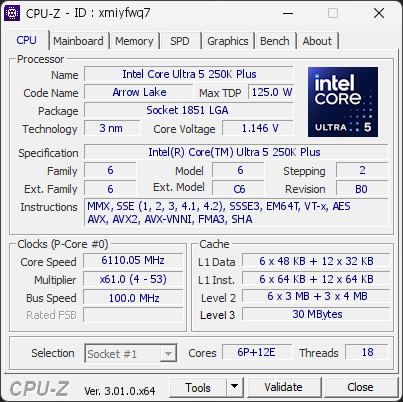
The processor did not sustain the frequency it reported during the test. The measured clock was 6110 MHz but the highest effective clock was significantly lower, below the threshold required for a valid result.
The effective clock counts the cycles actually executed. A gap like this means the processor was throttled by the hardware during the test, most often because it hit its thermal limit, sometimes a power or current limit.
Check the cooling system (dust, fan operation, thermal paste, airflow) and the power limits set in the BIOS, then run the validation again once the processor can hold its frequency.
The drive WDC WD20EZRX-00D8PB0 has performed 823,989 head load/unload cycles, more than double the 300,000-cycle rating typical for desktop hard drives.
The head-parking mechanism is far past its validated wear envelope, usually the result of an aggressive idle-parking timer accumulating cycles for years. Mechanical wear on the head ramp increases the risk of read errors and eventual drive failure.
Back up any important data on this drive now and plan its replacement. Relaxing the idle-parking timer with a manufacturer utility can slow further wear, but the accumulated cycles cannot be undone.

Scan this QR code
To open this page on your phone
Previous validations from this PC
Unexpected crashes (BSOD) (2)
Boot Time details
Hardware errors (WHEA)
1892 errors recorded in the Windows event log, showing the 10 most recent.
Intel PCI to PCI Bridge [8086:AE4D]
Driver problems
13 devices need attention.
Flagged processes
107 running processes, none flagged.
Inform a support service
If a partner support service is helping you with this PC, enter the service code they gave you to send them this validation. A valid service code is required.