
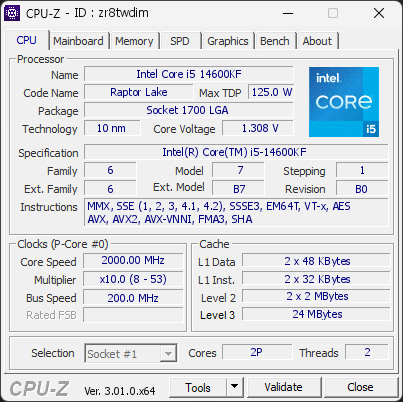
Your processor's power limits (PL1/PL2) appear to be set to an unlimited value. This means the CPU is allowed to draw as much power as it wants, with no enforced safeguard beyond what the cooling and voltage regulation can sustain. While this can unlock maximum performance, the processor may run hotter, consume more energy, and experience increased electrical stress over time.
This configuration is often applied automatically by motherboard manufacturers through performance-enhancing profiles. Even without any user changes, many boards ship with these limits effectively disabled by default.
We recommend reviewing your power limit settings in the BIOS or in the software provided by your motherboard. Restoring sensible PL1/PL2 values (typically aligned with the processor's rated TDP) can help lower temperatures, reduce power consumption, and extend the long-term reliability of your CPU.
2 device(s) have no driver installed, so Windows cannot use them at all. This is very common on a fresh Windows installation, where the chipset drivers have not been installed yet.
Windows ships generic drivers for common hardware but not for chipset controllers, card readers, or manufacturer-specific devices, which have to be installed separately.
Install the chipset driver package for your motherboard or laptop from the manufacturer's support page, then run Windows Update. The Drivers button in the Software section lists every device still waiting for a driver.
Your processor is currently operating with fewer threads than its official specifications. It is running with 2 threads, while this CPU normally supports 20 threads.
This limitation reduces performance and may indicate a configuration issue.
This situation can happen when Windows is set to limit the number of active cores, when BIOS settings are not at their defaults, or when a recent change has disabled certain CPU features. In rare cases, a BIOS update may be required for the system to properly detect the full capabilities of the processor.
We recommend checking Windows’ advanced boot options (msconfig) to ensure all cores are enabled. You should also load the default settings in your BIOS to restore proper CPU configuration.
Your processor runs microcode revision 0x120, older than the 0x12B revision that fixes a known stability and degradation issue on this CPU family.
Intel 13th and 14th generation Core processors could receive excessive voltage from the BIOS, which causes crashes and permanent damage over time. The fix is delivered through a microcode update included in newer BIOS versions.
Update the motherboard BIOS to the latest version from the manufacturer, then check that the microcode revision has changed. Until then, keep the BIOS power and voltage settings at their defaults (Intel Default Settings).
Your RAM is currently operating at a lower frequency than it was designed for. It is running at 5866 MT/s, while its rated speed is 8000 MT/s.
This doesn’t cause issues, but you may miss out on some performance.
Enabling the proper memory profile (XMP/EXPO/DOCP) in the BIOS usually restores the RAM to its intended speed. It’s optional, but adjusting this setting can help your system run a bit faster.
This PC encountered 4 unexpected crash(es) (BSOD, blue screen) in the 30 days before this validation, the most recent on 2026-11-14.
Crashes like these are often caused by a faulty driver, unstable overclocking or memory settings, overheating, or failing hardware.
Make sure Windows and your drivers are up to date. If the PC is overclocked, try returning to stock settings. The BSOD Details button in the Software section lists each crash.

Scan this QR code
To open this page on your phone
CPU clocks
Last sample and peak over the test, values in MHz
| Clock | Current | Peak |
|---|---|---|
| Cores | ||
| P0 | 2000.00 | 2000.00 |
| P1 | 2000.00 | 2000.00 |
| Uncore / BCLK | ||
| Ring / LLC | 1600.00 | 1600.00 |
| CPU BCLK | 200.00 | 200.00 |
| SOC BCLK | 200.00 | 200.00 |
Previous validations from this PC
Unexpected crashes (BSOD) (4)
Boot Time details
Hardware errors (WHEA)
27 errors recorded in the Windows event log, showing the 10 most recent.
Micro-architectural error, core 24
Micro-architectural error, core 24
Micro-architectural error, core 24
Micro-architectural error, core 24
Driver problems
2 devices need attention.
Flagged processes
13 running processes, none flagged.
Inform a support service
If a partner support service is helping you with this PC, enter the service code they gave you to send them this validation. A valid service code is required.